Salesforce CPQ order management: 4 challenges and how to solve them

Salesforce CPQ order management covers what happens after a quote is accepted: creating orders from the quote, activating and contracting them, handing them to fulfillment and keeping them accurate as things change. CPQ makes the first step easy. Most problems come later, in manual corrections, the handoff to fulfillment, approvals and order status across many accounts.
This guide explains how orders work in Salesforce CPQ, walks through the four challenges we see most often and how to solve each one, and covers what changes in Revenue Cloud Advanced.
Key takeaways
- Salesforce CPQ creates orders from a quote with the Ordered checkbox, Order By options or the Create Order button.
- Activated orders can be contracted, which creates the contract and subscriptions used for amendments and renewals.
- The four common challenges are manual errors, the handoff to fulfillment, approvals and changes, and order status visibility.
- Most fixes are native: validation rules, clean integration mapping, amendments and reports. Bulk changes across many orders are where a spreadsheet layer helps.
- Revenue Cloud Advanced adds fulfillment orchestration through Dynamic Revenue Orchestrator.
How orders work in Salesforce CPQ
Orders are the step between the accepted quote and fulfillment and billing in the Salesforce quote-to-cash process. CPQ offers four ways to create them, as shown on Trailhead.
| How you create it | What it does | Use it when |
|---|---|---|
| Ordered checkbox on the quote | Creates one order with all quote lines that have not been ordered yet | The whole deal ships and bills together |
| Order By Quote Line Group | With Ordered, creates one order per quote line group | Each group is a site, phase or delivery |
| Order By field | Splits orders by the value of a quote line field, such as product family or a custom field | Lines ship from different warehouses or on different dates |
| Create Order button | Lets you choose which lines go into the order | Only part of the quote is ready to order |
Swipe the table to see all columns
CPQ copies quote lines into order products, so prices, discounts and quantities carry over without re-entry. Once an order is activated, it can be contracted. For subscription products, that creates a contract with subscriptions, which later amendments and renewals start from.
4 Salesforce CPQ order management challenges
Creating the order is the easy part. These four problems show up in what happens around it.
1. Manual errors in order data
Orders still get edited by hand: ship dates move, quantities change, a product is swapped or a field is left blank. On large orders, each fix means opening order products one at a time, and mistakes slip through to fulfillment and billing.
How to fix it: lock down what can change with validation rules, required fields and picklists, and block activation until key fields are complete. For corrections across many lines or orders, make them in bulk on live data with those rules still applied, instead of exporting and re-importing.
2. Handoff to fulfillment and ERP
CPQ ends at the order, but fulfillment, inventory and invoicing often run in an ERP or a warehouse system. If the field mapping is loose, orders get rejected or re-keyed, and sales and operations see different versions of the same deal.
How to fix it: integrate through APIs or middleware, agree on one owner for each field, and send orders only when they are activated and complete. Splitting orders by ship date or warehouse with the Order By field also makes the handoff cleaner, because each order matches one fulfillment event.
3. Approvals and order changes
Approvals belong on the quote, but complex organizations often add checks after the order is created, and changes after booking reopen the discussion. Orders wait while people confirm what changed and who approved it.
How to fix it: approve price and terms on the quote, so the order inherits an approved deal. Use amendments for changes to contracted subscriptions, so CPQ prices the change. Our guide to Salesforce CPQ discount management covers approval thresholds, and our guide to custom orders in Salesforce CPQ covers non-standard deals.
4. Order status visibility
Sales wants to tell customers where an order stands. Operations wants to see every open order with a late delivery date. In standard Salesforce, that means list views and reports, then opening each record to change anything.
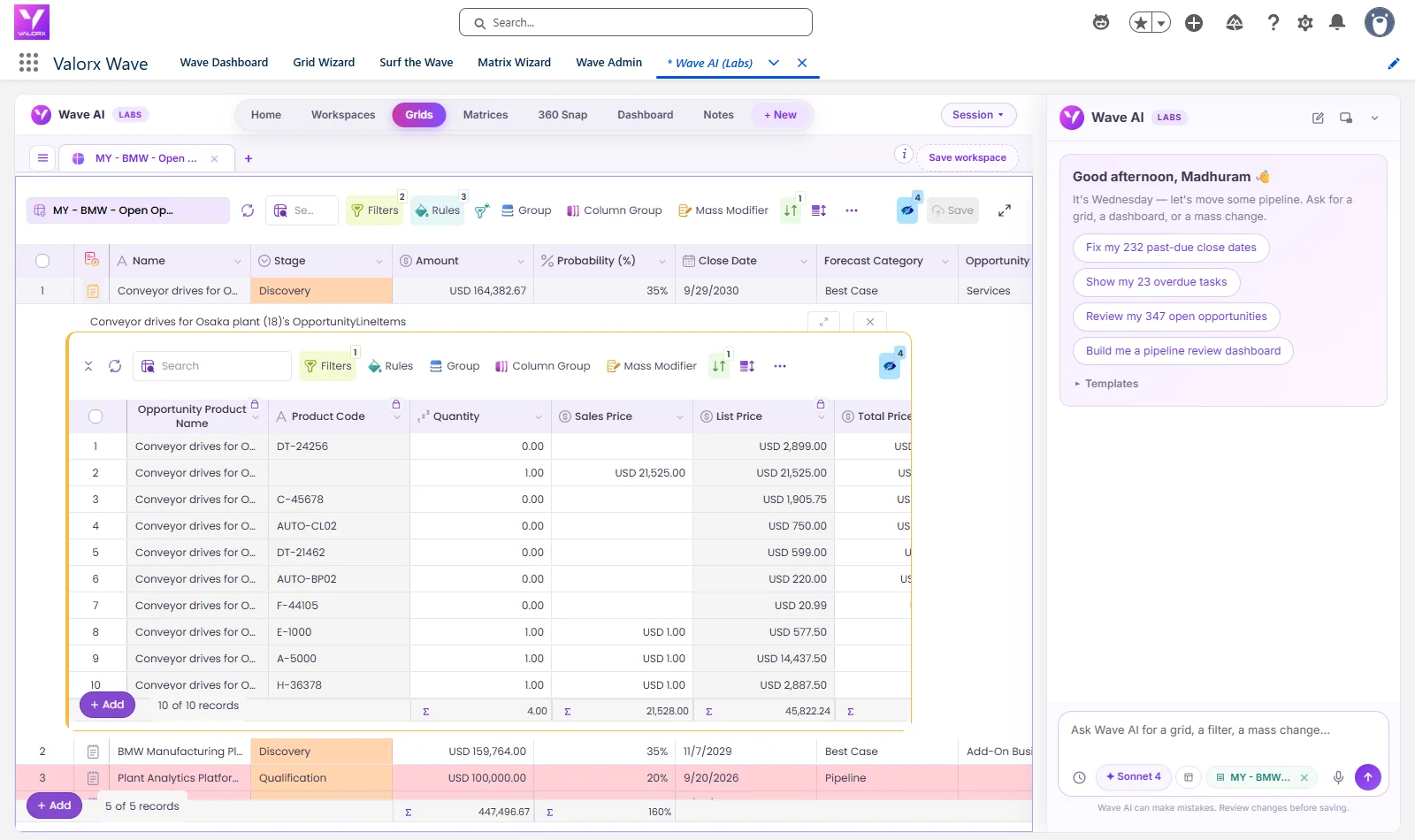
How to fix it: keep order status and key dates on the order in Salesforce, synced back from fulfillment systems, and build reports and dashboards on them. For teams that also need to act on what they see, a grid view lets them filter open orders and update them in place.
Order management best practices
To bring the four fixes together, here is where native Salesforce covers each one and where a spreadsheet layer adds speed.
| Challenge | Native fix in Salesforce | Where a spreadsheet layer helps |
|---|---|---|
| Manual errors | Validation rules, required fields, picklists and order activation rules | Bulk corrections across many orders, checked before saving |
| Fulfillment handoff | Integration through APIs or middleware with clean field mapping | Reviewing and fixing order data before it syncs |
| Approvals and changes | Approve on the quote; use amendments for changes after the contract | Updating dates and quantities across many lines at once |
| Status visibility | Order status values, list views, reports and dashboards | Filtering and updating open orders across accounts in one view |
Swipe the table to see all columns
Bulk order changes are one of the Salesforce CPQ limitations teams hit most as volume grows, and the same pattern shows up in professional services quoting, where large quotes become large orders.
Order management in Revenue Cloud Advanced
Everything above applies to Salesforce CPQ. Salesforce stopped selling CPQ to new customers in March 2025, and existing customers can keep using it, according to Salesforce’s CPQ end-of-sale page. Revenue Cloud Advanced goes further after the order. It sends orders to Dynamic Revenue Orchestrator, which decomposes commercial products into technical products and runs an orchestration plan of fulfillment steps, such as manual tasks, callouts to other systems, flows and milestones, as shown on Trailhead.
That covers much of the fulfillment handoff that CPQ leaves to integrations, but orders, rules and integrations need rebuilding in the new model. Our guide to choosing a Salesforce Revenue Cloud partner covers the migration.
Managing Salesforce CPQ orders with Valorx
We keep Salesforce as the system of record for orders and make reviewing and updating them faster.
- Valorx Fusion connects Excel and Google Sheets to live Salesforce data, including orders and order products. Teams update dates, quantities and statuses across hundreds of lines with formulas or fill-down, and changes save back with validation rules applied.
- Valorx Wave puts a spreadsheet-style grid inside Salesforce, so operations can filter open orders across accounts and update them in place.
Teladoc Health replaced manual exports, merges and re-entry across three Salesforce CPQ orgs with Fusion, cutting data management time by 70% with zero re-entry errors.
The interactive demo above shows a Fusion workbook connected to live Salesforce data. To estimate what faster quote-to-order work is worth to your team, try the CPQ ROI calculator.
Update hundreds of orders at once, without leaving your Salesforce data.
Both products work on your live Salesforce orders and order products, with your validation rules intact. The difference is where your team wants to work.
Frequently asked questions
How do you create an order from a quote in Salesforce CPQ?
Check the Ordered checkbox on the quote to create one order with all unordered lines, or use the Create Order button to choose which lines to include. CPQ copies the quote lines into order products.
Can one Salesforce CPQ quote create multiple orders?
Yes. Check Order By Quote Line Group to create one order per group, or set the Order By field to split orders by the value of a quote line field, such as product family or ship date.
What happens after an order is activated in Salesforce CPQ?
Activated orders can be contracted. For subscription products, CPQ creates a contract with subscriptions, which is the starting point for later amendments and renewals.
How do you change an order after it is booked?
For subscriptions, create an amendment from the contract so CPQ prices the change correctly. For one-off corrections such as dates or quantities on draft orders, update the order products directly, ideally in bulk with validation rules applied.
Is Salesforce Order Management the same as Salesforce CPQ orders?
No. Salesforce Order Management is a separate product focused on commerce order fulfillment. Salesforce CPQ creates standard Salesforce orders from quotes for sales-led deals.
How does Revenue Cloud Advanced handle orders?
Revenue Cloud Advanced sends orders to Dynamic Revenue Orchestrator, which decomposes commercial products into technical products and runs an orchestration plan of fulfillment steps such as manual tasks, callouts, flows and milestones.





Choose the workflow you need:
Try Wave in browser Extension

Try Wave in Salesforce

Try Fusion In Excel

Enhancing Salesforce for industry leaders