Salesforce CPQ limitations: 8 shortfalls and how to work around them

Salesforce CPQ is one of the most widely used quoting tools on the Salesforce platform. It puts guardrails around pricing, discounting and approvals, and for standard deals it does that job well.
Ask the people who build large or unusual quotes every day, though, and you hear the same list of complaints. This guide covers the Salesforce CPQ limitations we see most often, what causes each one, and how teams work around them without replacing CPQ.
Key takeaways
- Salesforce CPQ is strong at standardized, rule-driven quoting. Its limits show up with large quotes, bulk changes, multi-dimensional pricing and services work.
- Salesforce does not publish a single maximum quote line count. Performance drops as lines and price rules grow, and the Large Quote Threshold trades some validation for speed.
- Salesforce stopped selling CPQ to new customers in March 2025. Existing customers keep support and renewals, but new development goes to Revenue Cloud Advanced.
- Most CPQ limitations are interface limitations, not data model ones. A spreadsheet layer on the same CPQ objects removes them without a reimplementation.
- If you are staying on CPQ for the next few years, extend it. If you are starting fresh, evaluate Revenue Cloud Advanced.
Where Salesforce CPQ stands in 2026
Salesforce CPQ (Configure, Price, Quote) is a managed package, originally built by Steelbrick, that adds product configuration, price rules, discounting, approvals and quote documents to Sales Cloud.
In March 2025, Salesforce moved CPQ into an end-of-sale phase. New customers can no longer buy it. Existing customers can keep using it, renew, add licenses and receive support, while new product investment goes into Revenue Cloud Advanced. Salesforce describes this as end of sale, not end of life.
That context matters for any list of Salesforce CPQ limitations. The issues below are unlikely to be fixed inside the CPQ package itself, so the practical question for most teams is how to work around them.
What Salesforce CPQ does well

CPQ is built to put guardrails around the quoting process, so reps build quotes inside an approved framework and get them to buyers faster. On review sites such as G2, TrustRadius and Gartner Peer Insights, it generally scores well for that job. Its strengths:
- Governed quoting. Admins control who can see and change what, and validation rules stop invalid discounts and configurations.
- Complex pricing. Price rules, discount schedules and block pricing automate pricing that would otherwise be calculated by hand.
- Bundles and configuration. Product rules guide reps to valid combinations of products and options.
- Native Salesforce data. Quotes sit next to opportunities, accounts and products, with approvals and quote documents in the same place.
For configuration-heavy catalogs, see our guide to Salesforce CPQ for complex products.
Salesforce CPQ limitations: 8 shortfalls to know
The pattern behind most complaints is the same. CPQ works well when a quote has dozens of standard lines. It struggles when quotes get large, change often, or do not fit a catalog.
| Limitation | Who feels it most | Typical workaround |
|---|---|---|
| 1. Large quotes slow down or time out | Manufacturing, high-tech, distribution | Large Quote Threshold, or edit lines in a spreadsheet layer |
| 2. No bulk editing of quote lines | Reps and deal desk | Bulk edit in Excel, Google Sheets or an in-Salesforce grid |
| 3. Multi-dimensional quotes multiply lines | Multi-year, multi-site and ramp deals | Model segments as columns, not extra rows |
| 4. Services quotes resist standardization | Consultancies and systems integrators | Keep rate-card logic in a connected workbook |
| 5. Rules need specialist admins | RevOps and Salesforce admins | Audit and consolidate rules |
| 6. Quote Line Editor is hard to tailor by role | Sales, deal desk and finance | Role-specific views on the same quote lines |
| 7. Quote analysis means exporting | Finance and RevOps | Live pivots and formulas on quote data |
| 8. End of sale | Every CPQ customer | Extend CPQ now, plan Revenue Cloud Advanced on your timeline |
Swipe the table to see all columns
1. Large quotes slow down or time out
The Quote Line Editor (QLE) recalculates price rules, product rules and summary variables as reps change lines. On a quote with a few dozen lines, that is invisible. On a quote with several hundred lines, each calculation round trip gets slower, and heavy pricing logic can push the quote into Salesforce governor limits and timeout errors.
Salesforce does not publish a single maximum line count, because the ceiling depends on how many rules and fields each line carries. In the Trailblazer Community, admins with complex pricing describe hitting limits at around 900 lines. Lighter configurations go further, heavier ones hit the wall sooner, and reps usually find out mid-quote.
It’s hard to anticipate when these performance-related errors will hit, so there’s always the risk that users will be stopped dead in their tracks when working on a time-sensitive quote.
Source: Kelvin Tan, Valorx co-founder and Head of Professional Services, in Is Salesforce CPQ still worth it in 2026?
The native fix is the Large Quote Threshold. Above the threshold, CPQ sends only essential quote lines during UI calls and ignores quote-scoped product rules for that quote. It helps performance, but it does so by switching off some of the validation you implemented CPQ for.
2. No real bulk editing of quote lines
Changing a discount, quantity or term across 200 lines in the QLE means working through them line by line. There is no pasting values down a column, no fill-down and no find and replace. What takes two minutes in a spreadsheet can take an afternoon in CPQ, and late changes, such as a customer swapping 50 SKUs the day before signature, are where it hurts most.

This is why so many reps quietly rebuild quotes in Excel and re-key the result. That shadow spreadsheet then becomes the real quote, outside CPQ guardrails. Discounts are where this shows up first, as we cover in Salesforce CPQ discount management. To add bulk editing back without leaving CPQ, see how to bulk and inline edit Salesforce CPQ quote lines in Excel.
One of the biggest reasons for lagging Salesforce CPQ adoption is the rigid user experience. Many find this limits how quickly they can generate their quotes, especially for complex quoting scenarios. As a result, users take their quoting offline in spreadsheets, negating many of the benefits of having Salesforce CPQ.
Source: Kelvin Tan, Valorx co-founder and Head of Professional Services, in Is Salesforce CPQ still worth it in 2026?
3. Multi-dimensional quotes multiply quote lines
Multi-dimensional quoting (MDQ) splits a product into segments, such as years, quarters or locations. CPQ stores each segment as its own quote line. A 40-product deal over five annual segments becomes 200 lines before any options are added, and every one of those lines carries the performance cost described above.
Reps also lose the natural view of the deal. A finance lead wants products down the side and years across the top. The QLE shows a long list instead.
4. Professional services quotes resist standardization
CPQ is built for catalogs: defined products, defined prices, defined rules. Services quotes rarely fit that shape. Roles, rates, hours, phases, travel and pass-through costs change from one engagement to the next. Either the catalog grows into hundreds of near-duplicate products, or the real estimate lives in a spreadsheet.
It is a known irony in the ecosystem that many of the consultancies implementing Salesforce CPQ cannot comfortably quote their own services in it.
5. Rules and configuration need specialist skills
Price rules, product rules, summary variables, lookup tables and the Quote Calculator Plugin give CPQ its power, but they are a discipline of their own. Each new rule interacts with the others, and orgs that grow over several years often end up with rule sets that only one admin or partner fully understands.
The result is that simple pricing changes become change requests, and every added rule adds calculation load to the QLE.
6. The Quote Line Editor is hard to tailor by role
Field sets and package settings control what appears in the QLE, but every user still works in the same basic layout. A rep building a quote, a deal desk analyst checking margin and a finance lead reviewing terms need different views of the same lines. In the QLE they share one, so teams either crowd it with columns or export to see the quote their way.
7. Analyzing quotes means exporting them
Questions like blended margin by product family, or how this quote compares with the last three sent to the same account, need pivots, formulas and side-by-side views. CPQ reports answer some of this after the fact. During the deal, most analysts export to Excel.
Each export is a snapshot that starts aging immediately, and a copy of pricing data sitting outside Salesforce permissions. Read more on closing that gap in improving quote-to-cash in Salesforce CPQ.
8. End of sale means the gaps will not close natively
With CPQ in its end-of-sale phase, new quoting innovation is going into Revenue Cloud Advanced rather than the CPQ package. Existing customers keep full support, but it is reasonable to expect the limitations above will not be addressed inside CPQ itself.
Moving to Revenue Cloud Advanced is a reimplementation, with a new data model and separate licensing. Most teams need a plan that works on the CPQ they run today.
Watch: making Salesforce CPQ work for complex quoting
In this 30-minute on-demand webinar, Valorx's Jerret Kasper, who has spent over 10 years helping enterprises solve CPQ issues, walks through the problems revenue operations teams raise most and how to mitigate them. It includes a live demo of quotes with thousands of lines and customer examples from manufacturing, high-tech and financial services.
On-demand webinar, 30 minutes. View the webinar page
How to work around Salesforce CPQ limitations
There are three practical routes. Most teams combine the first two.
Tune native CPQ first
- Set a Large Quote Threshold if reps hit governor limits, and know which validations it switches off.
- Audit price and product rules. Remove rules nobody uses and consolidate overlapping ones. Fewer rules means faster calculation.
- Trim QLE field sets to the columns reps actually edit.
- Use quote line groups to give long quotes a structure reps can navigate.
Add a spreadsheet layer on top of CPQ
Most limitations on this list are interface limitations. The CPQ data model and rules are sound. The problem is editing and reading hundreds of lines through a form designed for dozens. A spreadsheet layer works on the same CPQ objects and keeps CPQ as the system of record.
That is the gap we built Valorx for:
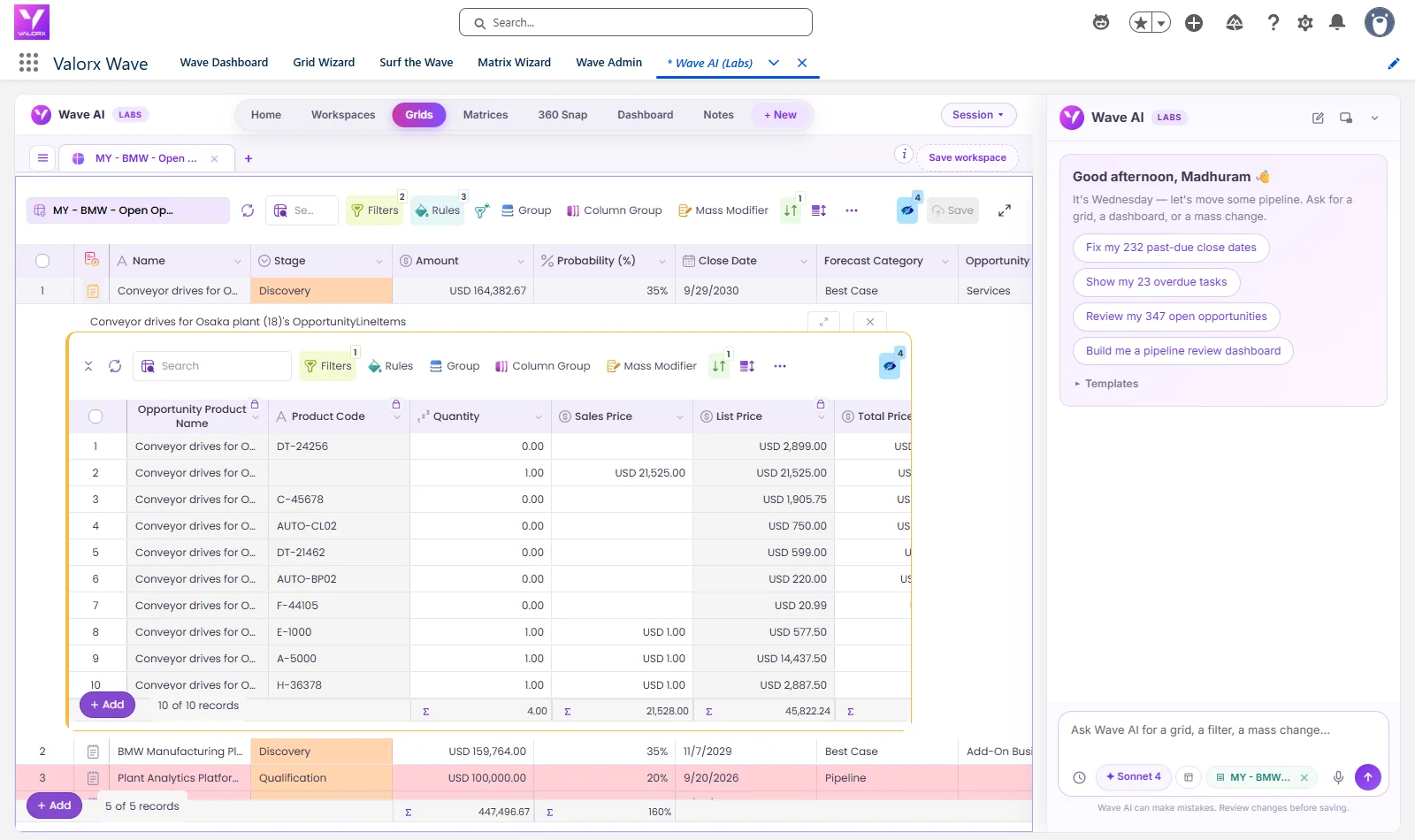
- Fusion connects Excel and Google Sheets to Salesforce CPQ. Reps load thousands of quote lines into a workbook, edit them in bulk, see segments as columns, and save back to Salesforce. Existing pricing workbooks and rate cards can be connected rather than rebuilt.
- Wave puts a spreadsheet-style grid inside Salesforce, for teams that want bulk editing without leaving Lightning.
Both run on Salesforce permissions and field-level security, and your CPQ pricing rules still run when lines save. Teladoc Health manages quote data across three Salesforce CPQ orgs this way and cut data management time by 70%. Micron reduced quote build time from 3.5 hours to under 10 minutes.
See how this works on our Salesforce CPQ page, or estimate the time your team would save with the CPQ ROI calculator.
Plan Revenue Cloud Advanced on your timeline
For new Salesforce customers, CPQ is no longer an option, and Revenue Cloud Advanced is the quoting product to evaluate. For existing CPQ customers, there is no forced deadline today. Extending CPQ buys time to plan a migration properly, instead of rushing one because reps are frustrated.
The spreadsheet layer carries over too. Fusion and Wave work with any Salesforce object, including Salesforce Revenue Cloud.
Frequently asked questions
What are the main limitations of Salesforce CPQ?
The most common are slow or failing large quotes, no spreadsheet-style bulk editing of quote lines, multi-dimensional quotes that multiply lines, poor fit for professional services, rules that need specialist admins, a Quote Line Editor that is hard to tailor by role, export-based quote analysis, and its end-of-sale status.
How many quote lines can Salesforce CPQ handle?
Salesforce does not publish a single maximum. The practical ceiling depends on how many price rules, product rules and fields each line carries. Performance typically drops in the hundreds of lines, and admins with complex pricing report hitting limits at around 900 lines.
Is Salesforce CPQ being discontinued?
Not yet. Salesforce CPQ entered end of sale in March 2025, so it is no longer sold to new customers. Existing customers can keep using it, renew, add licenses and receive support. New development is focused on Revenue Cloud Advanced.
Can you bulk edit quote lines in Salesforce CPQ?
Not in the spreadsheet sense. The Quote Line Editor has no pasting values down a column or fill-down across hundreds of lines. Teams add bulk editing with a tool such as Valorx Fusion in Excel or Google Sheets, or Valorx Wave inside Salesforce, and save the changes back to CPQ. Our guide to editing CPQ quote lines in Excel compares the options.
What does the Large Quote Threshold do?
Quotes above the threshold send only essential quote lines during Quote Line Editor calls, and CPQ ignores quote-scoped product rules for those quotes. It improves performance on large quotes at the cost of some validation.
Should we migrate from Salesforce CPQ to Revenue Cloud Advanced?
If you are a new customer, Revenue Cloud Advanced is the product to evaluate. If you already run CPQ, there is no forced deadline today. Many teams extend CPQ while they plan a migration, because moving is a reimplementation with a new data model.
Is Salesforce CPQ still worth using?
For existing customers with governed, complex quoting on Salesforce, usually yes, as long as you plan around the known limitations with native tuning and a bulk-editing layer.






Choose the workflow you need:
Try Wave in browser Extension

Try Wave in Salesforce

Try Fusion In Excel

Enhancing Salesforce for industry leaders