The spreadsheets you love meets the Salesforce data you need

Build pricing models, forecasts, and use your existing spreadsheets - connected directly to Salesforce.
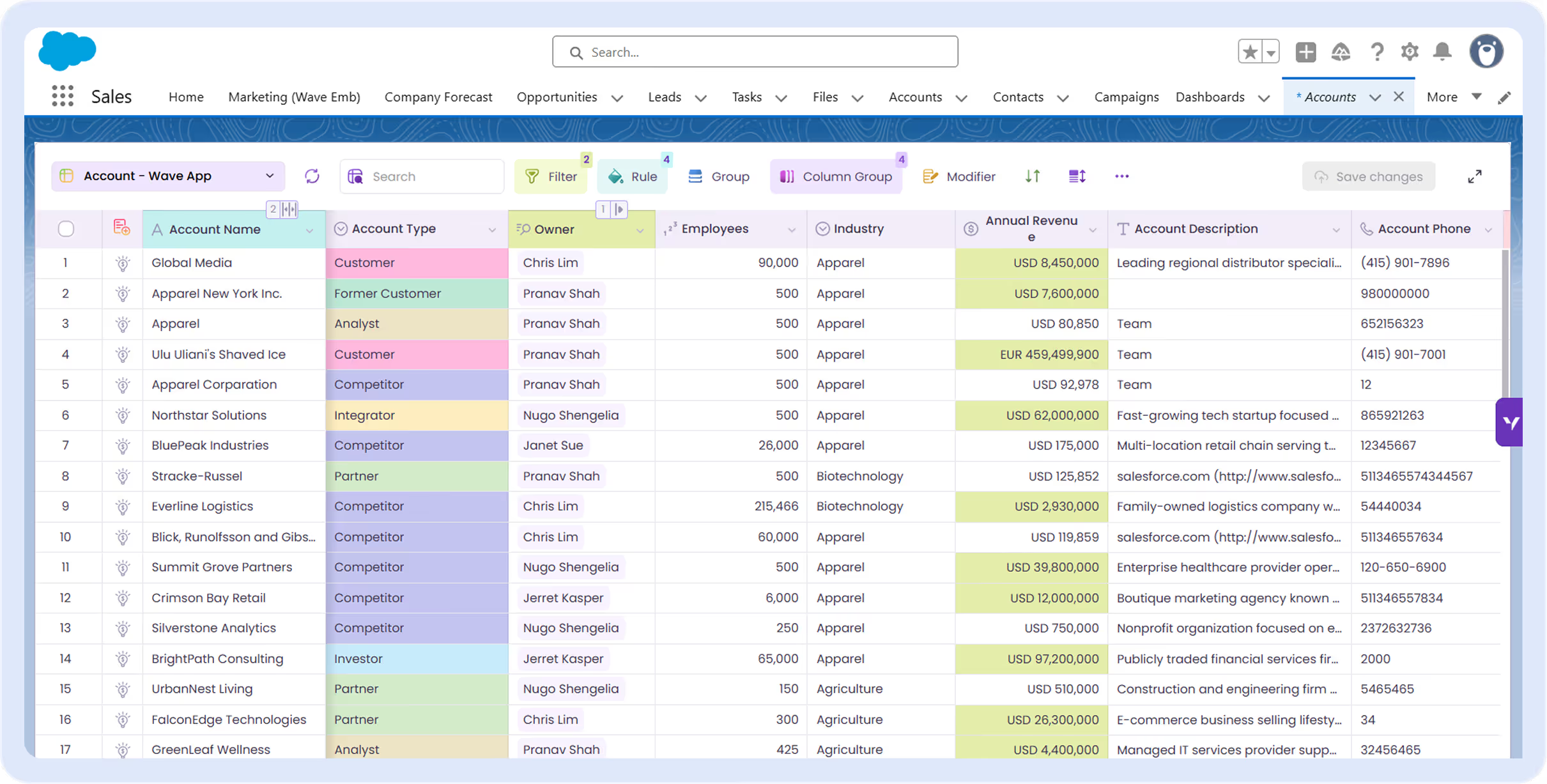
Screenshot of Valorx Wave sales dashboard showing account sales agreements with columns for product, planned quantity, sales price, and discount percentage for October 25 and November 25.
USE CASES

Why Fusion?

Bridge the gap between CRM and spreadsheets for seamless workflows.

Abstract hexagonal molecular structure in purple and blue tones representing a chemical or scientific concept.

35+

Fortune 500 Customers
Concentric circles in shades of purple, blue, and green on a white background.

One

Source of Truth
Translucent purple cube with soft glowing edges on a white surface.

100%

Data Stays in Salesforce
Purple and blue gradient fast forward icon with two right-pointing triangles.

10x

Faster Forecast Updates
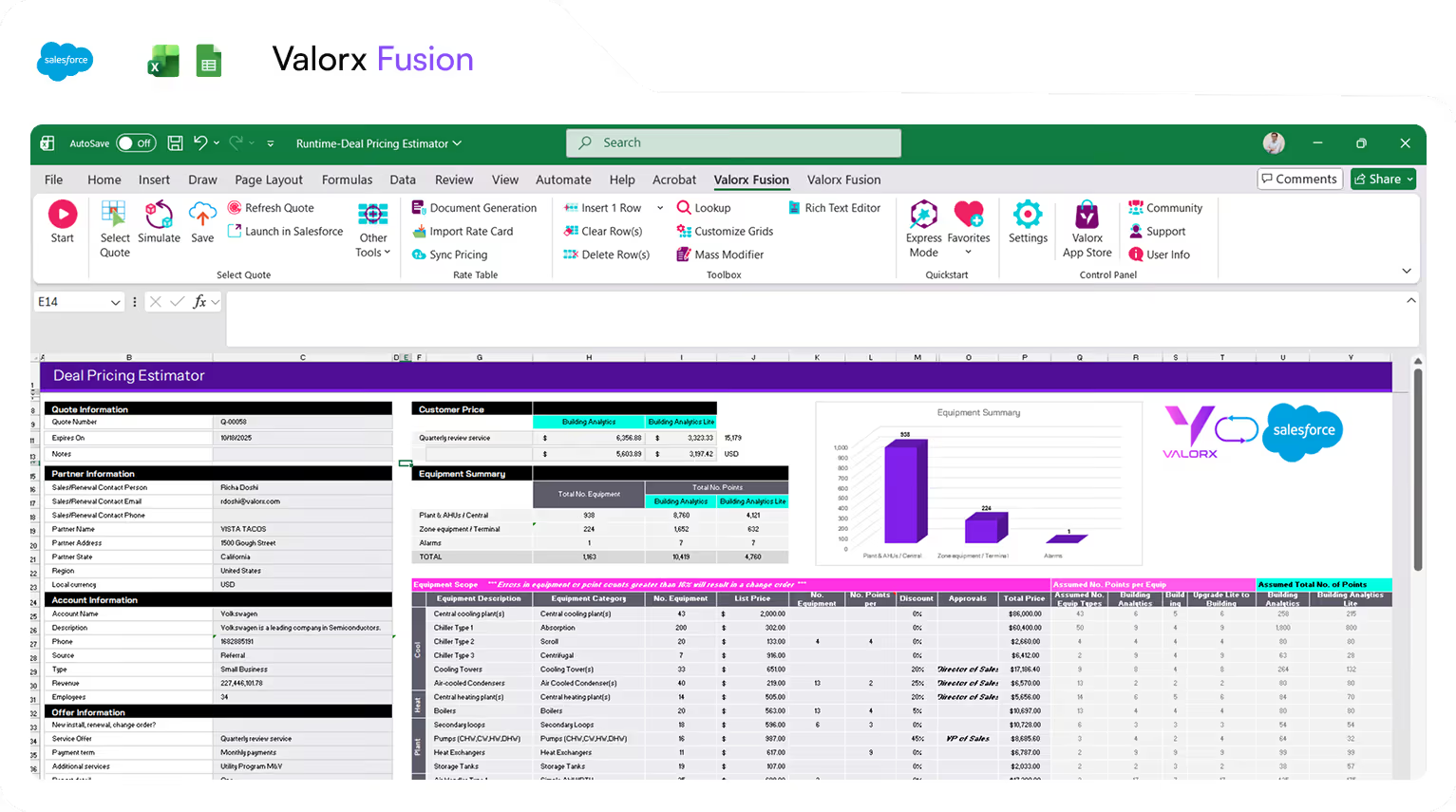
Excel spreadsheet interface showing Valorx Fusion deal pricing estimator with sections for quote, partner, account, offer information, customer price, equipment summary, and detailed equipment scope table.

Live Salesforce Data in Your Spreadsheets

Update, analyze, and save Salesforce records without leaving your existing spreadsheets. Maintain full Salesforce security.
Learn more
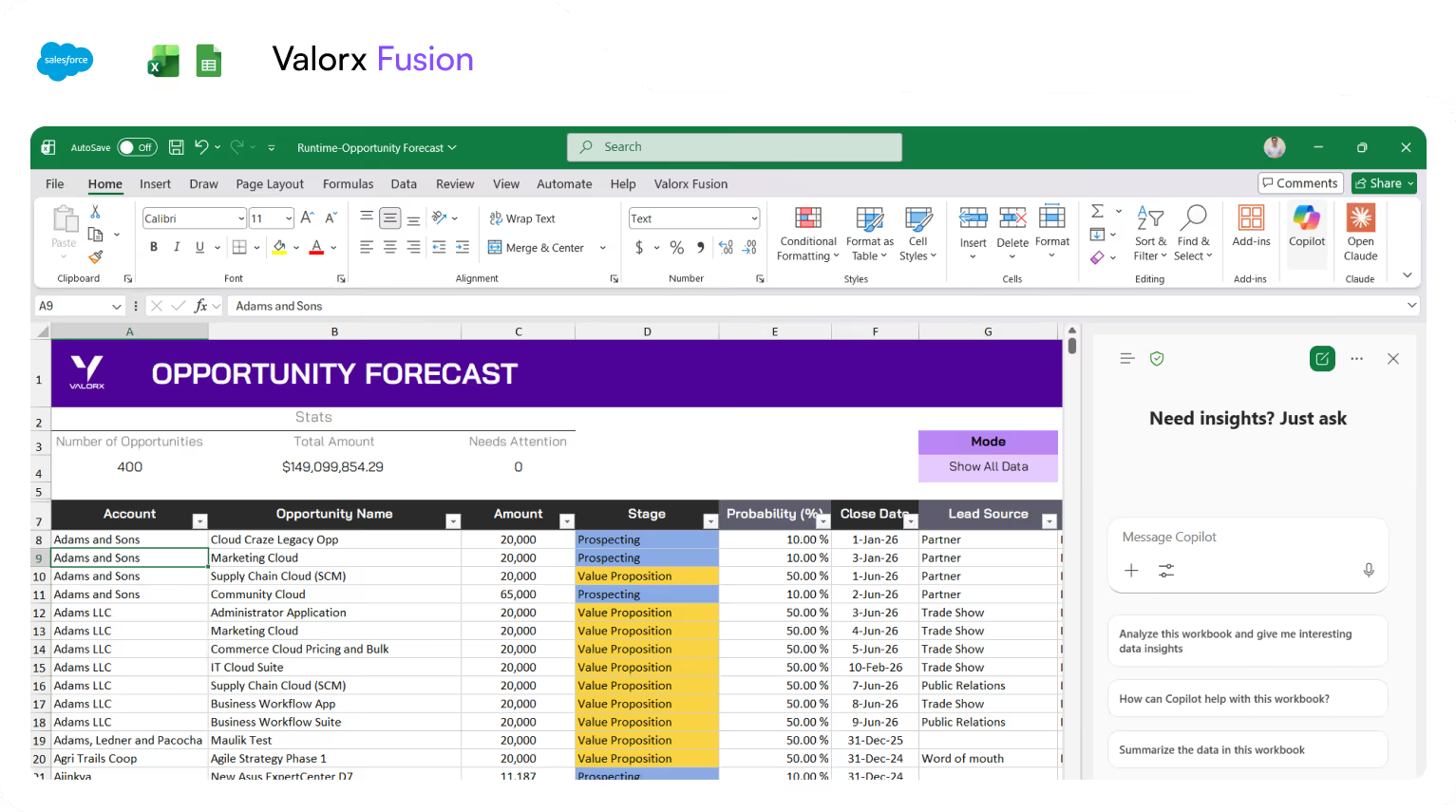
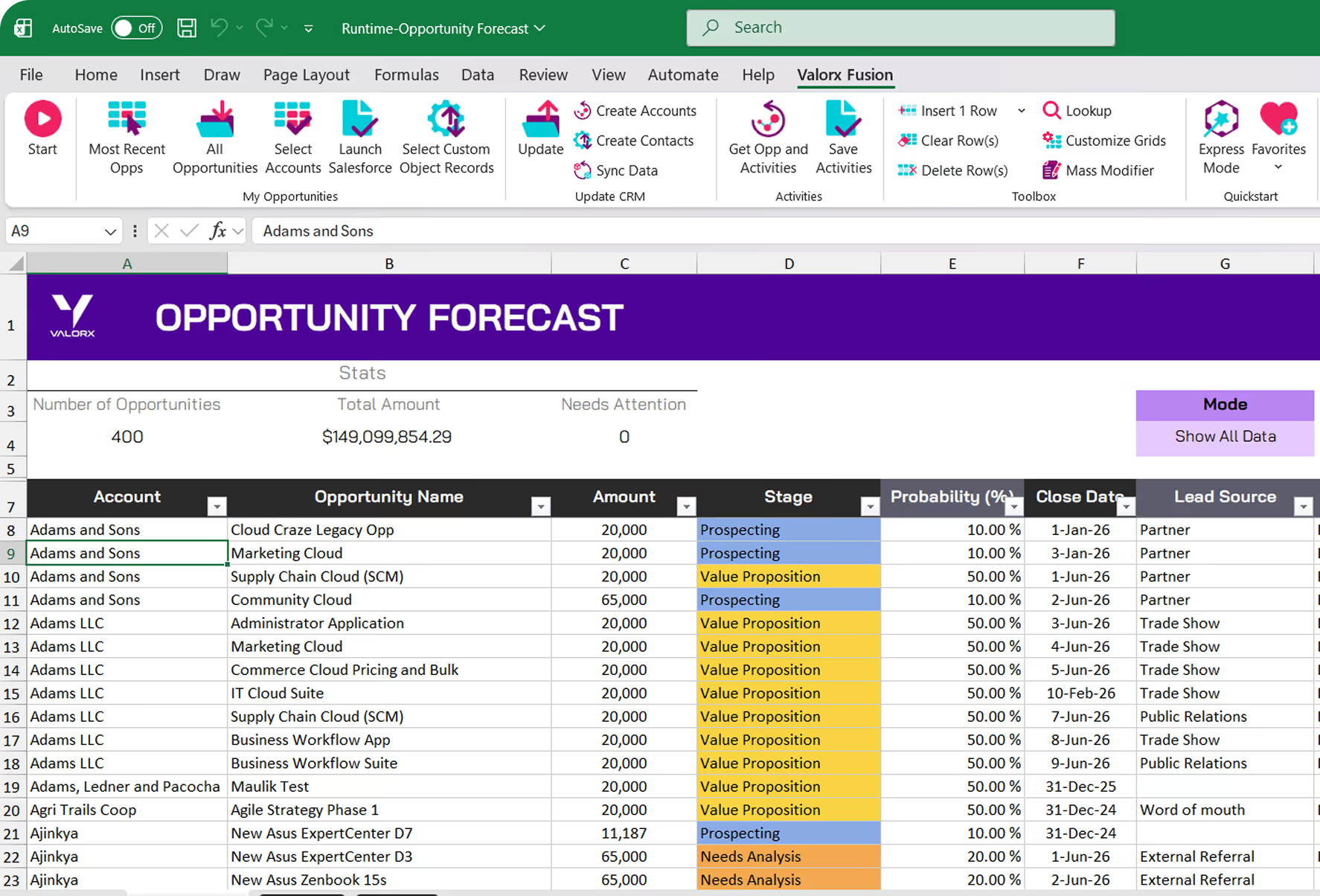
Excel sheet showing Valorx Fusion Opportunity Forecast with columns for Account, Opportunity Name, Amount, Stage, Probability, Close Date, and Lead Source, alongside a Copilot AI chat panel.

Familiar Excel Interface

Meet users where they are in Excel to eliminate training and change management while keeping admin control intact.
Learn more
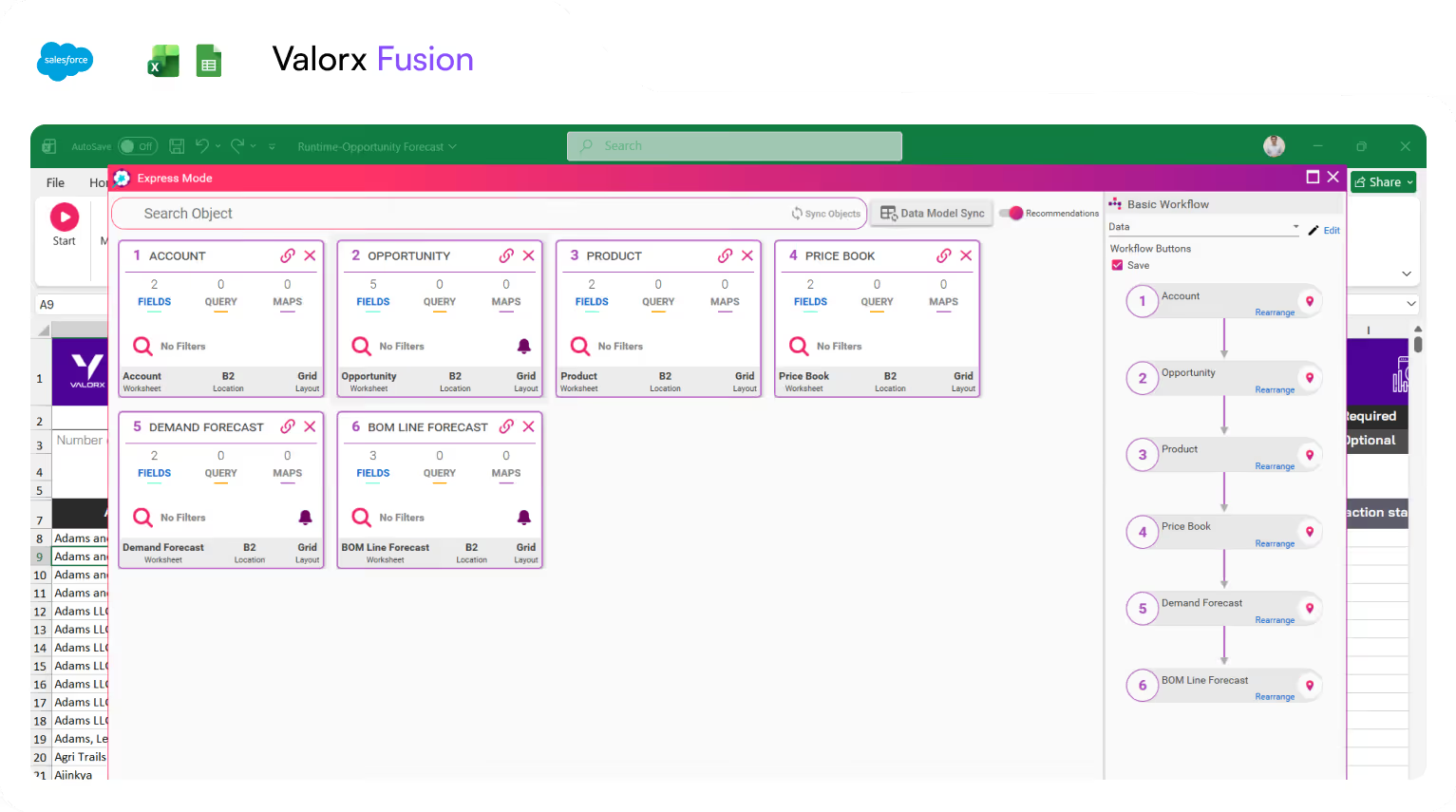
Software interface showing Valorx Fusion Express Mode with six synchronized data objects: Account, Opportunity, Product, Price Book, Demand Forecast, and BOM Line Forecast, each displaying fields, queries, and maps.

Built for Complex Workflows

Work on quoting, pricing, forecasting, and deal models directly in Excel, all while staying connected to live Salesforce data.
Learn more
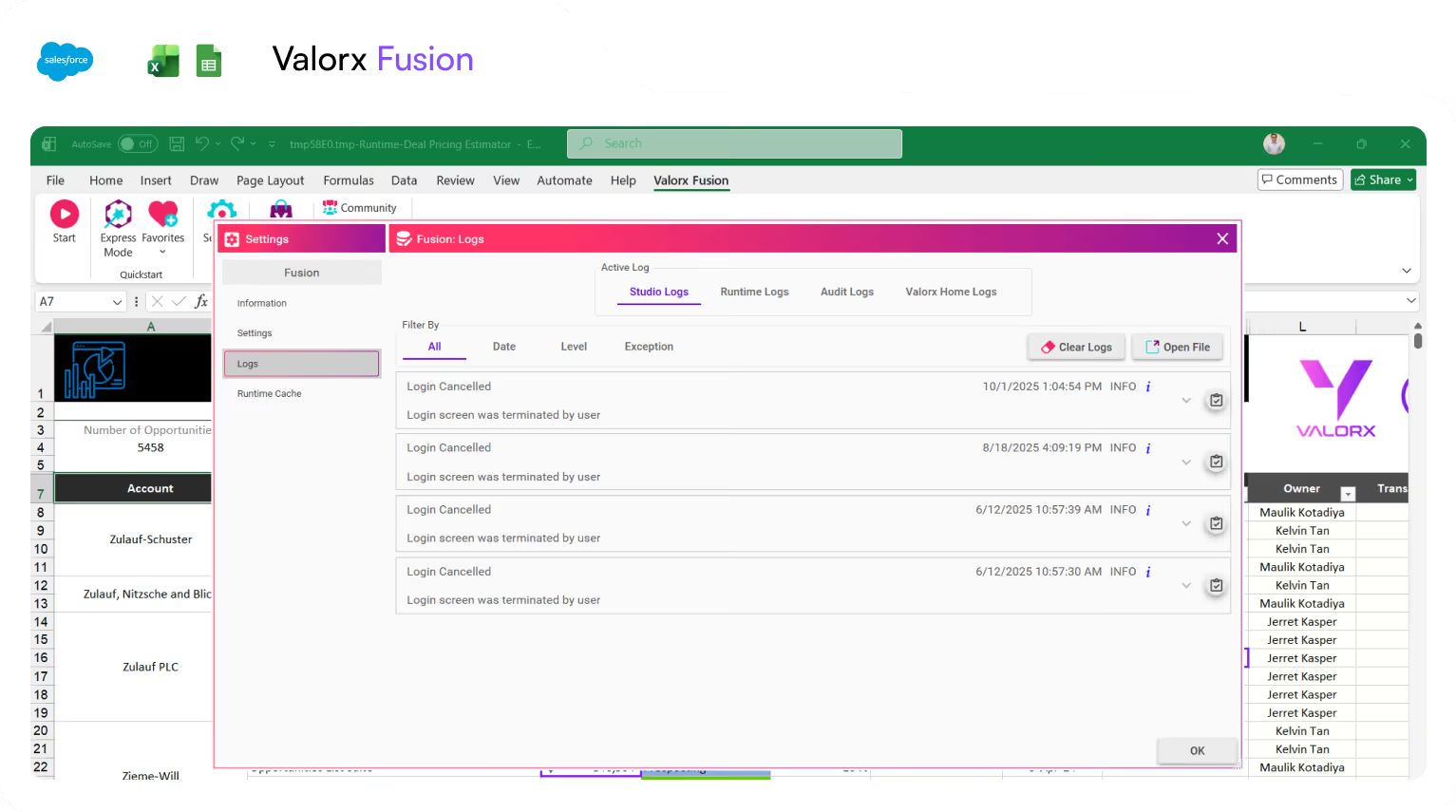
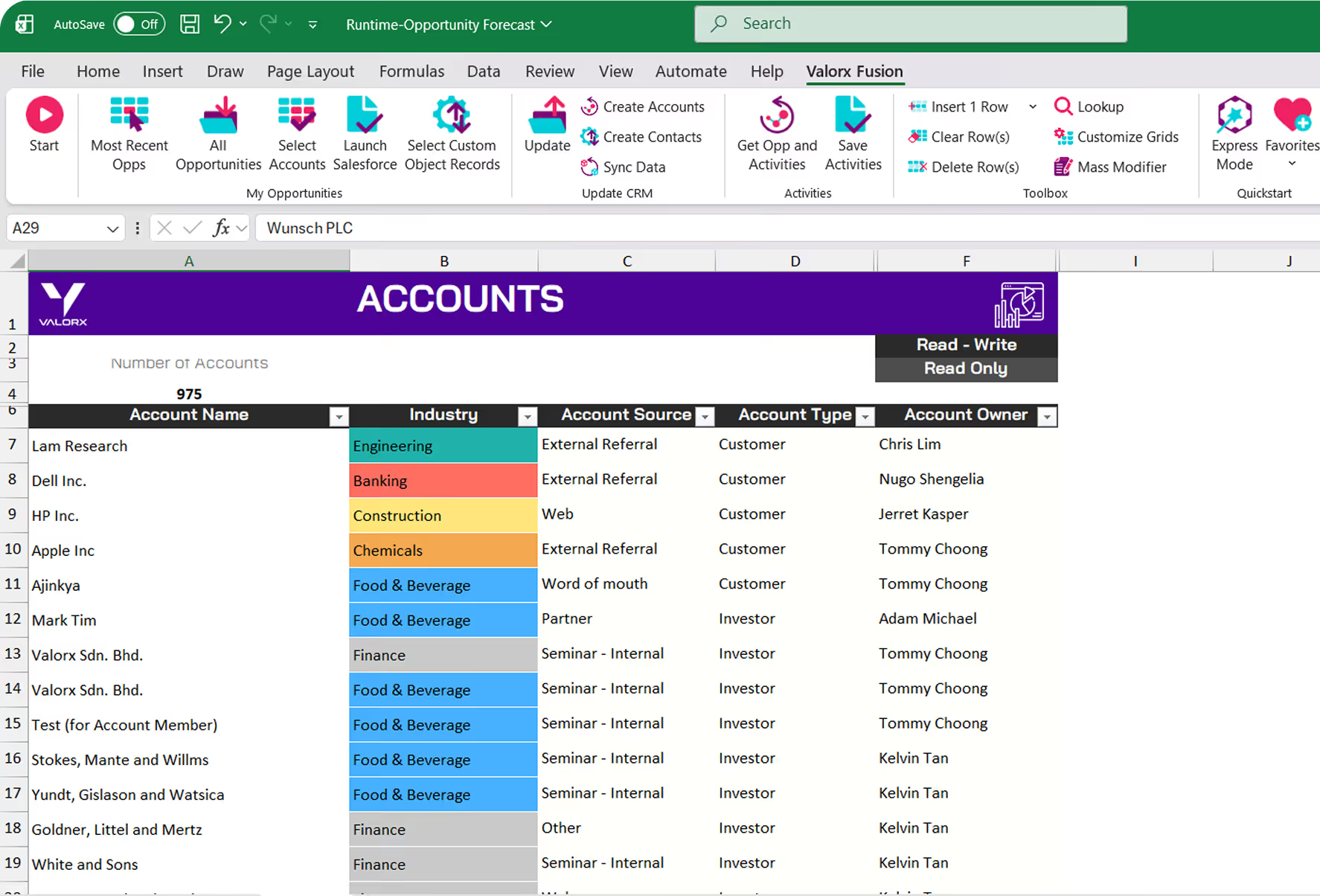
Screenshot of Valorx Fusion software integrated with Excel showing log settings with login cancelled entries and a spreadsheet listing accounts and owners.

No Version Chaos

Fusion apps live inside Salesforce, ensuring everyone works from secure, up-to-date data. No offline files or data silos—just live, controlled CRM access.
Learn more
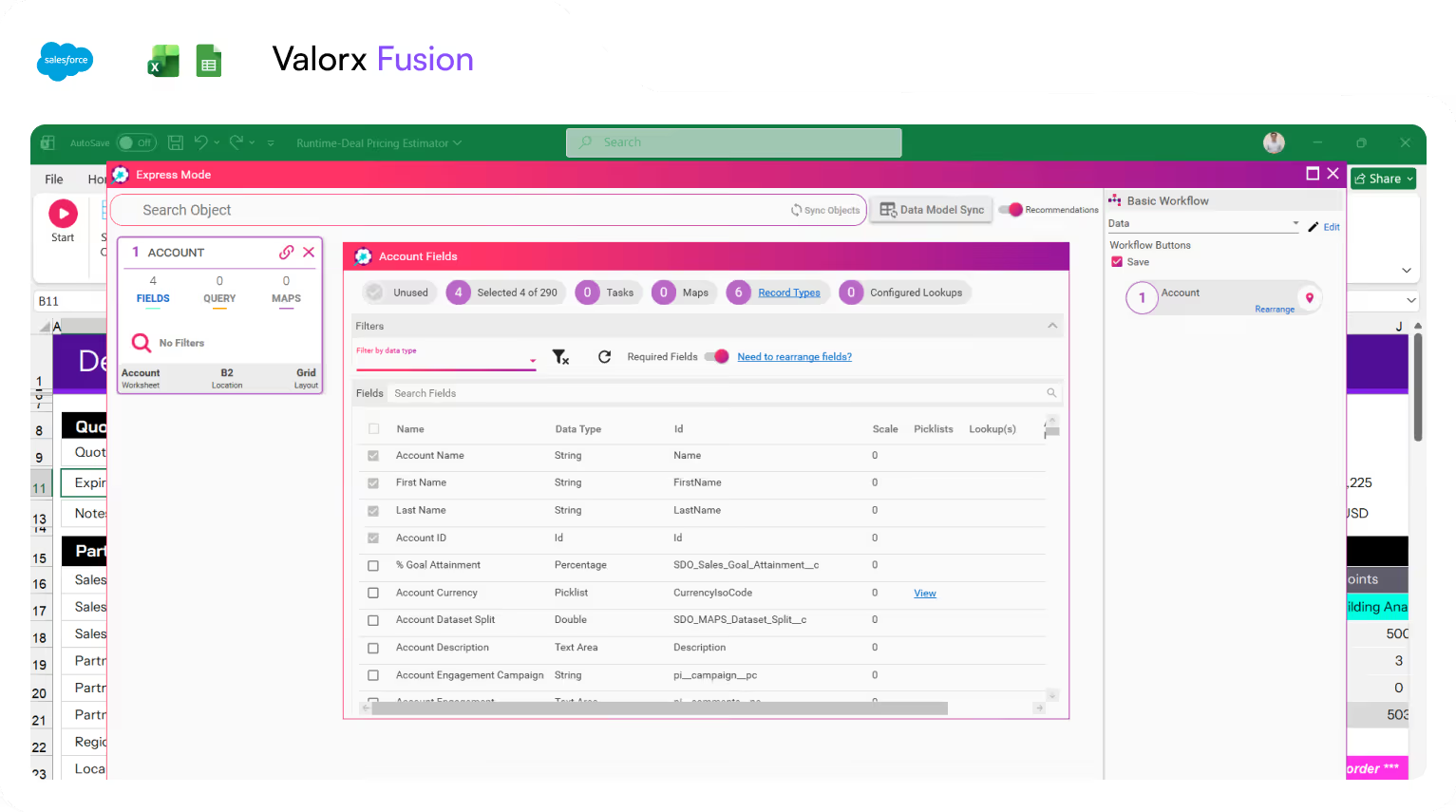
Valorx Fusion software interface displaying Salesforce account fields with options for filtering, field selection, and workflow settings.

Work with Any Salesforce Data Model

Bring any standard or custom field into your spreadsheet, apply formulas, and sync changes back to Salesforce instantly.
Learn more
Valorx Wave CRM dashboard displaying a table of opportunity records with columns for Name, Stage, Amount, Close Date, Owner, Opportunity Type, and Account.
Sales agreement table in Valorx Wave showing account details, products, planned quantities, sales prices, and discount percentages for October 25 and November 25.
Valorx Wave sales dashboard showing account details like name, phone, type, and owner, alongside a circular KPI chart with case status breakdown and 147 record count.

The functionality Salesforce left out

Fusion plugs the gaps in Salesforce's costing, pricing, modeling, quoting, and forecasting workflows.
Manufacturing Cloud
Revenue Cloud
Sales Cloud

Manufacturing Cloud

Finally, S&OP planning that works like a spreadsheet.
Icon of horizontal lines next to a vertical double arrow indicating height adjustment.
Advanced production scheduling
Purple download icon with a downward arrow inside a rounded square.
Aggregated and disaggregated forecasting
Icon with two purple arrows inside a light purple circle, one arrow pointing right above, the other pointing left below.
Flexible scenario planning
Purple cloud upload icon above a slim device with a blue light.
Cross-system data integration
Purple circle with a white lightning bolt and a purple star inside.
Multi-dimensional insights

Fusion + Revenue Cloud

Price, compare, and close deals—without leaving Excel.
Icon of horizontal lines next to a vertical double arrow indicating height adjustment.
High-volume quote management
Purple download icon with a downward arrow inside a rounded square.
Multi-dimensional quoting
Icon with two purple arrows inside a light purple circle, one arrow pointing right above, the other pointing left below.
Professional services quoting
Purple cloud upload icon above a slim device with a blue light.
Deal comparison and modeling
Purple circle with a white lightning bolt and a purple star inside.
Complex pricing calculations

Fusion + Sales Cloud

Mass updates without clicking into 200 records.
Icon of horizontal lines next to a vertical double arrow indicating height adjustment.
Mass updates to opportunities
Purple download icon with a downward arrow inside a rounded square.
Formula-driven sales analytics
Icon with two purple arrows inside a light purple circle, one arrow pointing right above, the other pointing left below.
Territory and quota planning
Purple cloud upload icon above a slim device with a blue light.
Pipeline forecasting
Purple circle with a white lightning bolt and a purple star inside.
Cross-object sales reporting

Salesforce can't replace spreadsheets, but they can work together

Without Valorx
Click through Opportunity → Quote → Line Items → Products
Toggle between 10 browser tabs to compare records
Learn Salesforce formula limits, then simplify your logic
Click record → edit → save → next record → repeat 200x
Can't use existing spreadsheet
With Valorx
Edit row in Excel - Fusion handles the objects behind
One view in Excel of every record, always current
Keep your Excel logic—connect it, don't rebuild it
Work in Excel, click save, Done
Use your existing spreadsheet with Salesforce, and it just works

Smiling young man with glasses and a beard wearing a black shirt on a light gray circular background with a small purple circle in the top right.
Eric Winston
Service Supervisor
Book a demo
Soft gradient background fading from light gray to pale blue and white.

Built for every team

Purple icon of an upward arrow chart combined with a funnel shape on a white rounded square background.

Sales Operations

Pipeline management, opportunity amendment, bulk renewals and more
Calendar icon with a blue checkmark indicating an event is confirmed or completed.

Revenue Operations

Daily + Weekly + Monthly + Quarterly + Yearly revenue reporting
Icon of a balance scale above three ascending bar chart columns in gradient purple and blue colors.

Finance & FP&A

Budget vs. actual, board reporting, variance analysis, revenue recognition
Purple price tags icon with a percentage symbol representing discounts or deals.

Deal Desk / Pricing

Margin analysis, discount modeling, approval workflows, deal scoring
Crystal ball with a rising arrow graph inside, symbolizing demand planning or forecasting.

Demand Planning

Weekly / Monthly forecasting, rolling forecasts, opportunity line-item scheduling
Icon showing a cloud with a downward arrow above a gear symbol, representing cloud download or settings.

Salesforce Admins

Data imports, migrations, mass updates, cross-org consolidation
three simple steps

How It Works

Curved arrow transitioning in color from purple to green, pointing to the right.
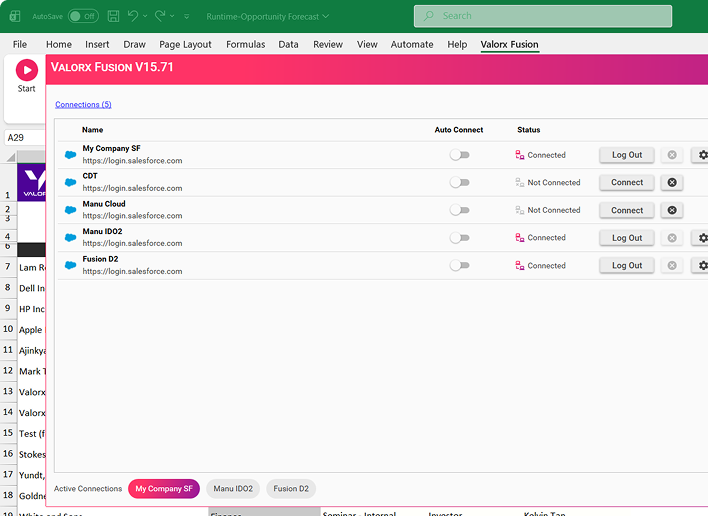
VALORX Fusion V15.71 interface showing a list of Salesforce connections with their auto-connect toggles, connection status, and buttons to connect, log out, or configure settings.
1

Connect

Install the Excel add-in or Google Sheets extension. Authenticate with Salesforce OAuth. Your credentials stay secure.
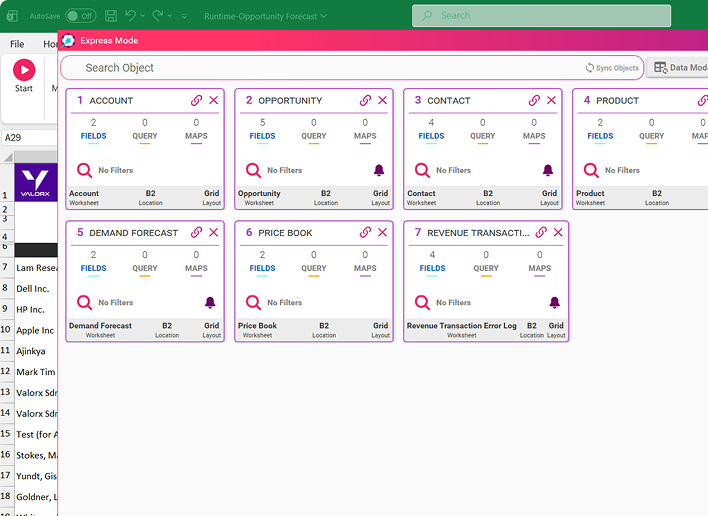
Dashboard window titled Express Mode showing seven linked data objects: Account, Opportunity, Contact, Product, Demand Forecast, Price Book, and Revenue Transaction Error Log, each with details on fields, queries, and maps, with a background spreadsheet visible.
2

Build

Use your existing workbooks. Add formulas, pivots, and charts. Select any Salesforce object and fields you need.
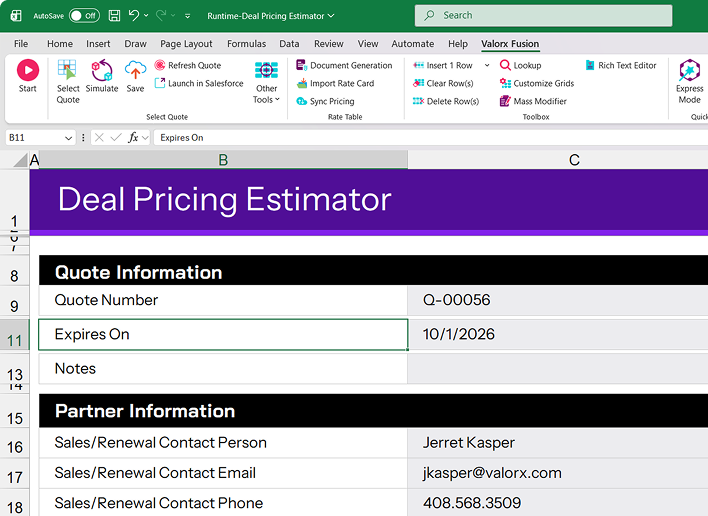
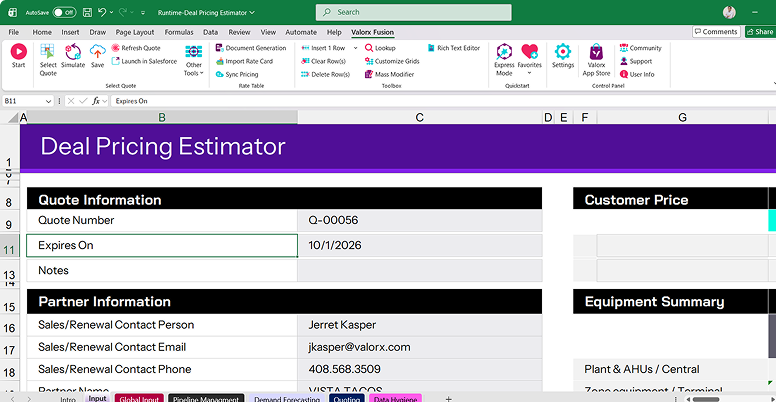
Excel spreadsheet titled Deal Pricing Estimator showing Quote Information with Quote Number Q-00056 and expiration date 10/1/2026, and Partner Information including contact person Jerret Kasper, email jkasper@valorx.com, and phone 408.568.3509.
3

Work

One click saves all changes to Salesforce. Full audit trail. Field-level security automatically enforced.
USE CASES

Make Salesforce work the way you want

Bring the power of a familiar spreadsheet experience to Salesforce — edit, analyze, and manage your CRM data the way you already know.
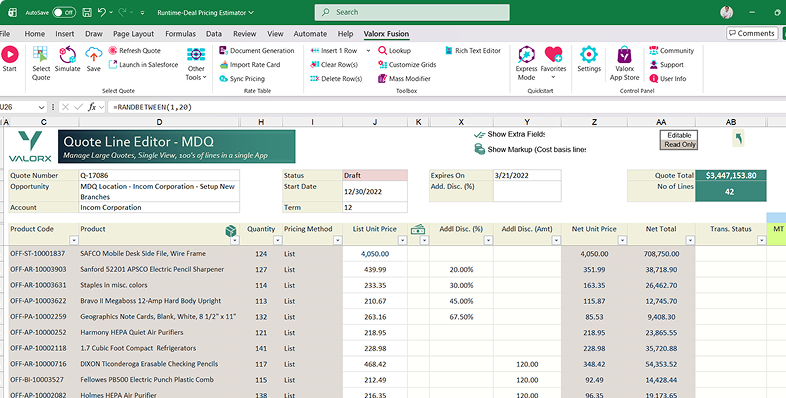
Excel spreadsheet titled Deal Pricing Estimator showing quote information, customer price, equipment summary with a bar chart, and detailed equipment scope and pricing data.

Multi-Dimensional Quoting

$3.4M quotes with 42+ lines, multi-location allocation
Learn more
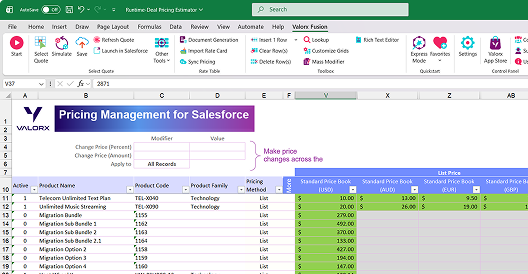
Wave Sales Price Management dashboard showing product list with columns for active status, product family, and list prices from zCPQ Products and zCirrus Price Book for Battery, High Capacity, Small Turbine, and Large Turbine.

Multi-Currency Pricebooks

USD, EUR, GBP, AUD, NZD—all in one view
Learn more
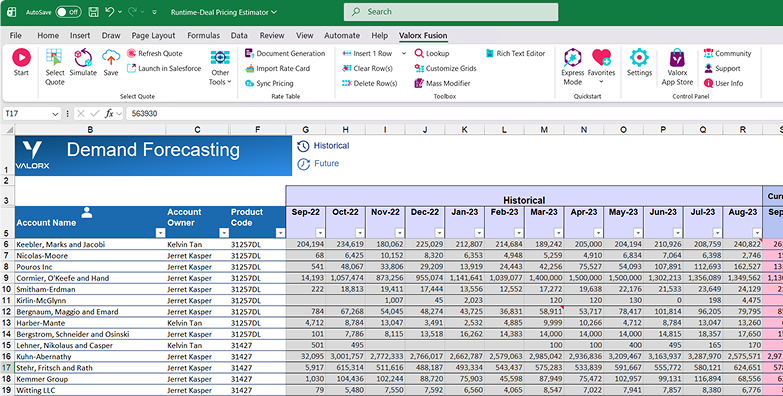
Dashboard screen titled Account Sales Agreements - Wave showing a data table with account names and product details, and an open Timeline – Telescope filter popup with date range options starting Jan 1, 2025, and ending Dec 1, 2026.

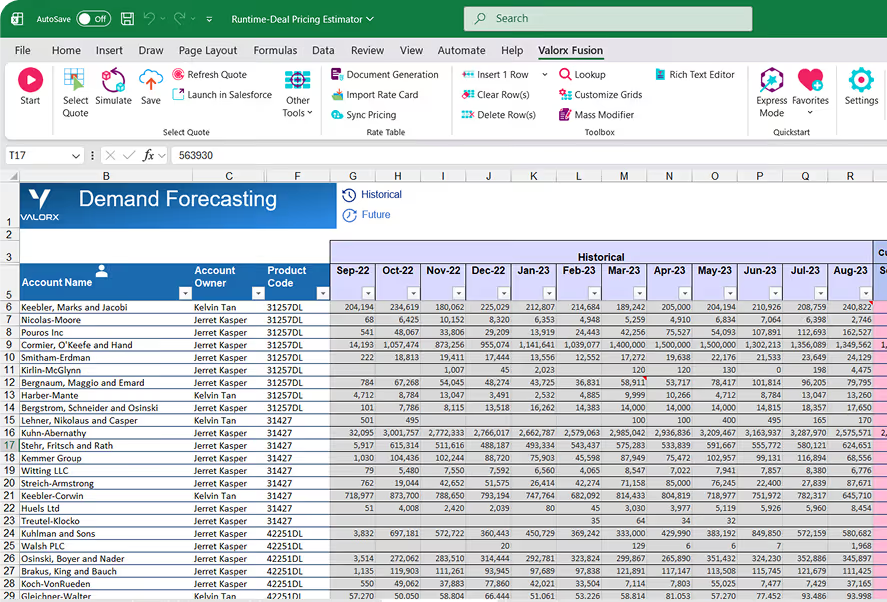
Demand Forecasting

Historical + future months with M+1/M+2/M+3 overrides
Learn more
Screenshot of a spreadsheet titled Pipeline Management showing account names, opportunity names, amounts, stages, probabilities, payment terms, close dates, campaigns, owners, and transaction statuses with the Valorx and Salesforce logos.

Deal Pricing Estimator

Complex quotes with charts and equipment summaries
Learn more
and more

Access all your favorite Excel features

From simple drag-and-drop to powerful formulas, enjoy all your go-to spreadsheet tools while working directly with your data.
Purple clipboard icon with a paper sheet and lines representing text against a rounded white background.

Copy & Paste

Quickly copy and paste data between grids and other sources using familiar keyboard shortcuts.
Icon of three vertical filter columns with a magnifying glass overlay, symbolizing filter search.

Filter Columns

Apply fast, column-level filters to zero in on exactly the records you need without leaving the grid.
Icon with two large arrows, one pointing left and one right, connected by small curved arrows indicating a swap or exchange.

Drag & Drop

Reorder columns, move fields, and organize your grid layout intuitively with simple drag-and-drop.
Icon of a vertical slider control with up and down arrows on the right side.

Sort Columns

Sort by one or multiple columns to surface top priorities — ascending or descending — in just a click.
Icon of a bar chart with an upward trending arrow indicating growth or increase.

Pivot Table

Summarize, group, and analyze large datasets dynamically with interactive pivot table views.
Purple lightning bolt icon on a white rounded square background.

Macros

Automate repetitive tasks with powerful macros that run sequences of actions in a single click.
Purple clipboard icon with a paper sheet and lines representing text against a rounded white background.

Column Grouping

Visually group related columns under a single header to keep complex datasets easy to read.
Icon of a stylized webpage layout with header, content blocks, and text lines in purple gradient.

Layout

Save and switch between different grid layouts — columns, sorting, grouping, filters — optimized for each workflow.
Icon with three vertical purple bars beside a purple snowflake symbol.

Freeze Columns

Pin key columns so they stay visible as you scroll horizontally through the grid.
Purple globe with a magnifying glass icon representing global search.

Global Search

Search across all visible columns and records in a grid to instantly find what you're looking for.
Icon of a purple and white envelope with an arrow pointing to a purple database stack representing smart email import.

Smart Import

Import data with intelligent field mapping, validation, and error handling powered by live metadata.
Two interlinked chain links with a purple gradient on a white circular background.

VLOOKUP

Pull in related data from other objects and tables using powerful lookup references.
Icon of a pencil drawing on a pie chart over stacked documents in purple shades.

Mass Modifier

Update hundreds of records at once with bulk edit operations that save time and reduce errors.
Icon of a translucent purple hand holding a pencil on a white background.

Auto Fill

Automatically populate fields based on patterns, rules, or previous entries to speed up data entry.
Symbol 'fx' in a gradient purple and blue color on a white background.

Formulas

Create calculated fields with spreadsheet-style formulas for real-time computed values.
Icon of a purple paint palette with a paintbrush resting on it.

Conditional Format

Highlight cells with colors and styles based on custom rules to spot trends and outliers at a glance.
Illustration of three stacked server units with a padlock in front, symbolizing enterprise security controls.

Enterprise Controls

Control who can view, edit, or configure grids at object and field level using role-based permissions.
Smartphone icon with a crossed-out Wi-Fi symbol indicating offline mode.

Offline Mode

Keep working without an internet connection — your changes sync automatically when you're back online.

Plans start at $0.

Valorx Wave brings a true spreadsheet UI to Salesforce, making complex data management intuitive and lightning fast.
Screenshot of Valorx Wave sales dashboard showing account sales agreements with columns for product, planned quantity, sales price, and discount percentage for October 25 and November 25.

Wondering about Fusion?

Everything you need to know about Valorx Fusion
How does Fusion connect to Salesforce?
Excel add-in connects via Salesforce API using OAuth. No passwords stored. Your Salesforce login controls access.
What Salesforce objects can I connect?
Any standard or custom object your profile has access to. If you can see it in Salesforce, you can connect it to Fusion.
Is my data secure?
All data remains in Salesforce, governed by your existing permissions, profiles, and field-level security. Fusion doesn't store your data.
How is Fusion different from Data Loader?
Data Loader is one-way (export/import). Fusion is bidirectional and live — edit in Excel, save to Salesforce instantly. No CSV mapping required.
How quickly can we deploy?
Most teams are productive in days. Install from AppExchange, connect via OAuth, start building. No integration project required.

Abstract purple outline of four connected circles inside a rounded square frame on a black background.
Abstract geometric logo featuring a circle above layered semicircles within a rounded square border.
Venn diagram with three overlapping purple circles on a black background.
Purple crescent shapes forming a circle on a black square background with rounded corners.
Purple outline icon of a briefcase inside a rounded square border on a black background.
Abstract black and purple geometric design with layered squares and rounded corners.
Green spreadsheet file icon representing an Excel document on a light background.
Abstract black and purple geometric design with layered squares and rounded corners.
Smiling young man with glasses and a beard wearing a black shirt on a light gray circular background with a small purple circle in the top right.
Eric Winston
Service Supervisor
Book a demo
Icon with three nested rectangles inside a rounded square outline, representing a scaling or resizing concept.
Microsoft Excel app icon with an overlapping white X on a green abstract background.
Purple geometric icon with three nested diamond shapes on a black background.
Three purple abstract human figures representing a group or team on a light background.
Icon with three stacked rounded rectangles in purple outline on a black background.
Abstract purple outline of four connected circles inside a rounded square frame on a black background.
Icon showing four interconnected circles forming a square with a horizontal line extending from the right circle.
Google Chrome web browser logo.
Salesforce logo with white text inside a blue cloud shape.
Abstract geometric design with multiple rounded squares outlined in purple on a black background.
Purple circular abstract icon with overlapping partial rings on a black square background with rounded corners.
Three overlapping purple circles forming a triangular Venn diagram on a black background.
Abstract geometric logo featuring a circle above layered semicircles within a rounded square border.