How to handle custom orders in Salesforce CPQ

To handle custom orders in Salesforce CPQ, model the repeatable parts with bundles, rules and pricing, give one-off items a defined path, and give reps a faster way to build and edit large, non-standard quotes on live CPQ data. CPQ is built to standardize, while custom orders vary from deal to deal. The goal is flexibility in how the order is built without losing CPQ’s rules and approvals.
This guide explains the kinds of custom orders teams quote, where Salesforce CPQ handles them well, where it strains and how to close the gap.
Key takeaways
- Custom orders combine non-standard configurations, customer-specific pricing and one-off approvals.
- CPQ handles configure-to-order products well. Engineer-to-order items, multi-dimensional orders and aftermarket service need extra design.
- The biggest practical problem is volume: custom orders add lines and edits, which are slow in the Quote Line Editor.
- Building the order in a spreadsheet connected to live CPQ data keeps the flexibility and the governance.
- BP manages quotes with more than 50 attributes per line this way and cut quote cycles from 4 days to 4 hours.
What counts as a custom order in CPQ
A custom order is any quote that does not fit standard catalog items and price books. New to CPQ? Start with what CPQ is and how it works. Most custom orders fall into one of five types.
| Order type | What makes it custom | How CPQ handles it | Where it strains |
|---|---|---|---|
| Configure-to-order | Products built from predefined options | Bundles, product rules and configuration attributes | Long option lists and deep bundles |
| Engineer-to-order | Custom design work priced from estimates | Placeholder or custom line types | Items that do not exist in the catalog |
| Custom pricing | Negotiated, tiered or customer-specific prices | Contracted prices, price rules, discount schedules | One-off prices and exceptions that need approval |
| Multi-dimensional orders | Pricing by year, site or delivery date | Multi-dimensional quoting (MDQ) | Each segment becomes a separate quote line |
| Aftermarket and service orders | Spare parts, repairs and service on installed equipment | Standard products plus custom service lines | Matching parts to the customer’s installed base |
Swipe the table to see all columns
Manufacturers see all five, often on the same quote. We cover the wider set of problems in CPQ challenges in manufacturing.
Where custom orders strain Salesforce CPQ
Complex configurations
Bundles and product rules can describe every valid option for configure-to-order products. Engineered items cannot be described in advance, so reps add placeholder lines and track the real configuration elsewhere. Nested bundles also add lines and calculation time. See Salesforce CPQ for complex products for how to keep bundles and rules manageable.
Customer-specific pricing
Custom orders rarely use list price. Contracted prices, volume tiers, surcharges and negotiated discounts all apply, and anything outside policy needs approval. Clear discount schedules and approval thresholds keep this fast. Our guide to Salesforce CPQ discount management covers the setup.
Quote volume and constant edits
Custom orders change often and run long. Editing hundreds of lines one at a time in the Quote Line Editor is slow, and multi-dimensional orders multiply the line count. This is the main reason custom quoting drifts back into offline spreadsheets. We cover the causes in Salesforce CPQ limitations.
Data integrity
When a custom order is built offline and re-keyed, prices, part numbers and dates drift between the spreadsheet, Salesforce and ERP. Errors surface at order or invoice time, when they are most expensive. See Salesforce ERP integration for keeping systems in sync, and the Salesforce quote-to-cash process for how quote errors travel downstream.
How to handle custom orders in Salesforce CPQ
- Model the repeatable core. Put standard products, options and rules in CPQ so most of every order is configured the same way.
- Give engineered items a defined path. Use a custom line type with required fields, such as drawing number, estimate and approver, instead of free-text placeholders.
- Keep pricing logic in one place. Use lookup tables and discount schedules rather than one-off manual prices, and route exceptions by threshold.
- Make bulk edits fast. Let reps build and change the full order on live CPQ data, so they never need a side spreadsheet. Our guide to editing CPQ quote lines in Excel compares the options.
- Sync with ERP. Pull costs, part numbers and availability into the quote, and push accepted orders back automatically.
Building custom orders with Valorx
We keep Salesforce CPQ as the system of record and give reps a faster place to build non-standard orders.
- Valorx Fusion connects Excel and Google Sheets to live Salesforce data. Reps assemble custom orders with copy and paste, fill-down, formulas and conditional formatting, see dimensions such as years or sites as columns, and save back with CPQ rules, validation and approvals applied.
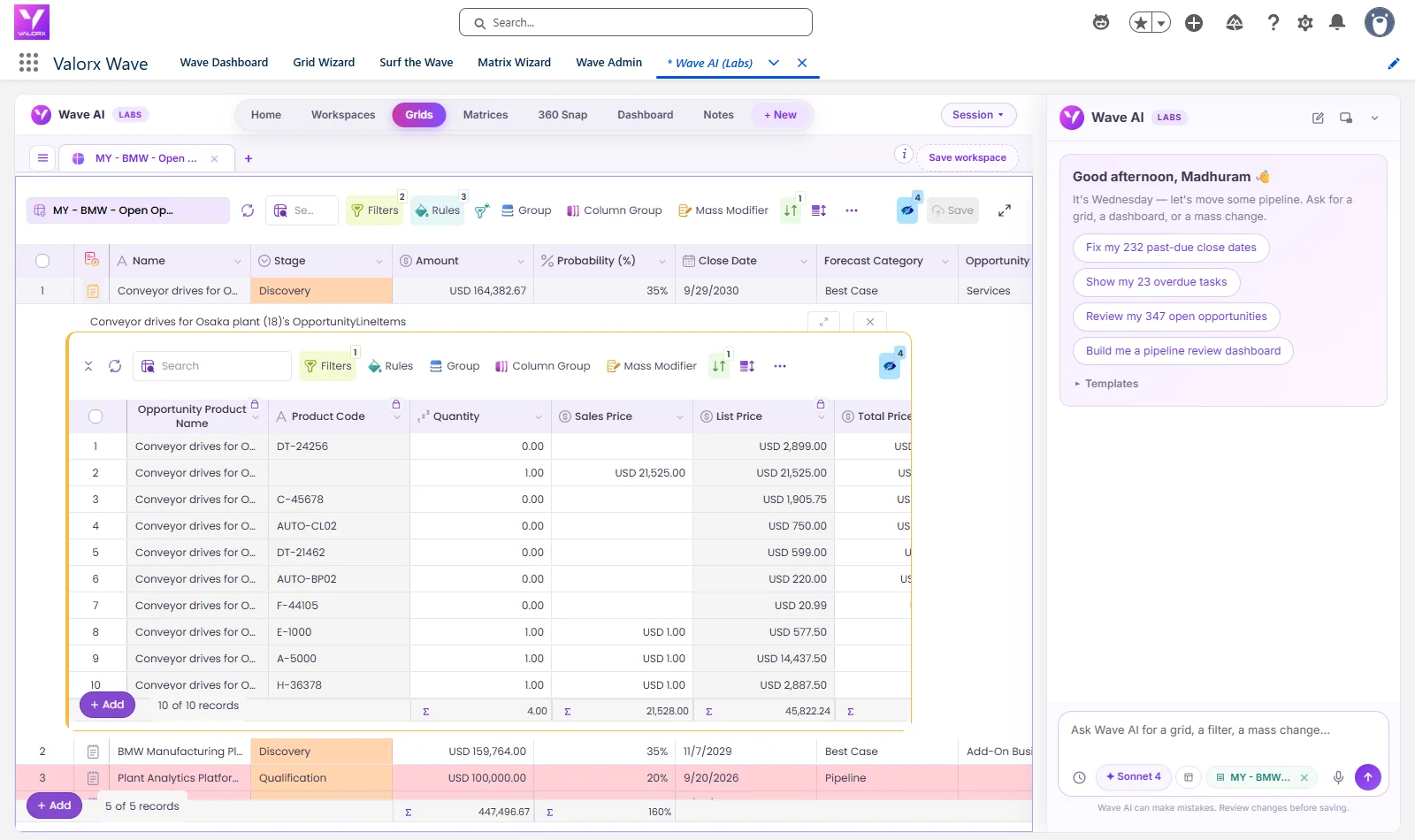
- Valorx Wave puts a spreadsheet-style grid inside Salesforce for bulk updates to quotes, products and prices.
BP's commercial team builds quotes of 150 to 300 lines and more than 50 attributes per line, covering commodity pricing, volume tiers, regional surcharges and currency conversions. With Fusion, account managers edit the full quote in a spreadsheet grid with every CPQ rule enforced, and quote cycles fell from 4 days to 4 hours across more than 15,000 quotes a year.
Click through the interactive tour above to see how Fusion connects Excel to Salesforce. If reps are working around CPQ today, our guide to Salesforce CPQ adoption covers how to bring them back.
Custom orders after the move to Revenue Cloud
Salesforce stopped selling CPQ to new customers in March 2025. Existing customers can keep using, expanding and renewing it, and there is no forced migration, according to Salesforce’s CPQ end-of-sale page. New customers get Revenue Cloud Advanced, which adds constraint-based configuration rules alongside its product catalog, pricing, quoting, contracting and order management.
For custom orders, constraint-based rules can describe complex configure-to-order products with fewer hand-built rules. They do not remove the rest of the problem: engineered items still need a defined path, customer-specific pricing still needs governance, and large orders still need fast bulk editing. Moving is a reimplementation, so most teams fix custom order handling on CPQ now. Fusion and Wave work on Revenue Cloud too, so the same way of working carries over if you migrate.
Frequently asked questions
What is a custom order in Salesforce CPQ?
A custom order is a quote that does not fit standard catalog items and price books. It can include engineered products, unusual product combinations, customer-specific pricing, multiple delivery dates or sites, and one-off approval paths.
Why are custom orders hard in Salesforce CPQ?
CPQ is built to standardize quoting. Custom orders vary from deal to deal, so they push against configuration rules, add many quote lines and need frequent edits, which is slow in the Quote Line Editor.
How do you handle engineer-to-order items in CPQ?
Model the configurable core in CPQ and give engineered items a defined path, such as a custom line type with required fields for drawing number, estimate and approver, so they still go through approvals.
Can you build custom orders in Excel and keep CPQ governance?
Yes, if the spreadsheet is connected to live CPQ data. With Valorx Fusion, reps assemble the order in Excel or Google Sheets and save it back to Salesforce, where CPQ rules, validation and approvals still apply.
Does Revenue Cloud Advanced handle custom orders better than CPQ?
Revenue Cloud Advanced adds constraint-based configuration rules, which can model complex configure-to-order products with fewer hand-built rules. Engineered items, custom pricing approvals and bulk editing of large orders still need the same design work, and moving from CPQ is a reimplementation.
How does CPQ handle aftermarket and service orders?
Spare parts and service are usually standard products plus custom service lines. The challenge is matching parts and pricing to the customer’s installed equipment, which often means bringing asset data from ERP or service systems onto the quote.





Choose the workflow you need:
Try Wave in browser Extension

Try Wave in Salesforce

Try Fusion In Excel

Enhancing Salesforce for industry leaders