Conga X-Author vs Fusion: Choosing the Right Salesforce Data Management Tool
Quick answer: Both tools let you read and write Salesforce records from a spreadsheet. The deciding differences are platform and entry cost. Conga's documentation states that macOS is not supported, and that X-Author runs on a Mac only inside a Windows virtual machine, and its AppExchange listing starts at $40 per user per month. Valorx Fusion works in Excel and Google Sheets, on Windows and Mac, with a free tier and Pro at $60 per user per month. X-Author makes more sense if you already run Conga CPQ or CLM and want Excel apps built by an admin. Fusion makes more sense if your team is mixed-platform, lives in Google Sheets as well as Excel, or wants to trial before buying.
We build Fusion, so read this knowing that. Everything factual below links to a source you can check yourself, including Conga's own documentation.
The real problem both tools solve
Salesforce is good at storing records and bad at letting people work with hundreds of them at once. So people export. A rep pulls a pipeline report into Excel, reworks it, and emails it around. Finance builds the quarterly model in a workbook that has never touched the CRM. By the time anyone loads the changes back, the org and the spreadsheet disagree, and nobody can say which one is right.
That is a data management problem, not a spreadsheet problem. The fix is to make the spreadsheet a live window onto Salesforce records rather than a copy of them. X-Author and Fusion both do this. They differ in how you get there, who has to build it, and what it costs to find out whether your team will actually use it.
Conga X-Author is an established Salesforce-to-Excel solution with configurable Excel applications, multi-object support, query and save actions, and close alignment with the wider Conga product ecosystem. Conga continues to maintain X-Author, with current Salesforce packages and a 2026 release available today.
Valorx Fusion connects Salesforce with Excel and Google Sheets so users can retrieve live Salesforce data, work with it using familiar spreadsheet functionality, and save changes back to Salesforce. Fusion also supports reusable spreadsheet applications, multi-object workflows, bulk operations, offline workflows, and existing Excel workbooks.
The short version:
- Already deeply standardized on Conga? X-Author may fit naturally into your existing architecture.
- Need a standalone Salesforce spreadsheet solution across Excel, Excel for Mac, and Google Sheets? Fusion is designed around that use case.
- Replacing an existing X-Author deployment? Compare your current apps, mappings, macros, objects, data volumes, and workflows rather than choosing based on a feature checklist alone.
X-Author vs Fusion at a glance
For a side-by-side comparison of both applications, you can reference this table:
What is Conga X-Author for Excel?
X-Author for Excel is Conga's Salesforce Excel plugin. Conga positions it as a way to manage CRM records from inside Excel, alongside its other Salesforce tools, Orchestrate and Grid.
The model is app-based. An admin opens X-Author Designer, builds a workbook mapped to Salesforce objects, adds action flows and menu buttons, and publishes it. Business users install a runtime-only version of the add-in and open the app the admin built. The spreadsheet is a designed artifact that belongs to the tool.
That suits organizations with a central admin team and a fixed set of processes. It suits them less well when a finance lead wants to connect their own model next Tuesday.
Is X-Author still supported?
Yes. Conga still sells it as part of its Salesforce suite. If you have read that the product was abandoned years ago, that is wrong, and we have said so in earlier versions of this post.
What is fair to say is that the release line has been stable for a long time. Conga publishes X-Author for Excel release notes under the Winter 2018 line, with patch releases since. For a mature tool inside a larger suite, stability can be a feature: no surprise interface changes, no retraining. It matters only if you are expecting a steady stream of new capability, particularly around AI and newer Salesforce data features.
Does X-Author work on a Mac?
No, not directly. Conga's install guide states that macOS is not supported, and that X-Author can be used on a Mac only when it is running a Windows virtual machine through VMware or Parallels. The installer places its files in the Windows Program Files directory and may require a Windows restart during setup.
This decides more evaluations than any feature on the list. If finance is on Windows and sales is on MacBooks, X-Author covers half your users unless you buy and manage virtualization for the rest. Fusion runs on both, and in Google Sheets for the people who never open Excel.
How much does each cost?
X-Author's AppExchange listing starts at $40 per user per month, with different packages for pre-configured apps and for building your own. There is no public free tier, and your real cost depends on the package and on the rest of your Conga contract.
Fusion publishes its pricing. The free plan connects Excel or Google Sheets, includes Design Studio, and covers up to 2,000 record updates a month. Fusion Pro is $60 per user per month billed annually, with unlimited record updates, unlimited custom objects and unlimited Salesforce instances.
The number that matters is not the sticker price. It is whether you can put the tool in a user's hands this afternoon and watch what happens. One path starts with a sales conversation. The other does not.
How each one handles your existing spreadsheets
This is the difference that shows up in week one of a rollout.
X-Author expects the workbook to be built in Designer. Your existing model becomes the specification for a new app rather than the thing you connect. For a standardized process used by fifty people, that is a reasonable trade. For the pricing workbook that one analyst has refined over four years, it is a project.
Fusion connects the file you already have. Formulas, pivots, conditional formatting and the tab nobody wants to explain all stay where they are, and the cells that should carry Salesforce data start carrying it live. Design Studio is there when you do want a controlled template for a wider group, but it is an option rather than a first step.
So the question to ask your team is simple: do we want to rebuild our models inside a vendor's tool, or connect the ones we trust?
Security and governance
Both tools run on the Salesforce platform and respect the permissions in your org. A user who cannot see a field in Salesforce cannot see it in the spreadsheet, and a validation rule that blocks a save in the UI blocks it from the spreadsheet too.
The question worth asking either vendor is what happens to the file. Fusion apps live inside Salesforce and pull live data when opened, so there is no exported copy circulating by email with last quarter's numbers in it. If your security review cares about data leaving the org, that is the answer it needs, and it should be about where the file lives rather than about encryption in transit.
Performance at volume
No comparison table settles this, and you should not trust a vendor's number, ours included. Both tools slow down somewhere. What differs is where, and how they behave when something fails.
Test with your data, not sample data:
- Load a query returning 10,000 rows across a parent and child object
- Edit 500 cells, including a picklist and a lookup, then save in one pass
- Repeat on records with active validation rules and required fields
- Time the save, then check how errors are reported when three rows fail
A tool that takes a minute to load and reports failures as one generic error is a cost you pay every month, not once during evaluation.
Which teams choose which
Where Valorx Fusion fits
Fusion is for teams who manage Salesforce data in spreadsheets and want those spreadsheets connected to live records instead of exported copies. It runs in Excel and Google Sheets, on Windows and Mac, works with any standard or custom object, and keeps your existing security model.
Teams at Genpact, Adobe, Swoop and Western Digital run Salesforce operations this way. Our customers cut CPQ quoting from three and a half hours to under ten minutes.
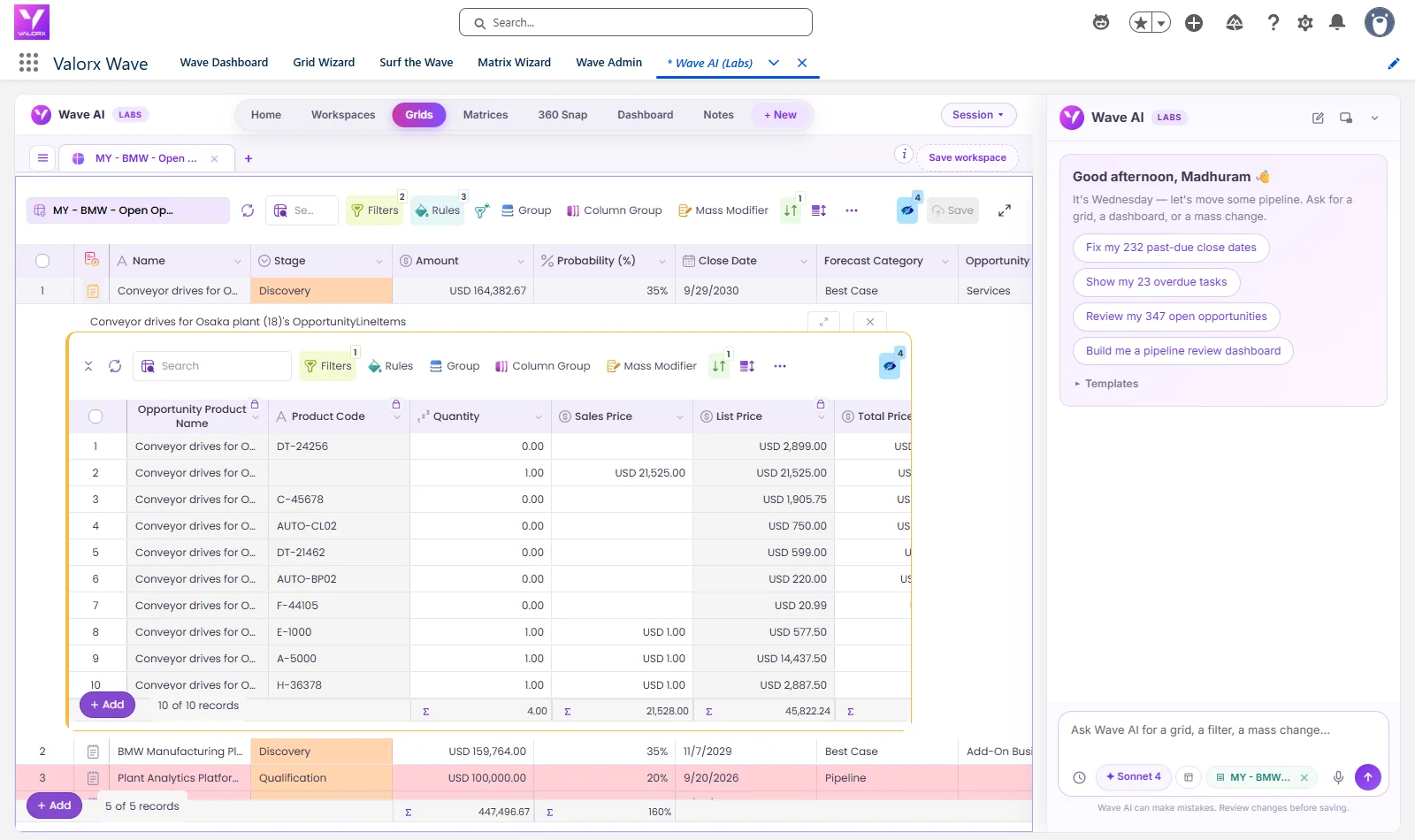
Note: If what you actually want is bulk editing inside Salesforce rather than in a spreadsheet, Fusion is the wrong comparison. Valorx Wave puts a spreadsheet-style grid natively in Salesforce with no add-in and no Excel. Plenty of teams run both: Wave for cleanup and pipeline work inside the CRM, Fusion for the models that genuinely belong in a spreadsheet.
Moving from X-Author to Valorx Fusion
For existing X-Author customers, switching tools does not mean migrating the underlying Salesforce records. Salesforce remains the system of record.
The work is rebuilding the spreadsheet application: its object mappings, queries, save logic, calculations, workflows and user experience. Valorx offers services to rebuild existing X-Author mappings and applications in Fusion, and the effort depends on how complex the current application is.
Before a move, inventory:
- Existing X-Author applications
- Salesforce objects and relationships
- Queries and filters
- Formulas and macros
- Save and validation logic
- External integrations
- User groups and permissions
- Data volumes
- Platform requirements
- Business-critical workflows
A good migration is not a one-to-one recreation. It is a chance to work out which parts of the old workbook still matter and which can be simplified.
You also do not have to cut over. The two are separate managed packages, so you can rebuild one application in a sandbox, run both through a real cycle such as a quarter-end or a forecast round, and move team by team afterward.
How to make the decision
Do not choose a Salesforce data management tool from a feature checklist.
Choose one representative process. Use real Salesforce objects. Load a realistic amount of data. Give the workbook to the people who will actually use and administer it.
Then measure:
- How quickly can users get the data they need?
- How easily can they make changes? Edit 500 cells, including a picklist and a lookup, and save in one pass.
- What happens when Salesforce rejects a record? Run it against objects with active validation rules and required fields, and check whether three failed rows are reported individually or as one generic error.
- How easy is the application to maintain, and who has to maintain it?
- Does it work across every spreadsheet platform your organization uses?
- Can it support the process as it gets more complex?
That tells you far more than whether both products have "Excel integration" checked on a comparison sheet.
See Fusion with your own Salesforce workflow
If you are evaluating an X-Author alternative, bring one of your existing X-Author applications or Salesforce spreadsheet workflows to a Fusion demo. Rather than a generic example, our team can walk through how that same workflow would run on your Salesforce data model.
FAQ: X-Author vs Fusion
What is X-Author used for?
Excel-based editing of Salesforce data, historically popular alongside Conga/Apttus CPQ deployments.
What is Conga X-Author for Excel?
A Salesforce Excel plugin from Conga that turns Excel into an interface for viewing and updating CRM records, with a Designer layer admins use to build reusable Excel apps for their users.
Is X-Author for Excel discontinued?
No. Conga still lists it among its Salesforce tools alongside Orchestrate and Grid. Its documented release line is Winter 2018, with patch releases since
Does X-Author work on Mac?
No. Conga's documentation says macOS is not supported and that X-Author runs on a Mac only inside a Windows virtual machine.
How much does X-Author for Excel cost?
Its AppExchange listing starts at $40 per user per month, with packages for pre-configured apps and for building your own.
What is the best X-Author alternative?
It depends on the gap. For Mac or Google Sheets support, a free tier, or connecting spreadsheets you already own, Valorx Fusion covers those. For bulk editing inside Salesforce without a spreadsheet at all, Valorx Wave is the closer fit.
Why do teams switch to Fusion?
Performance at volume, Google Sheets support, unlimited org connections, reusable Design Studio apps, and transparent pricing.
Is migration difficult?
No data migration — both work on live Salesforce data; switching means rebuilding templates, which Design Studio streamlines.
Does Valorx Fusion work with Google Sheets?
Yes. Fusion connects both Excel and Google Sheets to Salesforce. X-Author is an Excel add-in only.
Can Fusion and X-Author run in the same org?
Yes. They are separate managed packages, so you can trial Fusion alongside an existing X-Author deployment.
Do both tools support custom objects?
Yes. On Fusion, unlimited custom objects come with Pro, while the free plan covers unlimited standard objects.
Sources
- Installing X-Author for Excel, Conga Documentation Portal
- Conga X-Author for Excel, Salesforce AppExchange
- Salesforce automation tools, Conga
- X-Author for Excel release notes, Conga Documentation Portal
- Valorx pricing




Choose the workflow you need:
Try Wave in browser Extension

Try Wave in Salesforce

Try Fusion In Excel

Enhancing Salesforce for industry leaders