From Answer to Action: Pair Agentforce with Wave AI
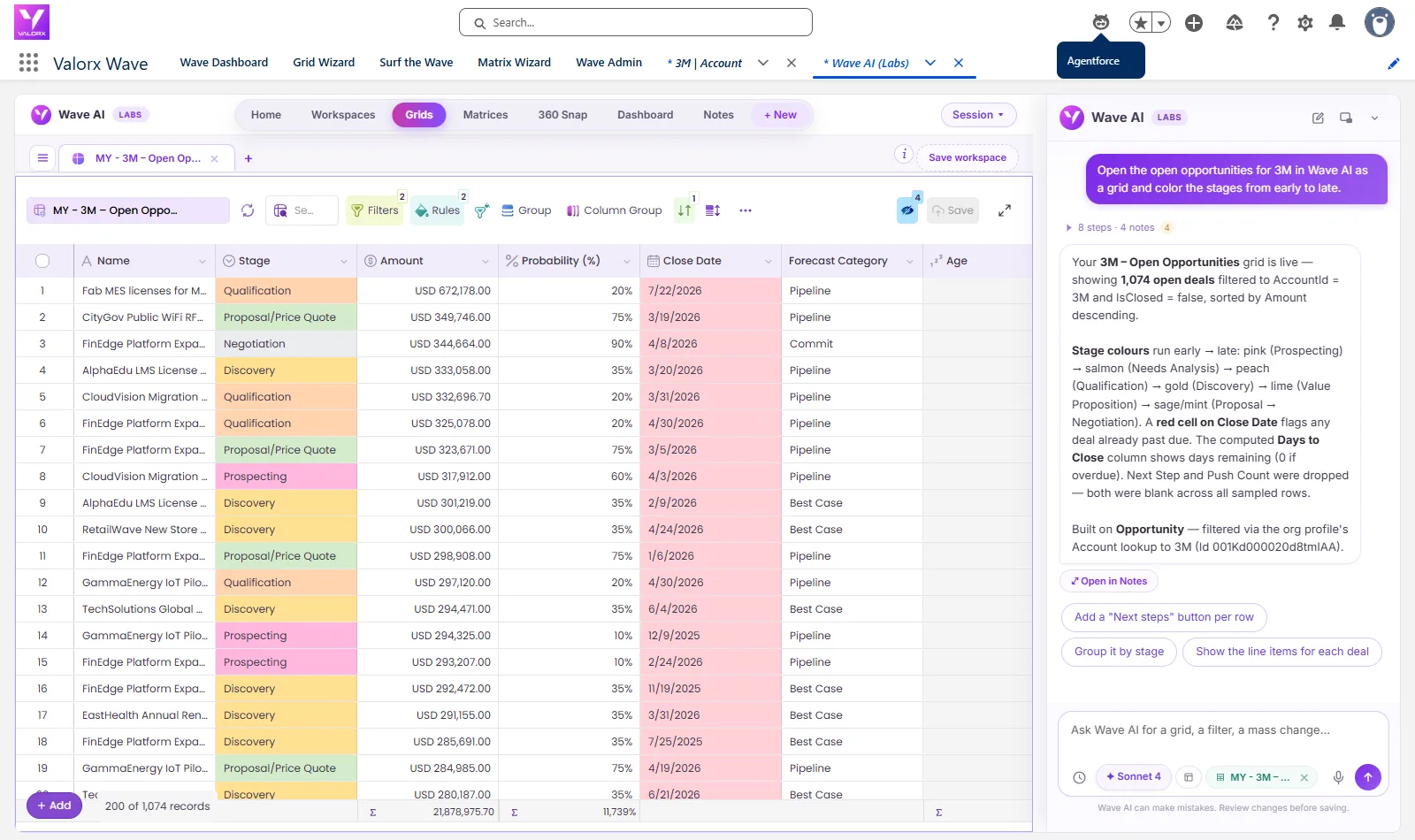
From Answer to Action. 549 of 3M's 1,074 open deals had close dates that had already passed, so the pipeline was still forecasting deals that should have closed. Watch Agentforce find them and hand the job to Wave AI, which moved all 549 in one reviewed change. Leave with the exact prompts to run it in your own org. Recorded in a Salesforce demo org with real screens, nothing mocked up.
The short answer
- Searching for an Agentforce alternative? For data work, you probably don't need one. Agentforce is very good at answering questions and acting on a record in the flow of work. Wave AI is where the hundreds of records behind the answer get changed.
- They work together. Agentforce hands your request to Wave AI, which opens in a Salesforce tab with the grid already built.
- Every bulk change is reviewed first. You see how many records, their current values, and a Yes before anything saves. Undo takes the whole change back.
- Nothing is exported. Wave AI runs inside your org and is in free public beta.
It started with one question about 3M
We opened 3M's account page and asked Agentforce for its open opportunities. It did exactly what it's good at: it found them and laid them out in the panel as cards, with deal name, stage, close date and a View More button. That's a good answer. It's the right data, from the right account, without a report or a list view.
Then the real question shows up, the one every Salesforce user knows. 3M has 1,074 open deals. 549 of them have a close date that's already passed. The answer is right, and now somebody has to fix what it found. Clicking through cards one at a time isn't how anyone wants to do that, and exporting to a spreadsheet takes the data outside Salesforce, where your sharing rules don't apply.
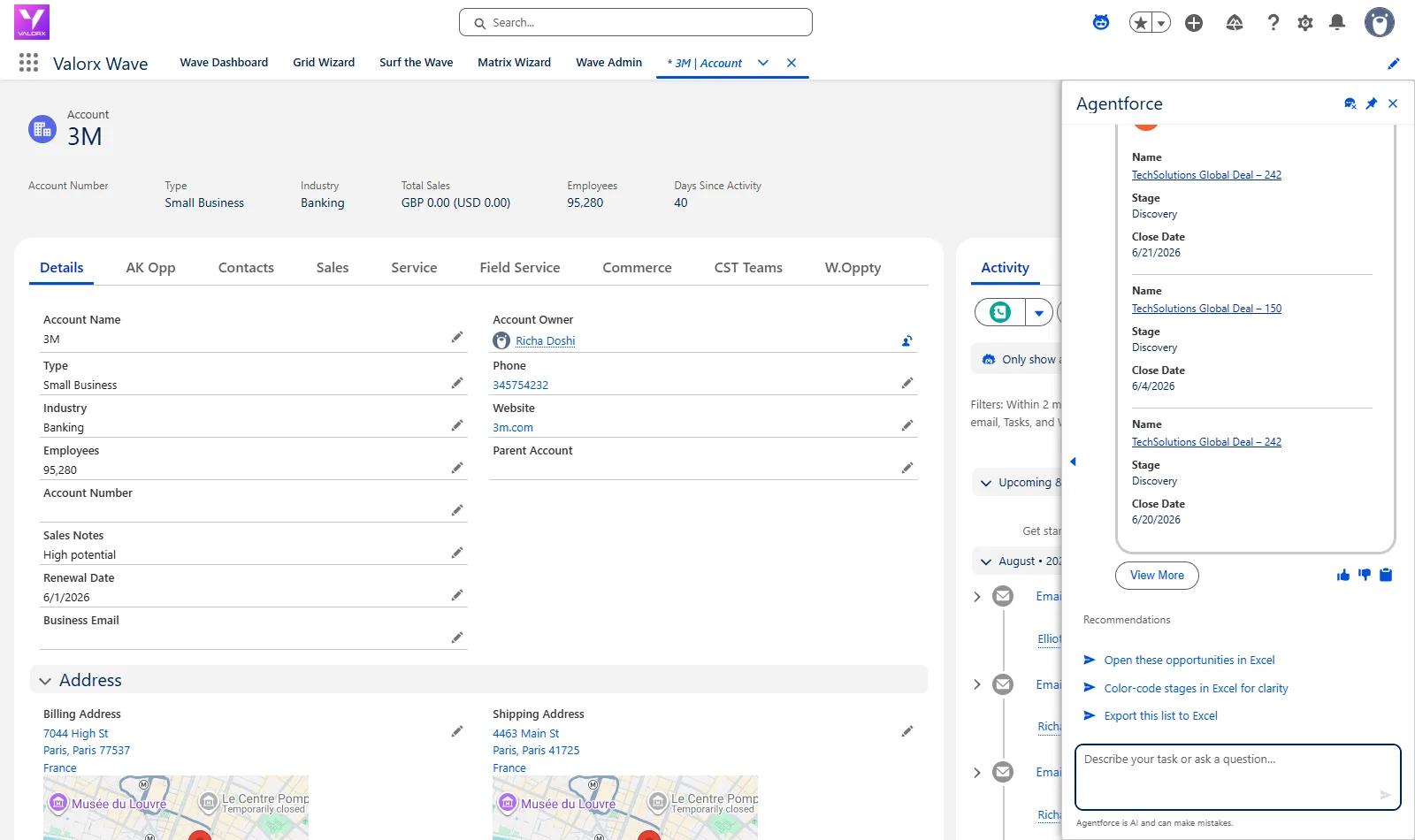
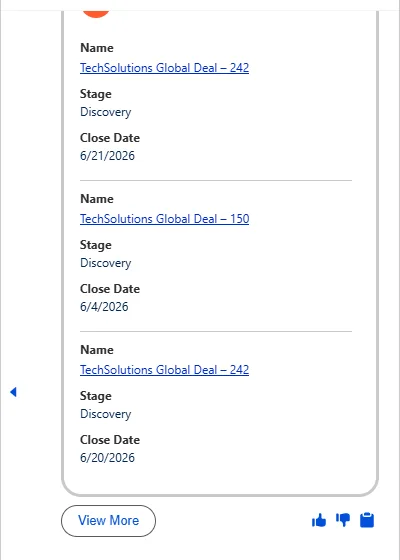
Agentforce passes the request. Wave AI builds it.
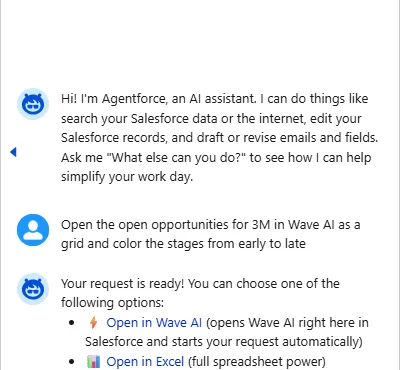
So we asked again, this time pointing Agentforce at Wave AI. Here's the request, word for word:
- Agentforce answered in about 14 seconds with two links: Open in Wave AI, which opens it right there in Salesforce and starts the request automatically, and Open in Excel. The Wave AI link carries your whole request, including the coloring.
- One click opened Wave AI in a Salesforce tab and it started on its own. No retyping, no second login, no file.
- About 30 seconds later the grid was live: all 1,074 open 3M deals, stages colored from early to late, and every past-due close date in red. It also said exactly what it built: the object, the filter and the sort.
You
Ask in plain words
On any Salesforce page, in the Agentforce panel.
Agentforce
Finds it, hands it over
Replies with Open in Wave AI. The link carries the request.
Wave AI
Builds the grid
1,074 rows, colored, in a Salesforce tab.
You, reviewing
See it before it saves
How many, what changes, then Yes.
Salesforce
Records updated
Same permissions. Undo is one message away.
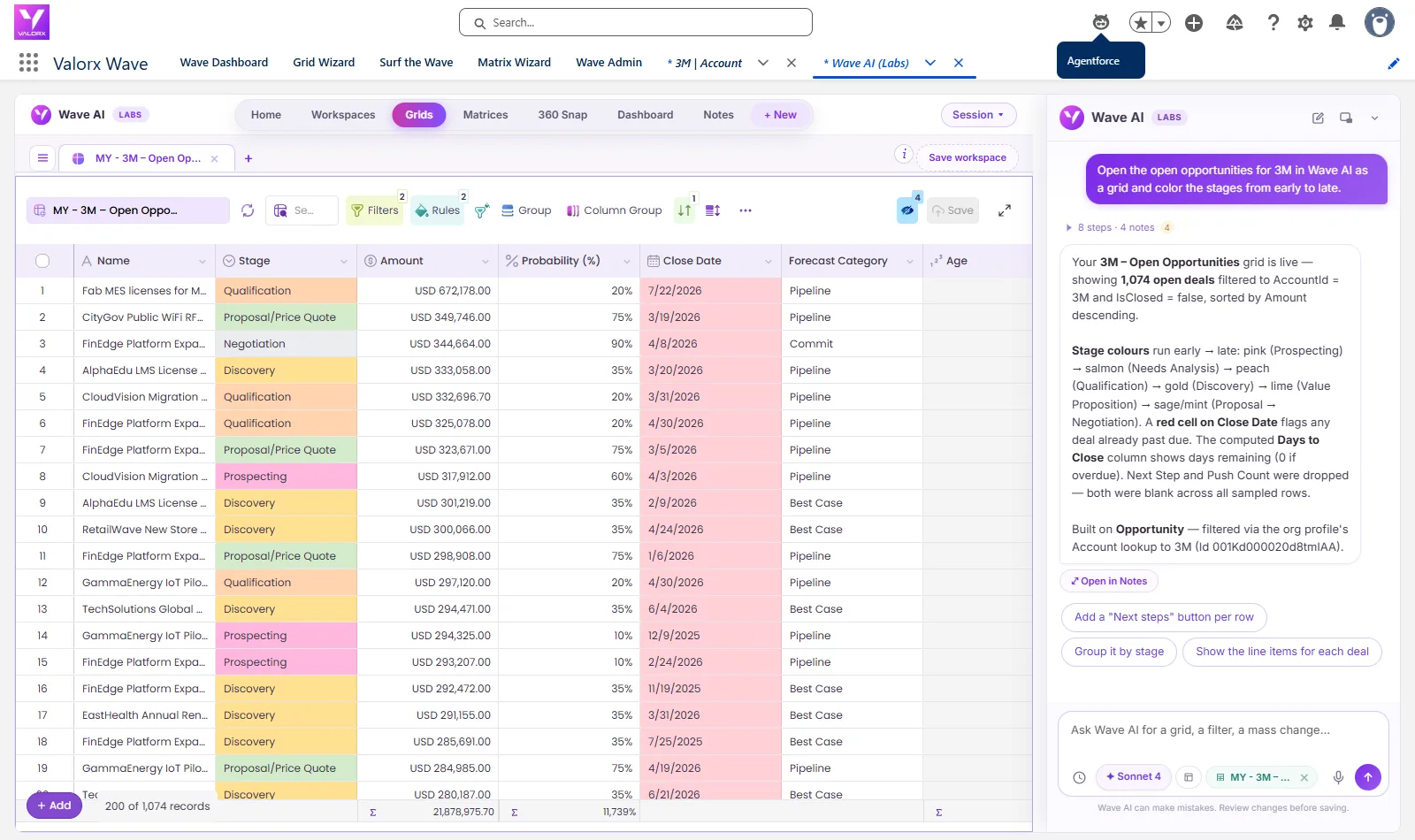
549 records, one change, reviewed before it saved
With the grid open, we typed the fix into Wave AI's chat, the same way you'd say it to a colleague:
In Salesforce terms, that's a mass update of 549 records, the kind of job that usually means Data Loader or an export. It didn't move anything yet. It came back with the plan: the field, the new value, the count (549 open opportunities), a sample of the current close dates, and the result of a dry run on 40 records. Then it asked, "Shall I apply this to all 549 deals?"
We said "Yes, apply it". A notice read 549 record(s) updated with an Undo button next to it, and the grid reloaded with every red cell now showing 12/31/2026.
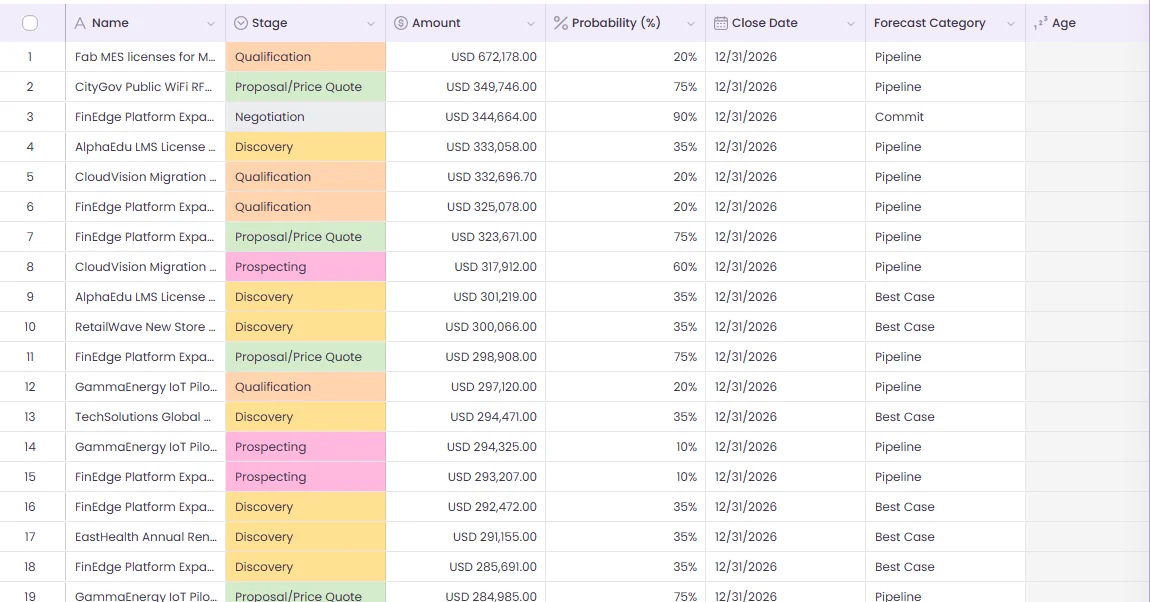
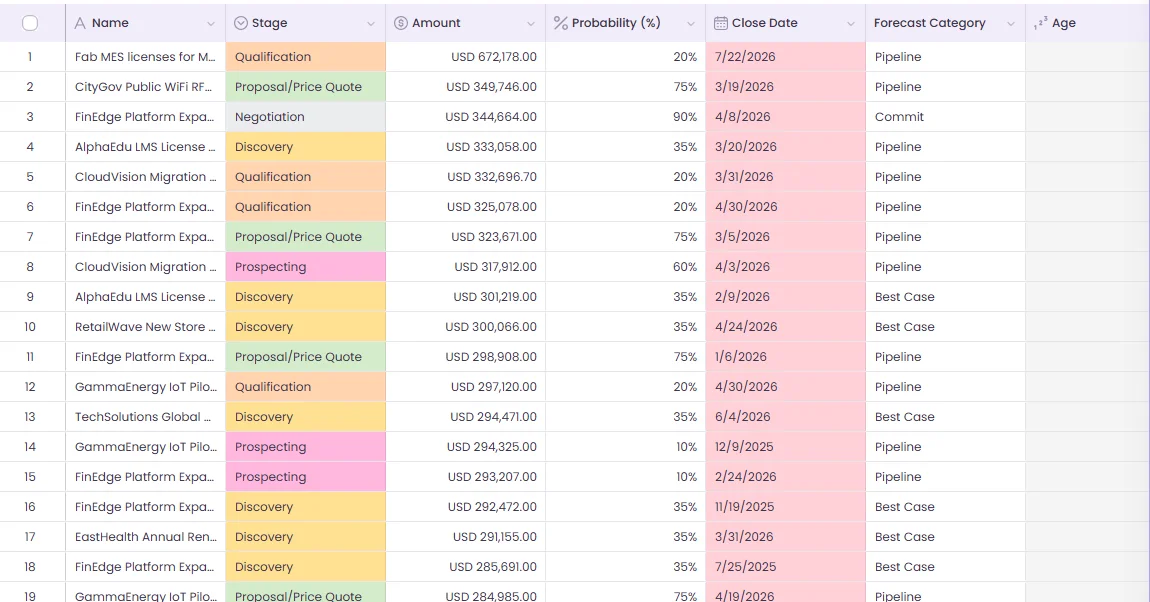 ↔Before · past due in redAfter · 12/31/2026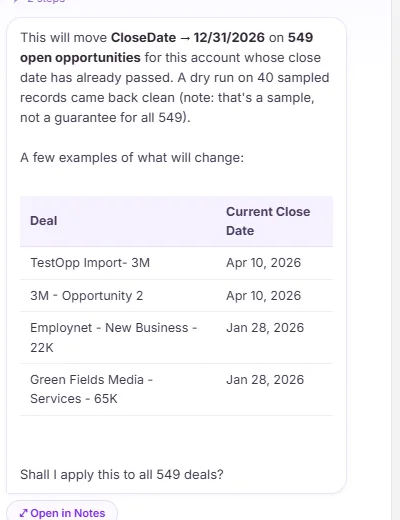
Then we tested the part people worry about. We typed "Undo that". Wave AI said what it would restore, all 549 close dates back to their original values, and asked again. After "Yes, restore them", every date was back. We didn't take the message's word for it: we queried Salesforce afterwards and compared all 549 records against a copy taken before the test. Every one matched.
Then the dashboard, where every chart opens its records
A grid is where you fix things. A dashboard is where you notice them. So we asked for one on the same account:
Four tiles and five charts came back: 1,074 open opportunities, $19.3M in pipeline, the commit and best case amounts, pipeline by stage, by forecast category, and the ten biggest deals. Then we clicked Discovery on the stage chart. The tiles recalculated to 55 deals and the grid beside the charts showed exactly those 55, ready to edit. Ctrl+click adds to the selection.
1,074
open 3M deals in one grid, from one Agentforce request
549
past-due close dates moved in one reviewed change
1
Undo to put all 549 back, checked in Salesforce
55
Discovery deals, one click on a chart away
0
files exported at any point
Looking for an Agentforce alternative? Compare the jobs first
This isn't a scorecard. Agentforce and Wave AI were built for different jobs, and most teams that care about clean Salesforce data will want both. Where we describe Agentforce, it's from Salesforce's own documentation, linked, as it read on 23 September 2026.
| The job | Agentforce | Wave AI |
|---|---|---|
| Where you use it | A panel on any Salesforce page, plus Slack and other channels. | A tab inside your own Salesforce org. Agentforce can open it for you. |
| What you get back | Answers, summaries, record details, drafted emails, records shown as cards. | An editable grid, a dashboard and a matrix, built from one sentence on your own objects. |
| Changing records | The standard Update Record action changes one record at a time, with Confirm, Edit and Cancel buttons.3 Agentforce Coworker proposes up to 15 records per command, each one confirmed.4 | Hundreds in one change. 549 in the run above, with the count, the current values and a dry run shown before a single Yes. |
| Undo | You confirm before each change. | You confirm before the change, and one Undo takes the whole change back. |
| Seeing the problem | Tableau Next and Slackbot build dashboards from a sentence, and both come bundled in the new Salesforce editions.2 | Dashboards whose every bar opens the records behind it in a grid you can edit, on the same screen. |
| Permissions | Runs as the signed-in user for employee agents, with the Einstein Trust Layer. | Runs as the signed-in person, under the same permissions and sharing rules. Nothing is exported. |
| Adding the other one | Agentforce can call Wave AI's actions, added in Agentforce Builder like any Apex action.6 | Takes requests from Agentforce and opens with the work already running. |
Agentforce pricing, and what Wave AI costs
Agentforce pricing is one of the most searched questions about it, so here's the published list in one place. Wave AI's line is short.
Agentforce, as published by Salesforce
Salesforce Foundations, with Flex Credits for Agentforce and Data 360 (restrictions apply)5Free
Flex Credits1$500 per 100,000
A standard or custom action (20 credits)8$0.10 each
Per conversation1$2
Agentforce add-ons, unmetered for employees1$125 / user / month
New editions: Core, Advanced, Max2$195 · $395 · $550 / user / month
List prices from salesforce.com, read 23 September 2026. Your contract may differ.
Wave AI
Freein beta
- No card
- No seat limit
- Einstein or your own AI key
- Your data never trains a model
Pricing arrives at public launch. Beta members hear first.
What each team gets from the pair
Salesforce admins
"Sales keeps asking me for exports."
You stop being the export desk. People ask Agentforce or Wave AI for the view themselves, fix what they find in place, and every change goes through a review first. Permissions and sharing rules still apply.
RevOps
"Close dates and stages are wrong on half the pipeline."
Ask for the past-due deals, see how many there are, change them in one reviewed step, and undo it if the rule was wrong. Same screen, same hour.
Sales leaders
"I can't see which deals actually moved."
Click any bar on the pipeline chart and the deals are right there in a grid. Fix the stale ones without opening forty records.
IT and platform owners
"How much of our data sits in spreadsheets we don't control?"
This is an AI project that reduces the data leaving your org. The work happens inside Salesforce, where the audit trail and the sharing model already are.
The prompts from this post
These are word for word what we typed. Swap in your own account and dates.
In the Agentforce panel
Open the open opportunities for 3M in Wave AI as a grid and color the stages from early to late
In Wave AI, with the grid open
Move the close date to 12/31/2026 on the deals here whose close date has already passed
Then, after checking the review
Yes, apply it
If you change your mind
Undo that
In Wave AI
Build a pipeline dashboard for the open opportunities of the account named 3M, by stage and by forecast category
Adding Wave AI to your own agent
Wave AI brings four actions that you add in Agentforce Builder the way you'd add any Apex action. One only reads, three build:
- Wave AI: Plan what to build reads your org and proposes what to make. It changes nothing.
- Build a grid, Build a matrix and Build a dashboard each build one thing and reply with its name, row count and a link that opens it in Wave AI.
Four actions is deliberate. Salesforce recommends no more than ten actions per subagent, so we kept ours few and coarse. The editing itself stays in Wave AI, where there's a review before anything saves.
What people ask us about Agentforce and Wave AI
Is Wave AI an Agentforce alternative?
Not for what Agentforce does best, which is answering questions and acting on a record in the flow of work. For bulk data work, finding, reviewing and changing hundreds of records at once, Wave AI is the tool, and it can take the request straight from Agentforce.
How much does Agentforce cost?
Salesforce lists Agentforce at $2 per conversation, Flex Credits at $500 per 100,000 (about $0.10 per standard action), add-ons at $125 per user per month, and the new Core, Advanced and Max editions at $195, $395 and $550 per user per month. Those are list prices from salesforce.com, read on 23 September 2026. Your contract may differ.
Is Agentforce included in Salesforce?
Partly. Salesforce Foundations gets you started for free with Flex Credits included, restrictions apply, and the new Core, Advanced and Max editions each include Flex Credits, from 500,000 to 2.75 million. Heavier use is paid through Flex Credits, conversations or per-user add-ons.
Do I need Agentforce to use Wave AI?
No. Wave AI is its own tab inside Salesforce, and you can type the same request there. The Agentforce handoff is one more way in.
Does it respect our permissions and sharing rules?
Yes. It runs as the signed-in person, under the same permissions and sharing rules as anywhere else in Salesforce. Nobody sees a record they couldn't already see or edits a field they couldn't already edit.
Can a bulk change be undone?
Yes. Undo covers the whole change, and Wave AI shows what it will restore before it does it. In the run above, all 549 close dates went back, and we checked them in Salesforce.
Is our data exported or used to train a model?
No file leaves the org. Model calls go through Einstein inside Salesforce or through your own key, and your data isn't used to train a model.
What's live in the beta today?
Grids and the fix-in-place work shown above are live. Dashboards, matrices and the Agentforce actions are in testing and rolling out to beta members. Wave AI installs as a managed package, and beta members get it first.
What does it cost?
Wave AI is free for the whole beta, with no card and no seat limit. Pricing is published at public launch.
Let Agentforce find it. Fix it in Wave AI.
Bring your own messy pipeline to the beta. We'll help you build the first grid on your own records.
Wave AI builds it. Valorx Wave runs it for the whole team.
Join the beta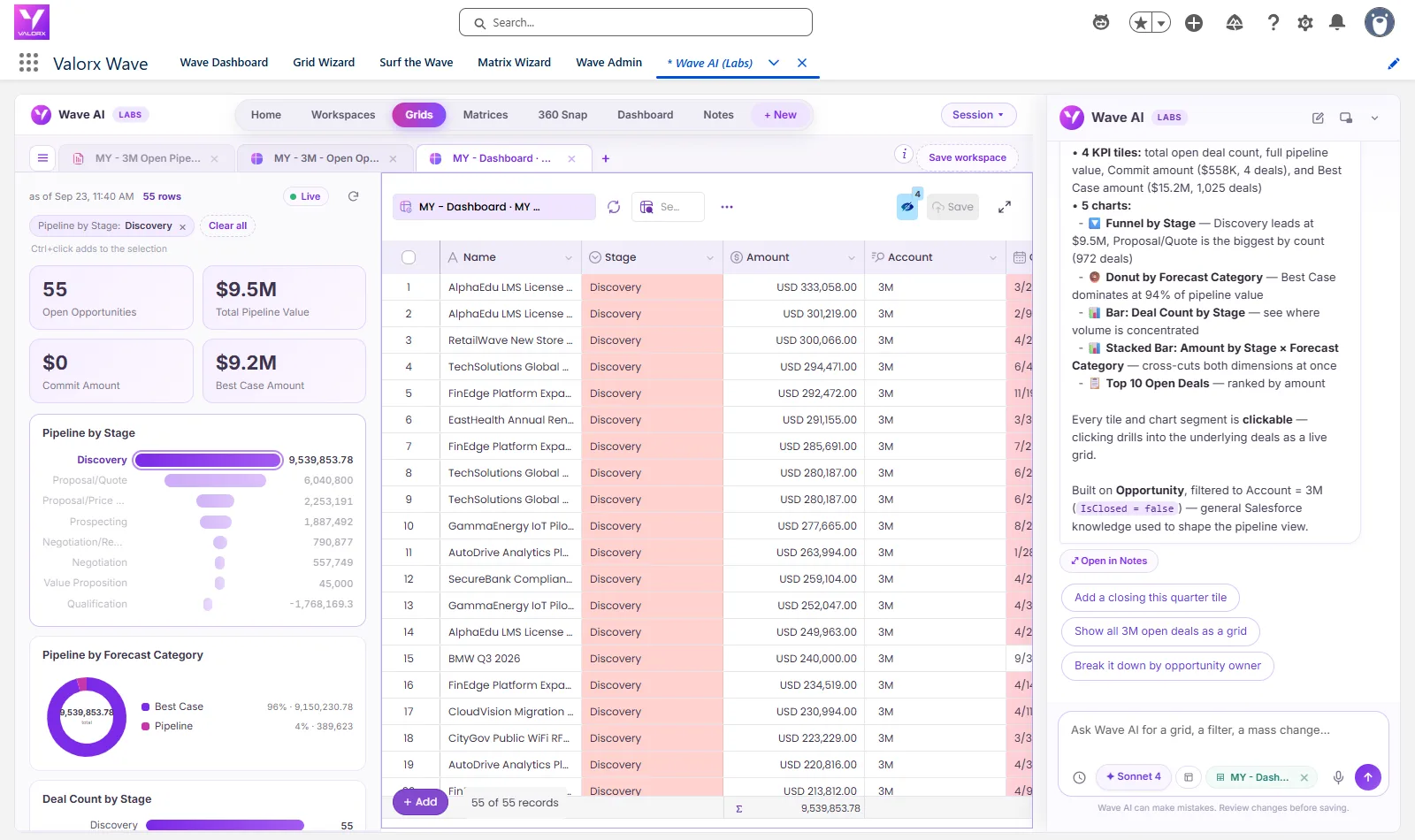
Sources, all read on 23 September 2026
- Salesforce, Agentforce pricing.
- Salesforce News, Salesforce simplifies editions, 3 September 2026.
- Salesforce Help, Update Record standard action.
- Salesforce Developers, Allow Agentforce Coworker to create and update records.
- Salesforce, Salesforce Foundations.
- Salesforce Developers, Apex InvocableMethod as an agent action.
- Salesforce Help, Agentforce considerations.
- Salesforce News, Agentforce flexible pricing, 15 May 2025.
The recordings were made in a Salesforce demo org on 23 September 2026. Waiting time in the videos is sped up. Salesforce, Agentforce, Slack and Tableau are trademarks of Salesforce, Inc. 3M appears as demo data only.

Choose the workflow you need:
Try Wave in browser Extension

Try Wave in Salesforce

Try Fusion In Excel

Enhancing Salesforce for industry leaders