Salesforce CPQ discount management: schedules, approvals and best practices

Salesforce CPQ discount management means setting how discounts are calculated, who can give them and when they need approval, then applying them consistently on every quote. CPQ handles the calculation through discount schedules, contracted prices and the pricing waterfall. The hard part is consistency: reps apply additional discounts by hand, approvals queue up, and changing discounts across hundreds of quote lines is slow.
This guide follows the order you would build it in: how CPQ calculates discounts, the discount types it supports, how to control them with approvals and guardrails, how to measure whether discounting is working, and how to fix the problems that still come up.
Key takeaways
- Salesforce CPQ applies discounts in a fixed order, the pricing waterfall, from list price to net price.
- Discount schedules, block pricing and contracted prices automate most discounting. Additional discounts entered by reps are the main source of inconsistency.
- Approval thresholds tied to discount level and margin keep standard deals fast and protect profitability.
- Guardrails such as role-based caps, a discount reason and a margin floor stop most problems before a quote reaches an approver.
- Track average discount, discount variance and margin after discount, not just approval counts.
- Large quotes make discount changes slow, because each line is edited separately in the Quote Line Editor.
How discounting works in Salesforce CPQ
Every quote line moves through the same sequence of prices, called the pricing waterfall. Each stage can apply a different kind of discount. New to CPQ? Start with what CPQ is and how it works.
| Price stage | What sets it | Typical use |
|---|---|---|
| List price | Price book entry | The starting price for every customer |
| Special price | Contracted prices or a manual special price | Negotiated prices for a specific account |
| Regular price | Discount schedules or block pricing | Volume and term tiers |
| Customer price | Additional discount entered on the quote line | Deal-specific discounts from the rep |
| Partner price | Partner discount on the quote | Reseller and channel margins |
| Net price | Distributor discount on the quote | Distributor margins, then the final price |
Swipe the table to see all columns
Knowing the order matters. A partner discount applies after the rep’s additional discount, so stacking them without a policy can take a deal well below the margin you expected.
Types of discounts in Salesforce CPQ
The waterfall sets the order. These are the discounts that feed each stage of it.
| Discount type | How it works in Salesforce CPQ | Watch out for |
|---|---|---|
| Volume discounts | Discount schedules with quantity tiers. Range applies one tier to the whole quantity; slab applies each tier to the units inside it | Picking range or slab without checking the effect on large orders |
| Term discounts | Term discount schedules based on subscription length | Overlap with volume tiers on the same product |
| Block pricing | A fixed price for each quantity band instead of a per-unit price | Bands that leave gaps or jumps in price |
| Contracted prices | Account-specific prices that override list price | Expired contracts that keep applying old prices |
| Additional discount | A percentage or amount the rep enters on the quote line | The main source of inconsistent, unapproved discounting |
| Partner and distributor discounts | Quote-level discounts for channel deals | Stacking with additional discounts beyond policy |
| Promotions | Price rules or temporary price books | Promotions left active after they end |
Swipe the table to see all columns
For configurable products with bundles and options, see Salesforce CPQ for complex products, and for one-off pricing on non-standard deals, see how to handle custom orders in Salesforce CPQ.
Setting up discount approvals
Discount schedules, block pricing and contracted prices run automatically. Additional, partner and distributor discounts are set by people, so they need a check when they go too far. That check is the approval process.
Most teams use standard Salesforce approval processes or Salesforce CPQ Advanced Approvals. Advanced Approvals adds approval rules, approval chains for multi-step sign-off and smart approvals, which only ask for re-approval when a relevant value changes.
Tie thresholds to discount level and margin. Here is an example of tiered thresholds. Set yours from your own margin targets.
| Discount on the quote | Example approver | Why |
|---|---|---|
| Up to 10% | No approval needed | Keep standard deals moving |
| 10% to 20% | Sales manager | Check the deal justification |
| 20% to 30% | Deal desk | Check margin and terms |
| Over 30% or below margin floor | Finance or VP of sales | Protect profitability |
Swipe the table to see all columns
Review the share of quotes that need approval every quarter. If most quotes need it, the thresholds are too tight and approvers stop reading. If almost none do, they are too loose.
Keeping discounts transparent and compliant
Approvals catch a discount after the rep has set it. Guardrails work earlier, while the rep is still quoting, so fewer quotes need approval and fewer get sent back.
- Cap discounts by role. Use validation rules or price rules to block additional discounts above each role’s limit, and mark products that should never be discounted as non-discountable.
- Limit stacking. Set a rule for how far additional, partner and distributor discounts can combine.
- Require a discount reason. Make a reason field mandatory above a set threshold, so approvers and finance can see why a discount was given.
- Set a margin floor. Show cost and margin on the quote line, compare net price with cost on every line and route quotes below the floor for approval automatically.
- Check before submitting. Show margin and discount against policy on the quote, so reps fix problems before approval rather than after.
- Keep an audit trail. Approval history and field history on discount fields show who changed what and when.
Measuring and reporting on discounts
Approvals and guardrails control individual quotes. Reporting shows whether they are working across all of them. Standard Salesforce reports and dashboards show what was discounted. Improving discount strategy also needs scenario planning: what happens to margin if a product family gets 5% more, or if a volume tier moves. Track these metrics monthly with sales and finance.
| Metric | What it shows |
|---|---|
| Average discount by segment and rep | Whether discounting is consistent or depends on who sells |
| Discount variance | How widely discounts spread for the same product and deal size |
| Share of quotes needing approval | Whether thresholds are set at the right level |
| Approval time | Whether approvals are slowing deals down |
| Margin after discount | Whether discounts protect or erode profitability |
Swipe the table to see all columns
Most teams run deeper discount analysis in Excel because pivot tables and what-if models are faster there. The risk is working on an export that is out of date as soon as it is made. Running the same analysis on live Salesforce data keeps it current. To estimate what faster, more consistent quoting is worth to your team, try the CPQ ROI calculator.
Where discount management still breaks down
Even with approvals, guardrails and reporting in place, four problems come up again and again, mostly on large or complex quotes.
1. Inconsistent manual discounts
Additional discounts depend on the rep, the quarter and the customer. Two similar deals end up with very different prices.
How to fix it: move common discounts into discount schedules and contracted prices, apply the role-based caps above, and watch discount variance by rep in your reports.
2. Approval bottlenecks
When every exception goes to one approver, deals wait. Approvers who cannot see margin impact either approve blindly or send quotes back.
How to fix it: route by threshold, use approval chains for large deals and show margin on the quote before it is submitted. Our guide to the Salesforce quote-to-cash process shows how approval time affects every stage after it.
3. Changing discounts across large quotes
A customer asks for 5% more across 300 lines, or a product family needs a new discount. In the Quote Line Editor, that means editing lines one at a time, with a recalculation after each change. We cover the causes in Salesforce CPQ limitations.
How to fix it: apply bulk discount changes on live CPQ data, so discount schedules and approvals still run on save. Our guide to editing CPQ quote lines in Excel compares the options.
4. Margin checks happen outside Salesforce
When cost and margin are not on the quote, reps and deal desks check them in a separate spreadsheet, if at all. The guardrails above only work if margin is visible where the discount is set.
How to fix it: add cost and margin fields to the quote line layout, and let reps check margin on live quote data instead of a copy.
Discount management best practices
To bring it together, here is the checklist we recommend.
- Write a discount policy that covers who can discount, how much and when approval is needed.
- Automate the common cases with discount schedules, block pricing and contracted prices.
- Set approval thresholds by discount level and margin, and review them every quarter.
- Add guardrails for role caps, stacking, discount reasons and a margin floor.
- Keep promotions time-bound with end dates on price rules or price books.
- Keep price books current. Our guide to bulk updating Salesforce price books and products shows how.
- Review the numbers monthly with sales and finance leadership.
Discounting in Revenue Cloud Advanced
Everything above applies to Salesforce CPQ. Salesforce stopped selling CPQ to new customers in March 2025, and existing customers can keep using it, according to Salesforce’s CPQ end-of-sale page. Revenue Cloud Advanced handles discounts differently. It uses pricing procedures and price adjustment schedules, such as volume tiers, with manual discounts added as a step in the pricing procedure, as shown on Trailhead.
The concepts carry over, but discount schedules, price rules and approval logic need rebuilding in the new model. Our guide to choosing a Salesforce Revenue Cloud partner covers the migration.
Managing discounts with Valorx
Most of the problems above come down to working line by line and checking margin outside Salesforce. We keep Salesforce CPQ as the system of record for discount schedules, rules and approvals, and make applying and reviewing discounts faster.
- Valorx Fusion connects Excel and Google Sheets to live Salesforce data. Reps apply a discount across hundreds of lines with one formula or fill-down, see margin next to price, and use conditional formatting to flag lines below the margin floor before saving. Changes save back with CPQ rules, validation and approvals applied. Sales leaders and finance can model discount scenarios and build discount dashboards with pivot tables and charts on live Salesforce data, without exporting.
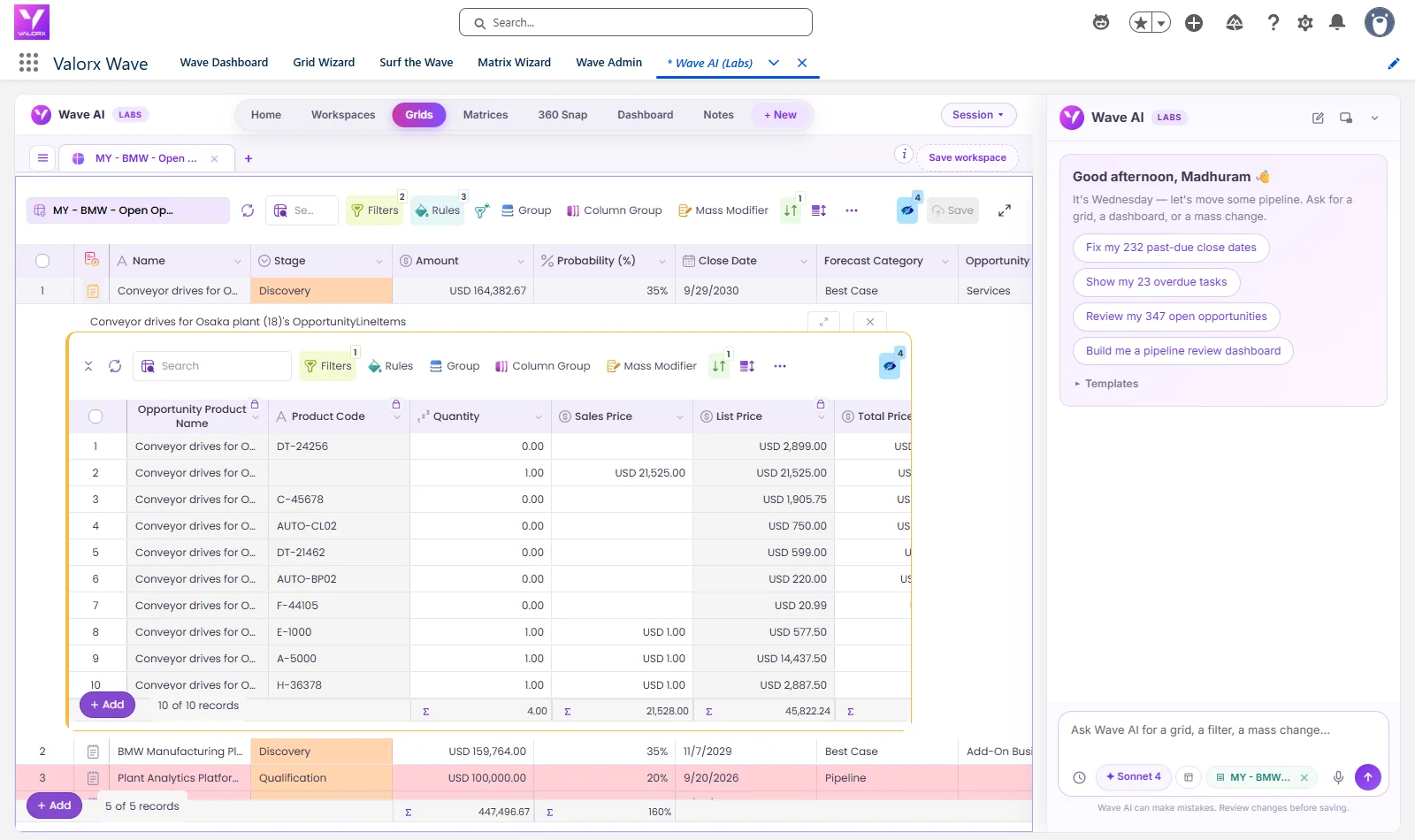
- Valorx Wave puts a spreadsheet-style grid inside Salesforce for bulk updates to price book entries, products and quotes.
BP's commercial team prices quotes with volume tiers, regional surcharges and commodity-linked pricing across 150 to 300 lines. With Fusion, quote cycles fell from 4 days to 4 hours across more than 15,000 quotes a year.
The interactive demo above shows price book entries updated in bulk in a Wave grid. If reps are working around CPQ to discount offline, our guide to Salesforce CPQ adoption covers how to bring them back.
Apply discounts across every quote line in seconds.
Both products work on your live Salesforce CPQ data, with your discount schedules and approvals intact. The difference is where your team wants to work.
Frequently asked questions
What types of discounts does Salesforce CPQ support?
Salesforce CPQ supports volume and term discount schedules, block pricing, contracted prices, additional discounts entered on the quote line, partner and distributor discounts, and promotions through price rules or price books.
What is the difference between range and slab discount schedules?
A range discount schedule applies the discount of the tier the total quantity falls into to every unit. A slab discount schedule applies each tier’s discount only to the units inside that tier, which gives a blended price.
How do discount approvals work in Salesforce CPQ?
Teams use standard Salesforce approval processes or Salesforce CPQ Advanced Approvals. Advanced Approvals adds approval rules, approval chains and smart approvals, which only ask approvers to re-approve when a relevant value has changed.
What is the Salesforce CPQ pricing waterfall?
It is the order CPQ applies prices and discounts: list price, special price, regular price after discount schedules or block pricing, customer price after additional discounts, partner price, and net price after distributor discounts.
How do you stop discount leakage in Salesforce CPQ?
Set approval thresholds and a margin floor, limit additional discounts by role, keep promotions time-bound, and review average discount and discount variance by rep and segment every month.
How do you report on discounts in Salesforce CPQ?
Use Salesforce reports and dashboards for average discount, discount variance by rep and segment, approval rates and margin after discount. For scenario planning, such as the margin impact of a new discount tier, teams use pivot tables and what-if models, ideally on live Salesforce data rather than exports.
How does discounting work in Revenue Cloud Advanced?
Revenue Cloud Advanced uses pricing procedures and price adjustment schedules, such as volume tiers, with manual discounts added as a step in the pricing procedure. Moving from CPQ means rebuilding discount logic in this model.





Choose the workflow you need:
Try Wave in browser Extension

Try Wave in Salesforce

Try Fusion In Excel

Enhancing Salesforce for industry leaders