Gridmate or Wave AI: Choosing a Salesforce Grid in the AI Era
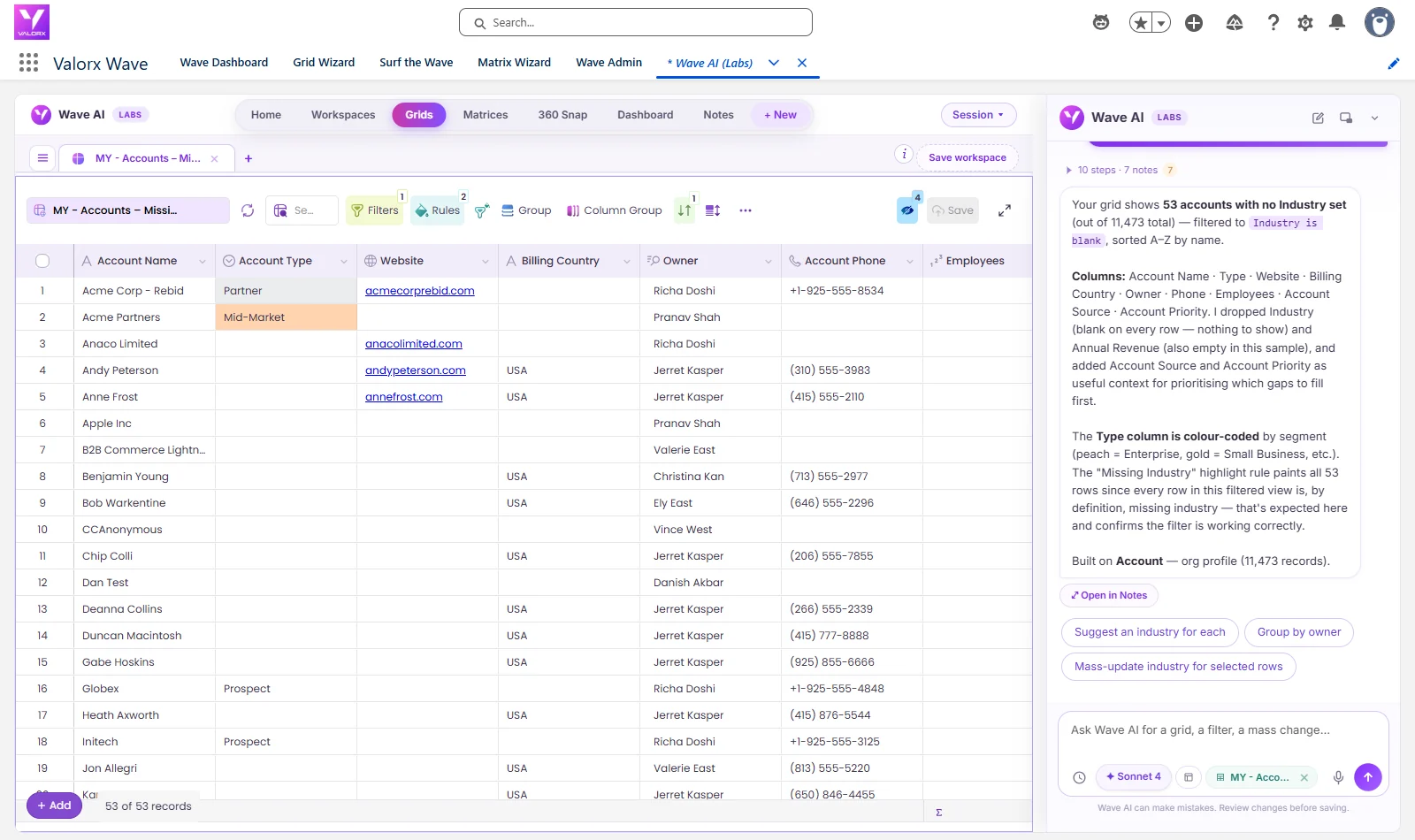
53 of our 11,473 accounts had no industry, 49 of those had no website either, and 42 had no account type. See one sentence build the grid of those 53, one more color the missing websites red, and a third set the 42 missing types in one reviewed change. Leave with the prompts and GridMate's published pricing. Recorded in a Salesforce demo org with real screens, nothing mocked up.
The short answer
- Comparing Gridmate and Wave AI? GridMate is a mature, well-reviewed grid suite that admins configure. Wave AI builds the grid from a sentence and changes records the same way. If your team asks for new views every week, that's the difference that matters.
- No configuration step. Ask for the records, the columns and the colors in plain words.
- Mass changes with a review. Count, current values and a dry run first, then one Yes. One Undo takes it back.
- Inside Salesforce, free in beta. Same permissions and sharing rules, nothing exported.
A data hygiene job, described in one sentence
Accounts with no industry break territory rules, segmentation and every report grouped by industry. We asked for them the way you'd ask a colleague:
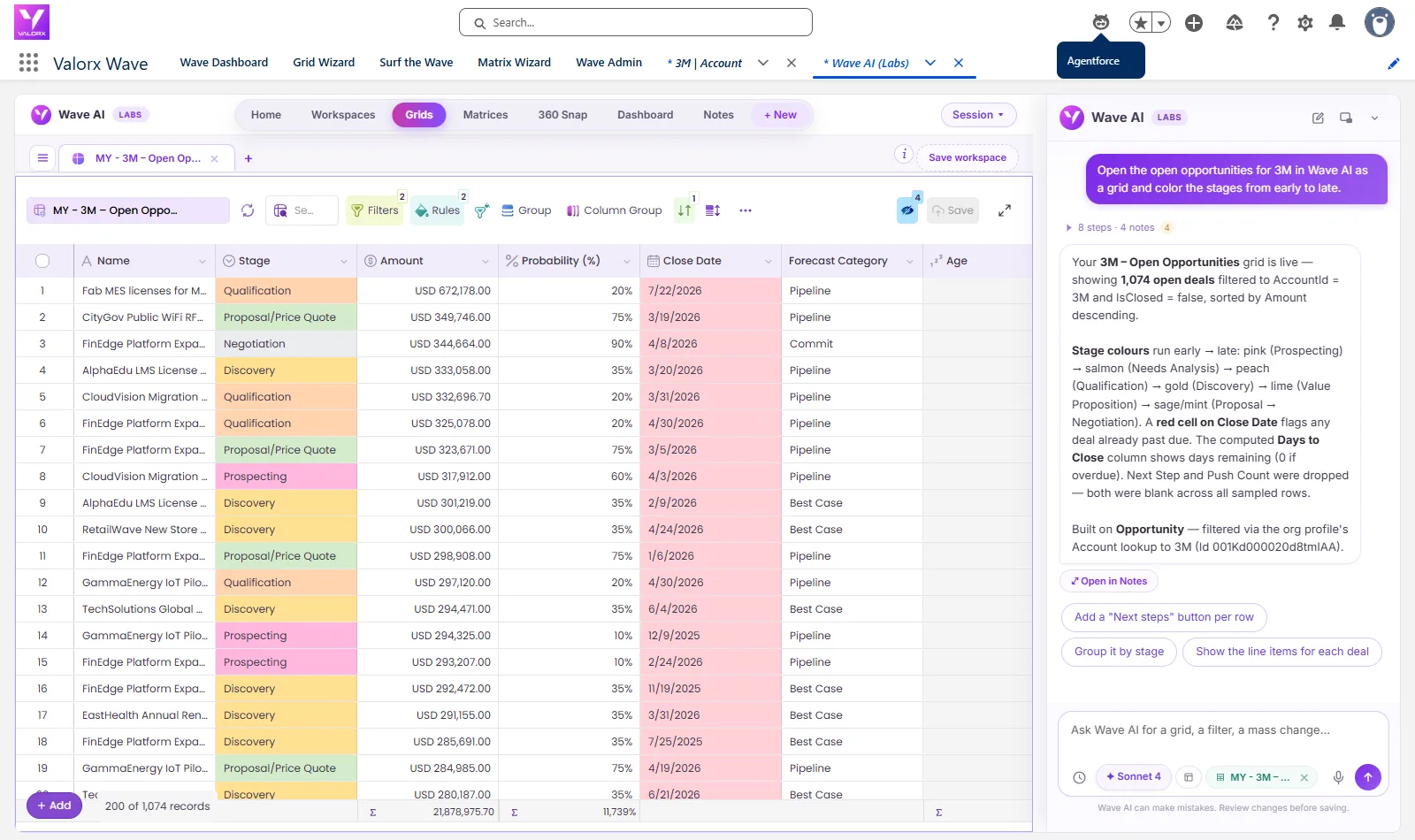
Wave AI found 53 accounts with no industry out of 11,473, built the grid with the columns we named plus phone and employees, sorted it by name, and added a rule that marks every row missing an industry. It also said what it had left out and why: the Industry column itself, because it would be blank on every row.
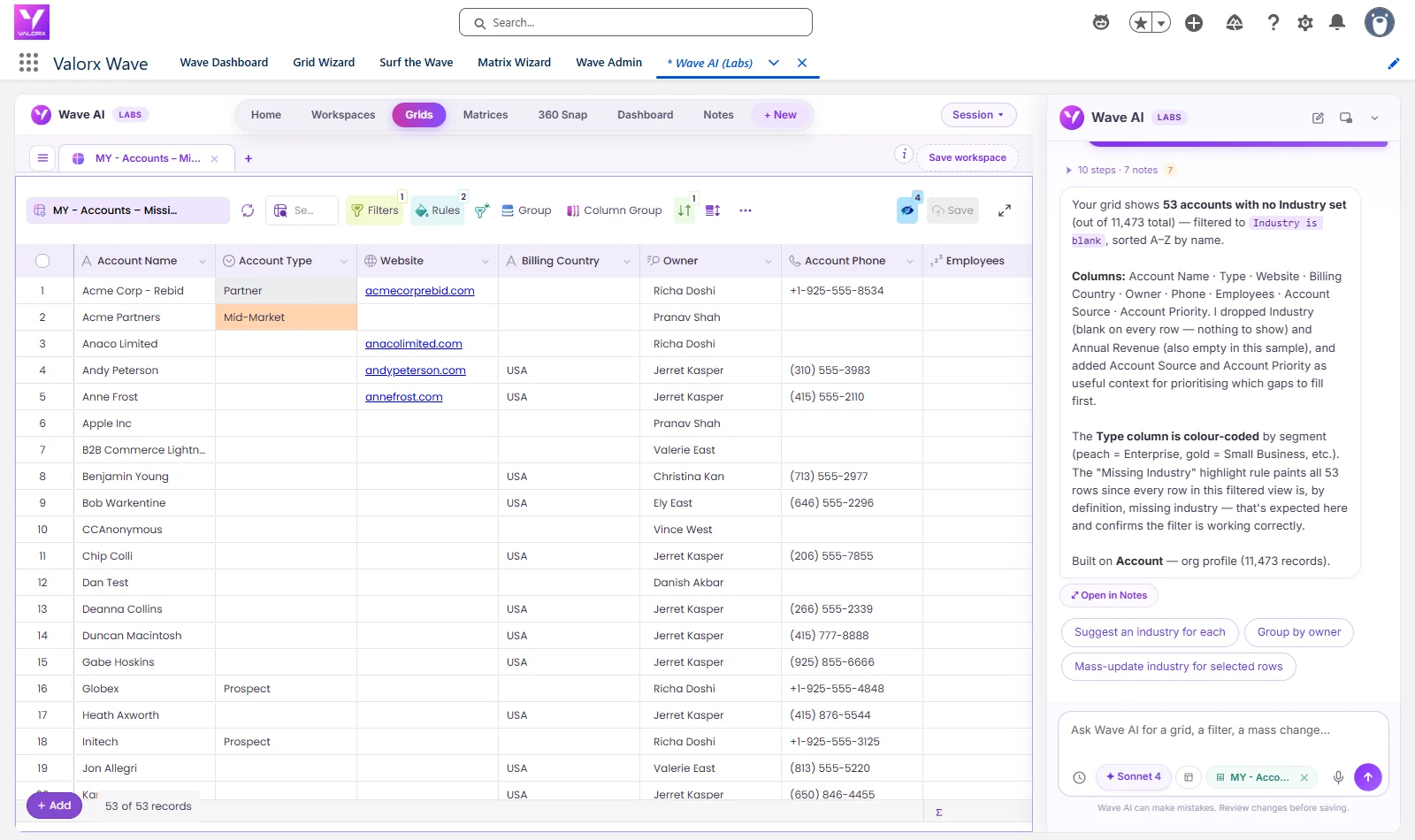
Color it in a sentence
Next we wanted the worst records to stand out:
The rule landed and flagged 49 of the 53. Wave AI then pointed out something a configuration screen wouldn't: its earlier "missing industry" rule already colored all 53 rows, and a row carries one color, so the new rule would be hidden wherever the two overlapped. It offered two fixes: make the new rule a cell rule on the Website column, or clear the old one.
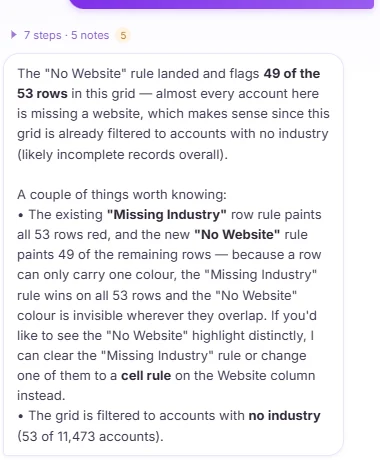
42 account types, one change, reviewed before it saved
Then the fix. Accounts with no type fall out of every segment, so we gave them a starting value:
Wave AI said 42 accounts in the grid had no type and would be set to Prospect, named a sample of them, and reported a dry run on 40 that passed. "Shall I apply this?" We said yes, and all 42 were updated with no failures. Then we undid it and checked all 53 accounts in Salesforce against a copy taken before the test. Every type was back as it was.
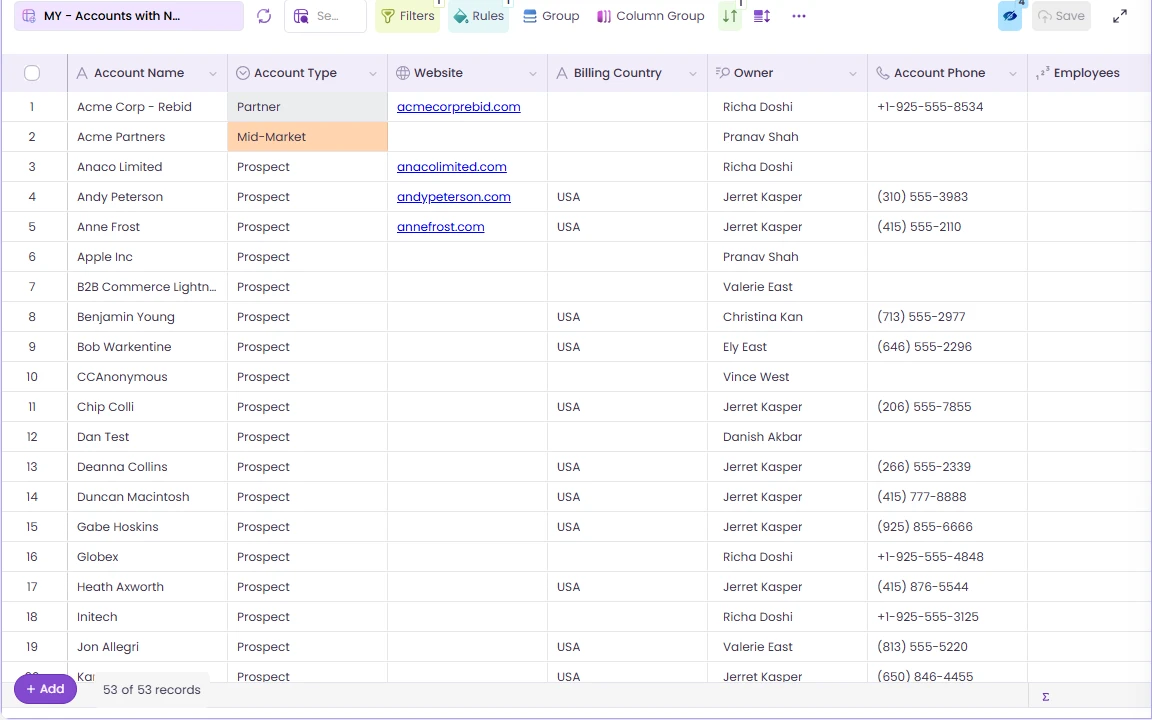
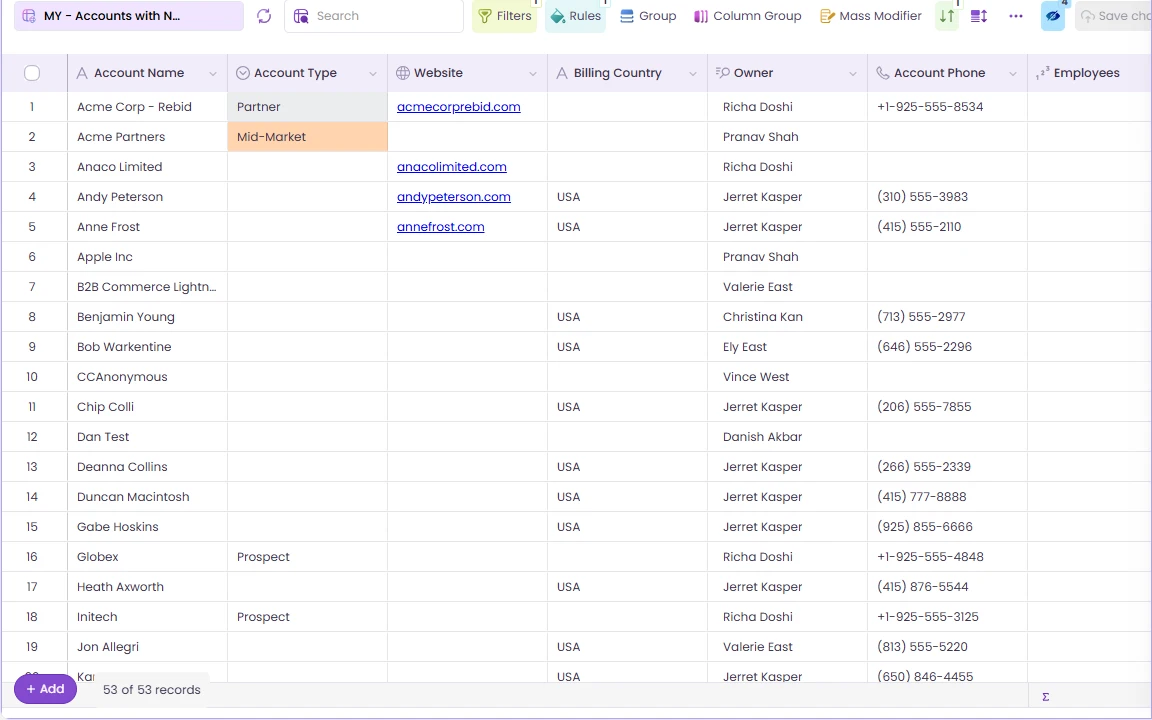 ↔Before · 42 with no typeAfter · Prospect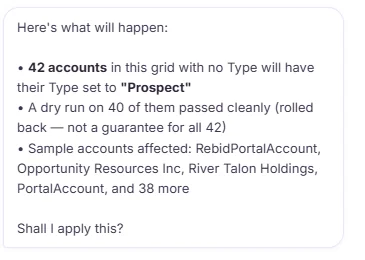
You
Describe the grid
Records, columns, sort, in plain words.
Wave AI
Builds it
53 accounts, ready to edit.
You
Add a rule
No website in red: 49 of 53.
You, reviewing
Fix in one change
42 types, count and dry run first.
Salesforce
Records updated
Same permissions. Undo takes it back.
53
accounts with no industry, found and gridded from one sentence
49
of them flagged red for no website
42
account types set in one reviewed change
1
Undo to put all 42 back, checked in Salesforce
0
grids configured by hand
Gridmate or Wave AI? Compare the jobs
GridMate has earned its reviews, and teams that want calendars, maps, kanban boards and Gantt charts on their record pages should look at it seriously. The comparison below is about building grids and changing records. Where we describe GridMate, it's from its own AppExchange listing, documentation and pricing page, linked, as they read on 23 September 2026.
| The job | GridMate | Wave AI |
|---|---|---|
| What it is | "An all-in-one productivity suite of 32 powerful Lightning components (grids, calendars, maps, kanban)", rated 5.00 from 133 reviews, version 12.32.0.1 | Wave AI, which builds grids, dashboards and matrices from a sentence, and Valorx Wave, the grid and matrix product it runs on. |
| Setting up a grid | Admins place and configure components in Lightning App Builder. Users can build their own grids with the GridMate Advanced User permission set.23 | Anyone with access asks for it in a sentence: records, columns, sort and color rules. |
| Mass changes | Mass create, edit and delete from the grid, plus approvals, flows and lead conversion.1 | Described in a sentence, with the count, current values and a dry run before one Yes, and one Undo. 42 above. |
| AI | No AI features are documented on the listing, pricing page or release notes as of 23 September 2026.14 | Ask, plan, build and change, in plain words. |
| Adding users | "When new users are added later, you must manually assign the appropriate permission set."5 | Runs under the permissions and sharing rules each person already has. |
GridMate pricing, and what Wave AI costs
GridMate, as published
Monthly6$15 / user / month
Annual6$180 / user / year
Free trial114 days
Nonprofit150% off, up to 10 licenses
Published prices from gridmate.io and AppExchange, read 23 September 2026. Your quote may differ.
Wave AI
Freein beta
- No card
- No seat limit
- Einstein or your own AI key
- Your data never trains a model
Pricing arrives at public launch. Beta members hear first.
What each team gets
Salesforce admins
"Every team wants its own grid."
They describe it and get it. You keep the permissions and sharing rules; they stop filing requests for new views.
Data and ops teams
"53 accounts with no industry. Now what?"
Find them in a sentence, color the worst, and fill the gaps you can in one reviewed change.
Sales teams
"I just want to edit a list."
Ask for the list you want and edit it in place, or change the whole set in one step.
IT and platform owners
"How many managed packages do we need?"
Wave AI runs inside Salesforce with no export, and every bulk change is previewed and reversible.
The prompts from this post
These are word for word what we typed. Swap in your own object and fields.
In Wave AI
Show accounts that have no industry in a grid with website, billing country, type and owner
Then
Highlight the rows that have no website in red
Then
Set the account type to Prospect on the accounts here that have no account type
After checking the review
Yes, apply it
If you change your mind
Undo that
What people ask about Gridmate and Wave AI
Is Wave AI a Gridmate alternative?
For grids and mass changes, yes: Wave AI builds the grid from a sentence and changes records in one reviewed step. If you need calendars, maps, kanban or Gantt components on record pages, GridMate covers those.
Does Gridmate have AI features?
None are documented on GridMate's AppExchange listing, pricing page or release notes as of 23 September 2026.
How much does Gridmate cost?
GridMate lists $15 per user per month billed monthly, or $180 per user per year billed annually, with a 14-day free trial and a nonprofit discount. Those are published prices read on 23 September 2026.
Can we use both?
Yes. They're separate managed packages. Wave AI runs in its own Salesforce tab.
Does Wave AI respect our permissions and sharing rules?
Yes. It runs as the signed-in person, under the same permissions and sharing rules as anywhere else in Salesforce.
What's live in the beta today?
Grids, color rules and the fix-in-place work shown above are live. Dashboards and matrices are in testing and rolling out to beta members.
What does Wave AI cost?
It's free for the whole beta, with no card and no seat limit. Pricing is published at public launch.
Describe the grid. Skip the setup.
Bring the list your team keeps asking you to build. We'll build it with you in a sentence, in the beta.
Wave AI builds it. Valorx Wave runs it for the whole team.
Join the betaSources
- Salesforce AppExchange, Grid Mate listing.
- GridMate Docs, RelatedList Grid.
- GridMate Docs, User Grid.
- GridMate Docs, Release notes.
- GridMate, FAQs.
- GridMate, Pricing.
The recordings were made in a Salesforce demo org on 23 September 2026. Waiting time is cut out of the videos. GridMate is a product of GridPal LLC. Salesforce is a trademark of Salesforce, Inc. Account names are demo data.

Choose the workflow you need:
Try Wave in browser Extension

Try Wave in Salesforce

Try Fusion In Excel

Enhancing Salesforce for industry leaders