After Slackbot Shows the Pipeline: Where Your Team Fixes It
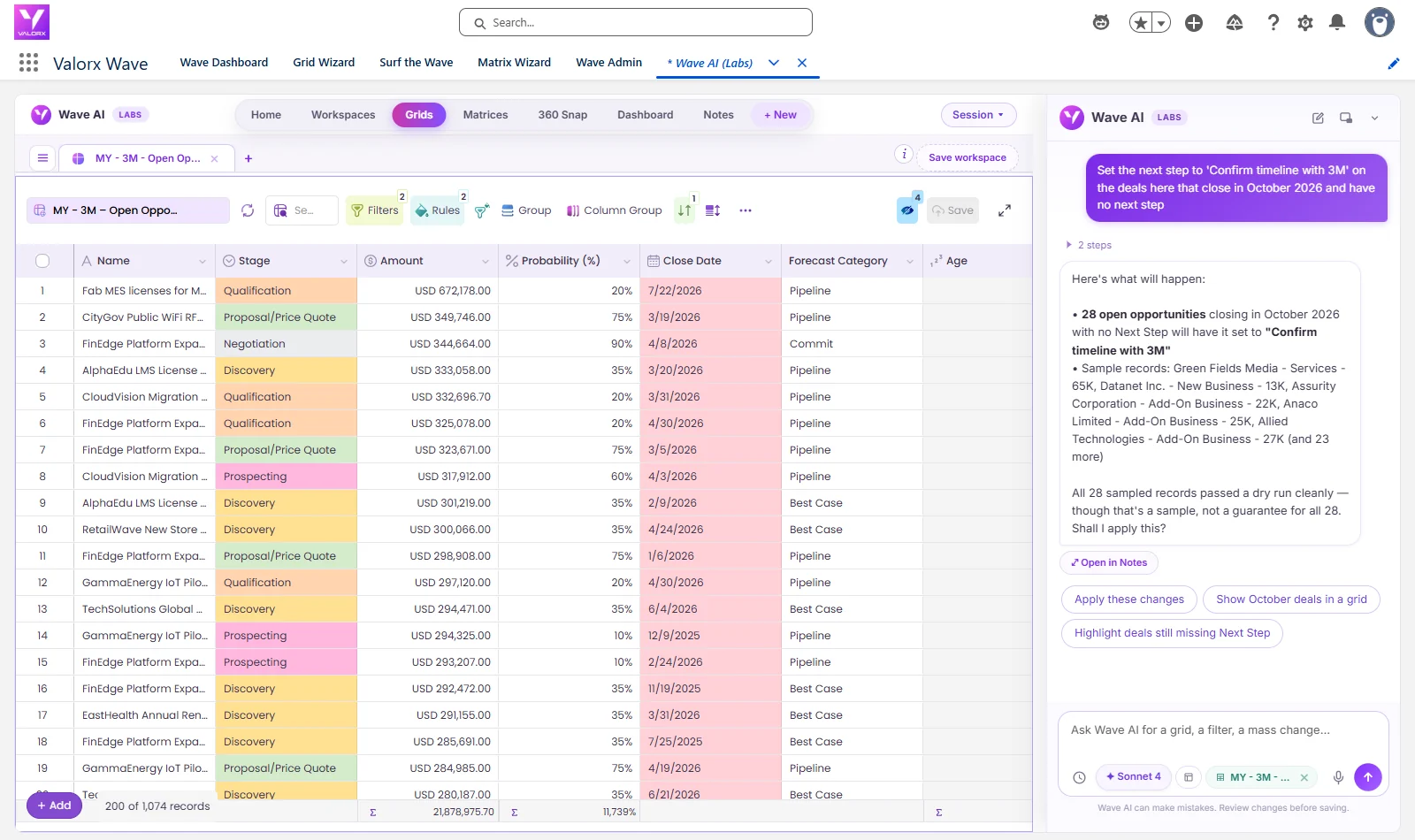
1,069 of 3M's 1,074 open deals had no next step recorded, and 28 of those were due to close in October. See where the team fixes that: one sentence in Wave AI gave all 28 a next step in one reviewed change, and one more took it back. Leave with the prompts and Slack's current pricing. Recorded in a Salesforce demo org with real screens, nothing mocked up.
The short answer
- Using Slack AI with Salesforce? Keep it for the conversation. Slackbot can find, create and update Salesforce records, and it asks you to review and approve before it changes anything. When the fix covers dozens of records at once, do it where you can see all of them.
- See the whole change first. Wave AI shows the count, a sample of current values and a dry run, then asks once.
- Undo is one message. "Undo that" puts every record back, and you can check it.
- Inside Salesforce. Same permissions, same sharing rules, nothing exported. Wave AI is free in public beta.
The number behind the pipeline number
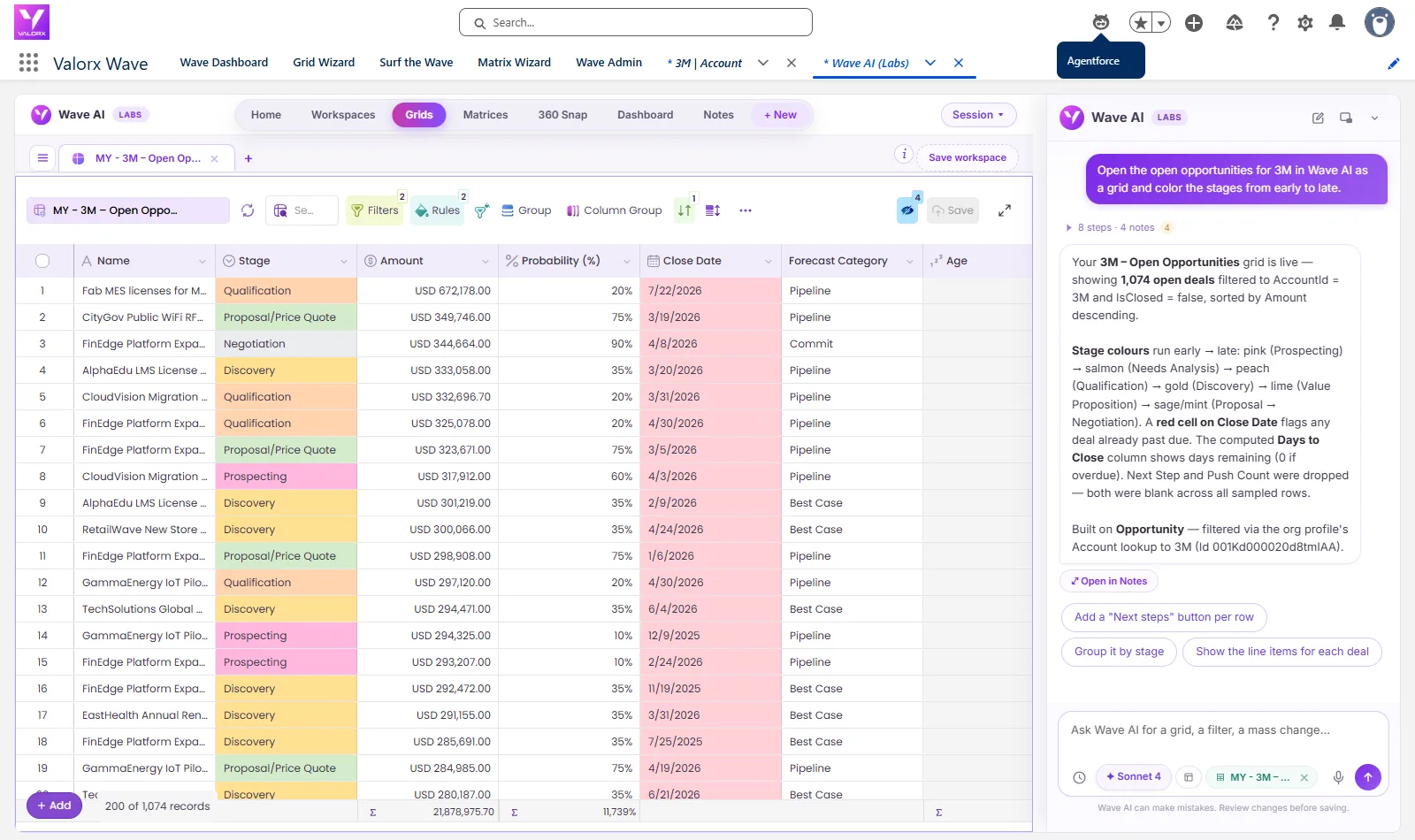
A pipeline summary, in a Slack channel or anywhere else, would tell you 3M has $19.3M across 1,074 open deals. The number that should worry a sales manager is a different one. 1,069 of those deals have no next step, so nobody has written down what happens next. 28 of them are due to close in October.
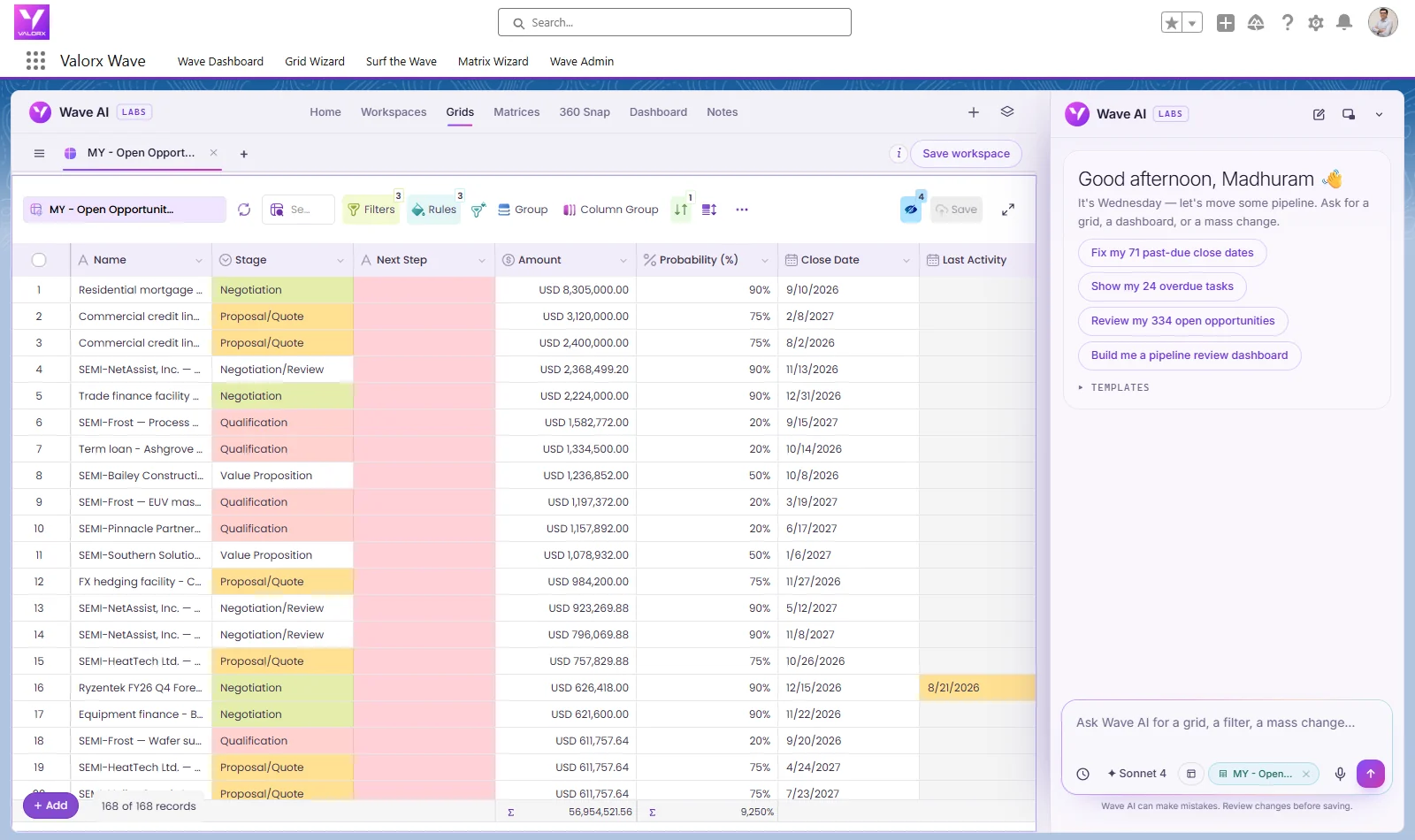
Slackbot can update a Salesforce record from a thread, with an approval step, and that's exactly right for one deal. For 28 deals you want to see them together, check the rule, and change them at once. So we asked Wave AI for 3M's October deals with the Next Step column showing, blanks in red:
29 deals came back, and 28 of them had an empty, red Next Step. Then the fix:
Slack
Sees the pipeline
A summary in a channel or a DM.
Wave AI
Opens the deals
3M's open deals in a grid, in Salesforce.
Wave AI
Finds the gap
28 October deals with no next step.
You, reviewing
See it before it saves
How many, what changes, then Yes.
Salesforce
Records updated
Same permissions. Undo takes it back.
28 deals, one change, reviewed before it saved
Wave AI didn't change anything yet. It said 28 open opportunities close in October 2026 with no next step, listed five of them with the rest counted, reported that all 28 had passed a dry run, and asked, "Shall I apply this?"
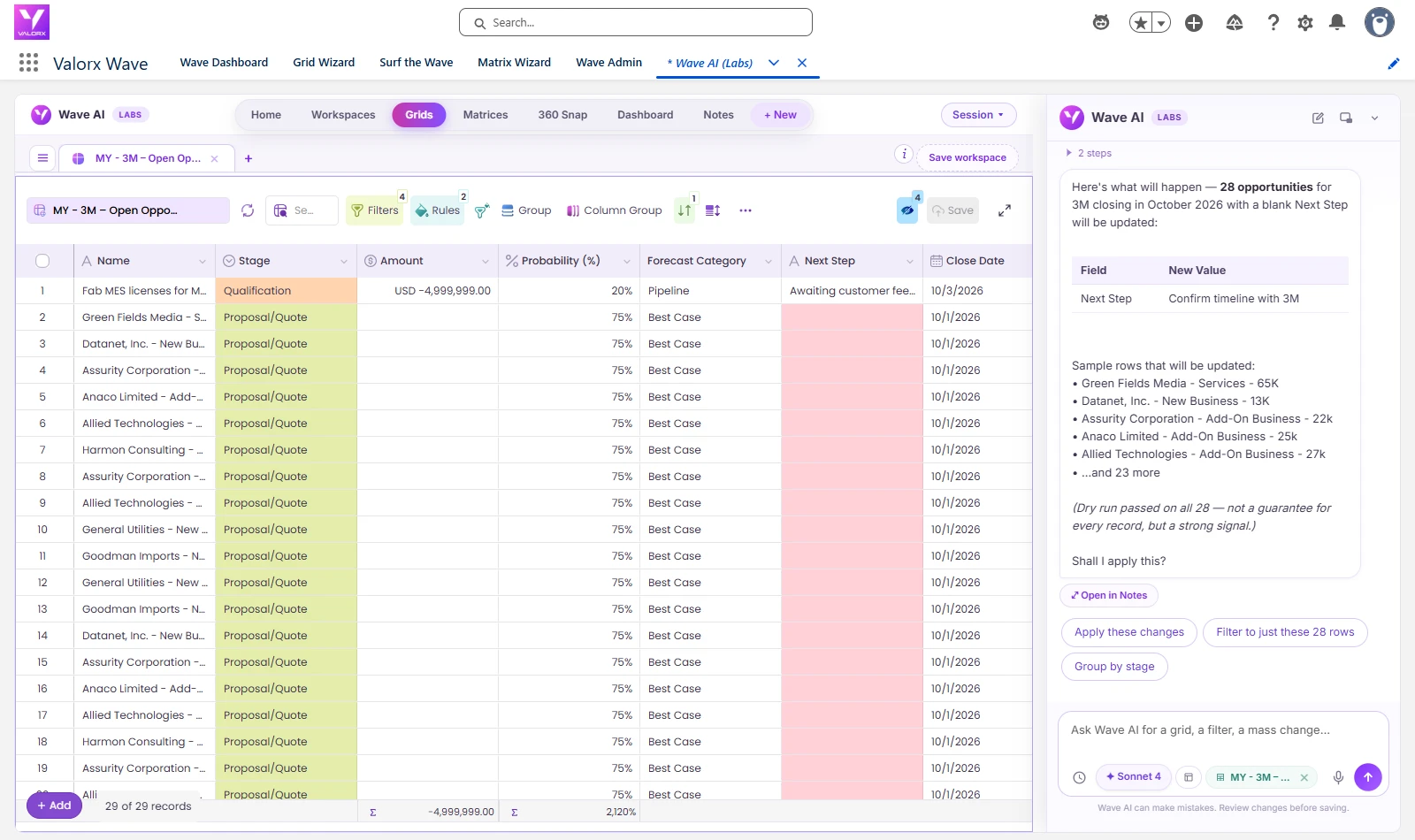
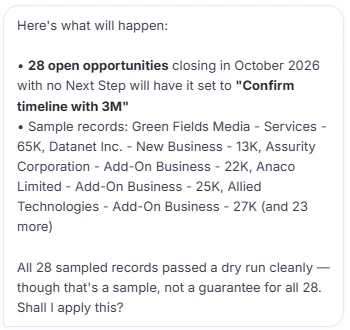
We said "Yes, apply it". Wave AI reported all 28 deals updated, and the grid refreshed: every red cell now read "Confirm timeline with 3M", and the red was gone.
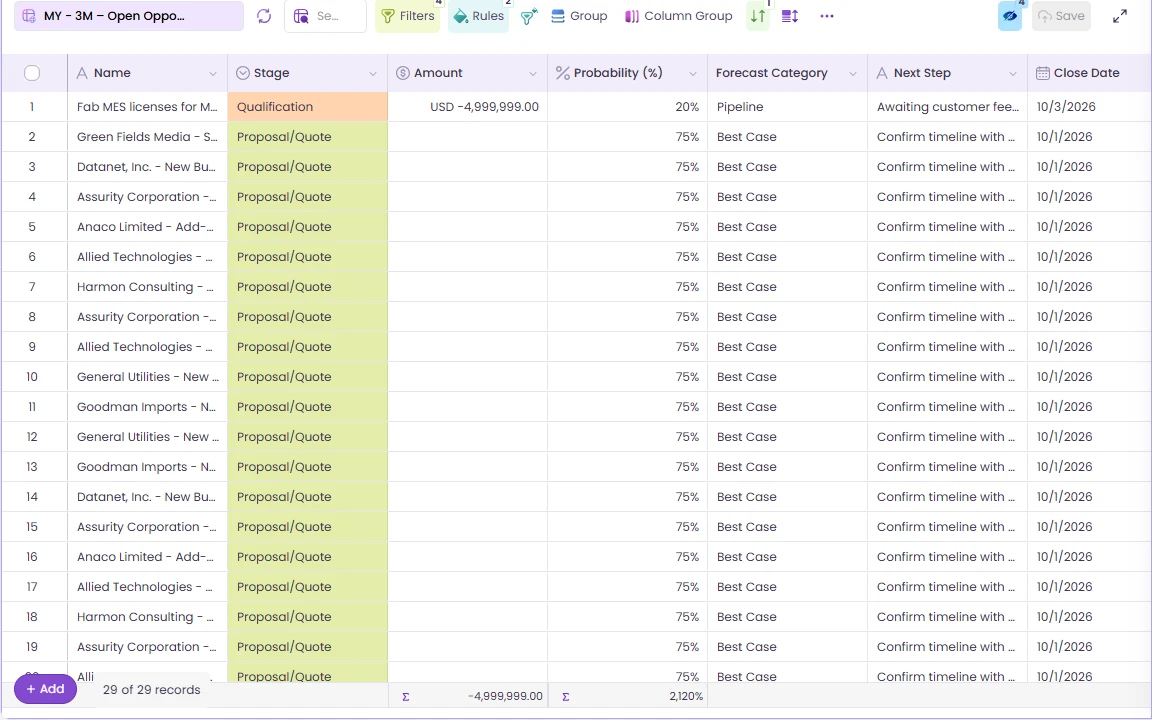
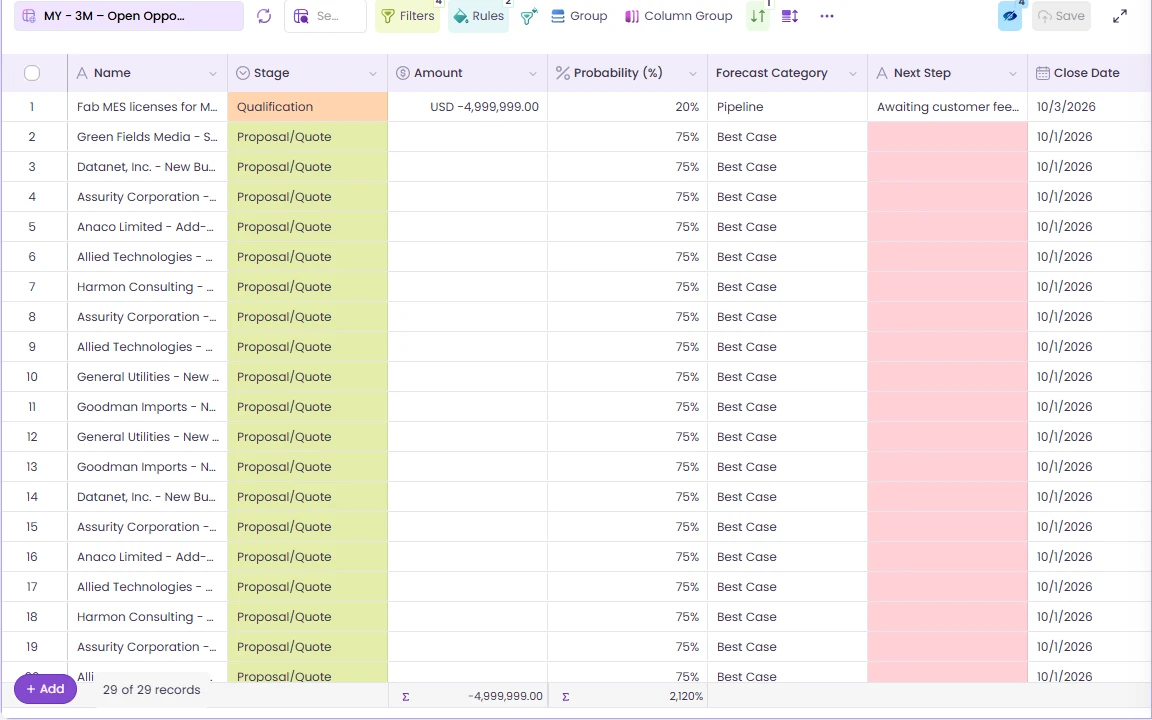 ↔Before · 28 blank, in redAfter · 28 filled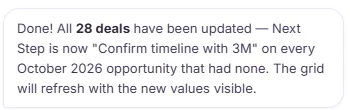
And one message to take it back
A bulk change you can't reverse is a bulk change people won't make. So we tested the reverse. We typed "Undo that"; Wave AI said what it would restore, the next step on all 28 deals back to blank, and asked again. After "Yes, restore them" every value was back. We queried all 1,074 of 3M's open deals afterwards and compared them to a copy taken before the test. Zero differences.
1,074
open 3M deals in one grid
1,069
of them with no next step recorded
28
closing in October, fixed in one reviewed change
1
Undo to put all 28 back, checked in Salesforce
0
files exported
Slack AI and Wave AI: compare the jobs
Slack is where the team talks about the pipeline, and Slackbot now works with Salesforce data directly. The comparison below is about one job: changing many Salesforce records at once. Where we describe Slack, it's from Slack's and Salesforce's own pages, linked, as they read on 23 September 2026.
| The job | Slack and Slackbot | Wave AI |
|---|---|---|
| Changing records | Slackbot can find, create and update Salesforce records. "Before it makes any changes, you'll be prompted to review and approve."1 | Hundreds in one change, with the count, a sample and a dry run before a single Yes. 28 in the run above. |
| What admins control | Admins choose whether Slackbot can write to some objects, all but some, or none.2 | Runs as the signed-in person, under the permissions and sharing rules you already set. |
| Records in a channel | A Salesforce channel is tied to one record, and people with permission can edit its fields there.3 | A grid of every matching record, editable in place. |
| Dashboards | Slack help says Surfaces "are static files and don't currently pull in new data."4 Salesforce says live data begins rolling out in October.5 | Dashboards on live records, where every bar opens the records behind it. |
| Undo | Not described on the pages above. | One Undo takes the whole change back. |
Slack pricing, and what Wave AI costs
Slack, as published
Free6$0
Pro, annual · monthly6$7.25 · $8.75 / user / month
Business+, annual · monthly6$15 · $18 / user / month
Enterprise+6contact sales
Full Slackbot6Business+ and above
List prices from slack.com, read 23 September 2026. Salesforce's new Core, Advanced and Max editions include Slack.7 Your contract may differ.
Wave AI
Freein beta
- No card
- No seat limit
- Einstein or your own AI key
- Your data never trains a model
Pricing arrives at public launch. Beta members hear first.
What each team gets
Sales managers
"The pipeline review happens in Slack."
Keep it there. When the review turns up 28 deals to fix, fix them in one reviewed change instead of assigning 28 follow-ups.
RevOps
"Next steps are blank on almost everything."
Pick the slice that matters this month, set it in one step, and undo it if the wording was wrong.
Salesforce admins
"I don't want bulk edits from a chat thread."
Bulk changes happen in Salesforce with a preview, a count and an undo, as the signed-in person.
IT and platform owners
"Which tool changed this record?"
Wave AI changes records inside Salesforce, as the person who asked, so wherever you track field history, it shows who changed what and when.
The prompts from this post
These are word for word what we typed. Swap in your own account, month and wording.
In Wave AI
Show the open opportunities of the account named 3M that close in October 2026 with their next step, and highlight blank next steps in red
Then, with the grid open
Set the next step to 'Confirm timeline with 3M' on the deals here that close in October 2026 and have no next step
After checking the review
Yes, apply it
If you change your mind
Undo that
Then
Yes, restore them
What people ask about Slack, Salesforce and Wave AI
Can Slackbot update Salesforce records?
Yes. Slack's help pages say Slackbot can find, create and update Salesforce records, and that you'll be prompted to review and approve before it makes any changes. Admins decide which objects it can write to.
Why fix records in Wave AI instead of Slack?
For one record, Slack is quick. For dozens, Wave AI shows every record that will change, runs a dry run, applies them in one step and takes them back with one Undo.
How much does Slack cost?
Slack lists Pro at $7.25 per user per month billed annually or $8.75 monthly, and Business+ at $15 or $18. Enterprise+ is priced by sales. Full Slackbot is on Business+ and above. Those are list prices read on 23 September 2026.
Are Slack Surfaces live dashboards?
Slack's help center says Surfaces are static files that don't currently pull in new data. Salesforce says live data begins rolling out in October.
Does Wave AI respect our permissions and sharing rules?
Yes. It runs as the signed-in person, under the same permissions and sharing rules as anywhere else in Salesforce.
What's live in the beta today?
Grids and the fix-in-place work shown above are live. Dashboards and matrices are in testing and rolling out to beta members.
What does Wave AI cost?
It's free for the whole beta, with no card and no seat limit. Pricing is published at public launch.
Talk about it in Slack. Fix it in Wave AI.
Bring the pipeline your team keeps discussing. We'll help you fix the first slice of it in the beta.
Wave AI builds it. Valorx Wave runs it for the whole team.
Join the betaSources
- Slack Help, Use Slackbot with Salesforce records.
- Slack Help, Manage Slackbot write access to Salesforce.
- Slack Help, Salesforce channels.
- Slack Help, Surfaces.
- Salesforce, Slack Surfaces.
- Slack, Slack pricing.
- Salesforce News, Salesforce simplifies editions, 3 September 2026.
The recordings were made in a Salesforce demo org on 23 September 2026. Waiting time is cut out of the videos. Slack, Slackbot and Salesforce are trademarks of Salesforce, Inc. 3M appears as demo data only.

Choose the workflow you need:
Try Wave in browser Extension

Try Wave in Salesforce

Try Fusion In Excel

Enhancing Salesforce for industry leaders