Managing the Month-End Forecast Lock in Salesforce Manufacturing Cloud

Month-end forecast lock in Salesforce Manufacturing Cloud is the process of reviewing, approving, and freezing forecast data before it becomes the official demand plan used by Finance, Operations, and Supply Chain teams. Successful forecast lock processes depend on clear approval workflows, distributor data coverage, exception management, and governance around late adjustments. This scenario shows how a demand planning team manages forecast lock across 180 accounts and the operational challenges that emerge before the planning cycle closes.
Month-end is the most operationally intense point in the Manufacturing Cloud cycle. In the week before forecast lock, the demand planning team is racing to close out adjustments, reconcile distributor gaps, secure rep approvals, and produce a locked forecast that Finance can use. This scenario walks through how a well-configured Manufacturing Cloud org supports that process — and where the friction typically appears.
How forecast lock works in Salesforce Manufacturing Cloud
In Salesforce Manufacturing Cloud, forecast lock is typically managed through a combination of Forecast Sets, Account Forecasts, Account Forecast Periods, approval workflows, and custom status fields. While the exact implementation varies by organization, the objective is consistent: ensure that planning data moves through a controlled review process before becoming the official forecast used by Finance, Operations, and Supply Chain teams.
The setup: Manufacturing Cloud forecast lock scenario
Month-end forecast lock scenario
23 accounts still Open; follow-up tasks auto-assigned to reps.
12 accounts with no POS: 8 proxied, 4 blanks defaulted with a note.
All 180 accounts at Under Review — adjustments, notes, and approvals complete.
Consolidated forecast reviewed. Late-change cutoff 5 pm — then manager override + note.
5 pm: the Platform Owner runs the Lock Flow. Values become the official demand plan.
Pacific Semiconductor (fictional) runs a monthly S&OP cycle with a lock date of the 20th of each month. They have 180 distributor and direct accounts managed by a demand planning team of four. Each account has 18 monthly Account Forecast Period records in the current Forecast Set window.
By the 18th, the demand planning lead needs all 180 accounts to have:
- Week 2 rep adjustments entered (with notes where variance > 15%)
- Any accounts with no distributor submission flagged and reviewed
- Account Forecast Period values approved by the rep's manager
- Forecast Lock Status set to "Under Review"
On the 19th, Finance reviews the consolidated forecast. On the 20th, the Platform Owner runs the lock Flow.
Business impact: If forecasts are not finalized before the lock date, Finance cannot confidently commit revenue expectations, procurement teams may delay purchasing decisions, and production planning can become unstable. The lock process ensures all stakeholders are working from a single approved version of demand.
What supports forecast lock in Manufacturing Cloud?
The coverage dashboard: 180 accounts in one view
The demand planning team opens the cycle with a CRM Analytics dashboard showing submission status: which accounts have distributor POS data loaded, which have rep adjustments, which have Forecast Lock Status still at "Open." This view — 180 accounts in a single screen — replaces the manual tracking spreadsheet that previously ran the same function.
They filter by status to find the 23 accounts still showing "Open" on the 16th and assign follow-up tasks to the appropriate reps automatically via a Flow that runs each morning in the pre-lock window.
Validation rules that enforce adjustment notes
The validation rule requiring notes on adjustments greater than 15% is creating accountability that did not exist before. Reps are documenting design win ramps, inventory corrections, and customer-specific intelligence that previously lived only in email threads or tribal knowledge. The demand planner reviewing the records can see the rationale without hunting for context.
The lock flow: Moving forecasts to a locked state
Platform Owner runs the Flow on the 20th, 5 pm.
Every current-period record moves to Locked status.
Validation rule stops non-managers changing values.
Final values + a full audit trail are retained.
On the 20th at 5pm, the Platform Owner runs the Lock Flow. The organization moves the current planning period into a locked state through Flow automation, supporting approval processes, and validation rules. This prevents unauthorized changes while preserving an audit trail of the final forecast values. The locked values become the official demand plan.
Managing hundreds of forecast records before lock
By the final week of the planning cycle, the challenge is often not forecasting logic but operational review. The demand planning team is responsible for validating hundreds of accounts and thousands of Account Forecast Period records before the lock date.
For Pacific Semiconductor, 180 accounts with 18 forecast periods each represents more than 3,200 forecast records that may require review. Planners need to identify accounts that are missing distributor submissions, locate adjustments without supporting notes, confirm manager approvals, and verify that Forecast Lock Status values are progressing through the review process.
Manufacturing Cloud provides the forecasting framework, dashboards, and record structure to support this work. However, as forecast volumes grow, organizations often discover that the operational review process becomes just as important as the forecasting process itself. The ability to quickly identify exceptions, incomplete records, and approval bottlenecks can determine whether the forecast locks on time.
This is why many mature forecasting organizations treat month-end review as a separate operational workflow with defined ownership, escalation paths, and daily coverage monitoring during the pre-lock period.
Where operational review becomes difficult
The forecasting framework may be configured correctly, yet planners still face an operational challenge as forecast volumes grow. Reviewing thousands of forecast records, identifying missing submissions, updating exception values, and validating approval status can become time-consuming when each record must be reviewed individually.
Many organizations address this by introducing spreadsheet-style operational workspaces inside Salesforce that allow planners to review, update, and manage forecast exceptions in bulk while maintaining governance and auditability. This becomes particularly valuable during the final days before forecast lock, when speed and visibility are equally important.
Where the friction appears in the forecast lock process
Late forecast adjustments
Three accounts receive significant new information on the 19th — after Finance has begun their review but before official lock. A key distributor revises their Q3 submission down by $800K. A design win confirmation arrives for an account the rep had flagged as "hold."
The process question: how do late adjustments work? The team's decision: updates before 5pm on the 19th are accepted; the Finance review reopens to incorporate them. After 5pm on the 19th, changes require a manager approval override and a mandatory note documenting the exception.
This process cannot be fully enforced by Manufacturing Cloud configuration — it requires process discipline from the team. But the Forecast Lock Status field and the approval workflow provide the infrastructure to support it.
The 12 accounts with no distributor data
The 23 accounts still marked "Open" represent forecast review status, while the 12 accounts without distributor submissions represent a separate data completeness issue.
Twelve accounts have no POS data submission for the current month by the 17th. For 8, the rep has entered a judgment-based forecast with a note: "No POS received; using prior month actuals as proxy, verified via phone with distributor." For 4, the fields are blank — the rep did not complete the record.
The daily coverage Flow has been escalating the 4 blank accounts for three days. On the 17th, the demand planning lead reassigns them to default values with a note and notifies the rep managers. The accounts will lock with proxy values; the accuracy tracking will reflect the missing distributor data in the notes.
What happens after forecast lock?
Once the forecast is locked, the demand planning team begins measuring forecast accuracy. The locked forecast is compared against actual demand, distributor POS submissions, shipment data, and inventory movements. Accounts with significant variances become discussion points in the next S&OP cycle.
Over time, these reviews help planners identify recurring issues such as unreliable distributor submissions, overly optimistic adjustments, or product lines with persistent forecasting errors.
What the month-end process reveals about system health
The monthly lock process is a diagnostic. The accounts that consistently have late adjustments, missing distributor data, or blank notes are the accounts with process gaps — either the rep is not engaged with the system, the distributor has not been onboarded to the portal, or the integration with a specific distributor's data feed is unreliable.
The demand planning lead's post-S&OP review — a 30-minute meeting with the Admin the week after lock — reviews these patterns. A distributor that has missed submissions for three consecutive months triggers an outreach from the channel team. A rep whose accounts consistently show late adjustments triggers a coaching conversation.
Month-end forecast lock checklist
- Distributor submissions complete — Sales Rep
- Variance notes entered — Sales Rep
- Manager approvals complete — Manager
- Forecast Lock Status updated — Planner
- Finance review completed — Finance
- Lock process executed — Platform Owner
- Variance tracking scheduled — Demand Planning Lead
This is Manufacturing Cloud functioning as a process system, not just a data system. The value is not only in the locked forecast numbers — it is in the visibility into process health that the system provides continuously.
But visibility alone does not finish the work. Once the system surfaces exceptions, planners still need a faster way to update, validate, and close them before lock.
How Valorx Wave speeds up month-end forecast review
From visibility to action before forecast lock
Dashboards identify exceptions. Operational grids help planners close them before the lock date.
Dashboard surfaces the work
Wave helps close the gaps
Manufacturing Cloud surfaces the work, but it doesn't speed up the doing. The Coverage Dashboard tells the planner which 23 accounts are still "Open" and which 4 are blank — then closing those gaps means opening records one at a time, or exporting to a spreadsheet and reloading with Data Loader. That is the manual tracking the dashboard was supposed to replace, just moved one step downstream.
This is where Valorx Wave fits. Wave is a spreadsheet-style grid that runs inside Salesforce and edits Manufacturing Cloud records in bulk. The planner filters to exactly the exceptions the dashboard flags — missing distributor data, adjustments without notes, Forecast Lock Status still "Open" — and updates hundreds of Account Forecast Period records in one view: enter adjustments, add the required variance notes, and move lock status across the whole filtered set at once. Mass Modifier handles the repetitive work, like defaulting the four blank accounts to proxy values with a note, in a single action instead of four separate record edits.
It is not a return to the offline tracking spreadsheet. Wave edits the live records, so every validation rule, approval, and audit-trail requirement still applies — the variance-note rule still fires, manager approval is still required, every change is logged. The planner gets spreadsheet-speed bulk editing without leaving Salesforce or losing governance. For a four-person team validating 3,200+ forecast records against a hard lock date, that is the difference between a manual scramble on the 19th and a process that locks on time, every month.
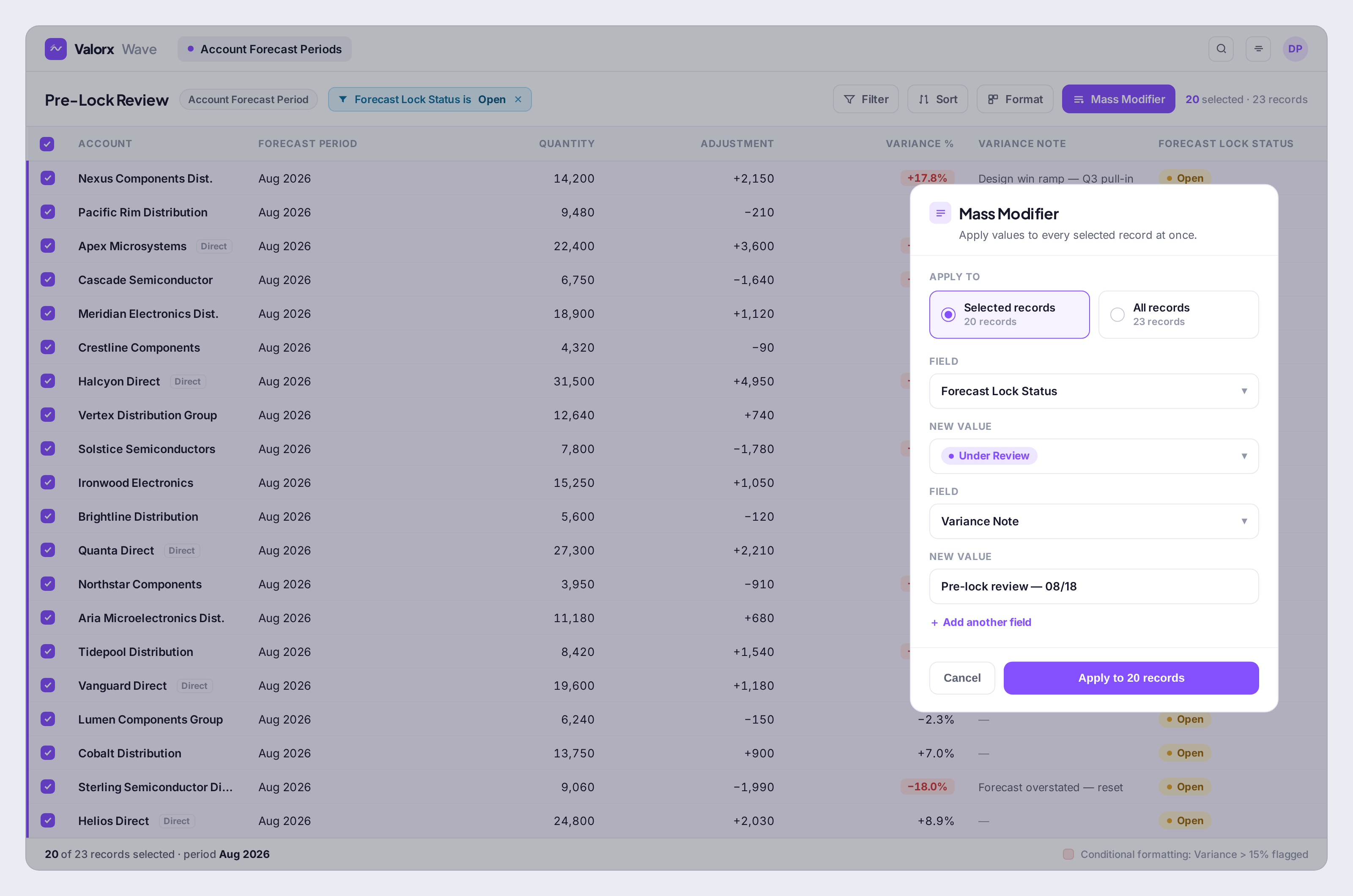
As forecasting programs mature, planners often find that the challenge is no longer the forecasting model itself but the operational work required to review, update, and validate thousands of forecast records before lock. See how manufacturing teams use Valorx Wave to review forecast exceptions, perform bulk updates, and manage month-end forecasting activities directly inside Salesforce.
Frequently asked questions
How often should a Manufacturing Cloud forecast be locked?
Most manufacturers lock forecasts monthly as part of their S&OP cycle, but the cadence depends on planning volatility. Businesses with stable demand may lock monthly, while companies facing frequent allocation changes, design win activity, or distributor fluctuations may review forecasts weekly while still maintaining a monthly official lock.
What should happen when distributor data is missing before forecast lock?
Organizations should define a documented fallback process before the planning cycle begins. Common approaches include using prior-month actuals, applying historical averages, or allowing sales representatives to submit judgment-based forecasts with supporting notes. The key is ensuring every exception is visible and auditable rather than leaving records incomplete.
Who should own the forecast lock process?
Forecast lock is typically a shared responsibility. Demand planning owns forecast readiness, sales teams provide adjustments and market intelligence, Finance reviews the consolidated forecast, and system administrators or platform owners manage the technical lock process. Clear ownership reduces last-minute delays and approval bottlenecks.
What metrics indicate a healthy forecasting process?
Beyond forecast accuracy, leading organizations monitor operational metrics such as on-time submissions, percentage of accounts requiring late adjustments, approval completion rates, missing distributor data, and forecast variance trends. These indicators often reveal process issues before they impact forecast accuracy.
How can manufacturers reduce last-minute forecast changes?
The most effective approach is establishing structured review checkpoints throughout the planning cycle rather than concentrating reviews immediately before lock. Weekly exception reviews, automated reminders, approval workflows, and distributor submission tracking help surface issues earlier and reduce end-of-cycle surprises.
When do forecasting teams outgrow dashboards and reports?
As forecasting programs expand across hundreds of accounts, planners often need to review large numbers of forecast records simultaneously, investigate exceptions, and coordinate approvals across multiple stakeholders. At that stage, teams typically look for more operational review processes and workspaces that help manage high-volume forecasting activities efficiently.
What is a forecast lock?
The month-end step where forecast data is reviewed, approved, and frozen as the official demand plan consumed by Finance, Operations, and Supply Chain.
How are late changes handled?
Through governed exceptions: documented adjustment requests with approval, not silent edits — preserving trust in the locked number.
What makes lock cycles smooth?
Clear approval workflow, distributor submissions in before review week, and exception dashboards that surface missing or anomalous accounts early.

.svg)




Choose the workflow you need:
Try Wave in browser Extension

Try Wave in Salesforce

Try Fusion In Excel

Enhancing Salesforce for industry leaders