The Real Cost of Forecasting in Excel for Manufacturing
Quick answer: Forecasting in Excel looks free because Excel is already on every desk — but the real costs are hidden: hours of manual consolidation each cycle, version-control chaos ("FINAL_v7"), stale data the moment it's exported, and forecast errors that turn into inventory and revenue misses. The breakdown below quantifies each cost and shows what connected forecasting replaces.
Spreadsheet-based forecasting looks inexpensive because Excel is already available, familiar, and flexible. Finance teams know it. Sales teams can update it. Operations teams can manipulate it. For many manufacturers, that makes spreadsheets feel like the lowest-cost way to manage demand planning, distributor forecasts, and monthly S&OP preparation
That is the first cost calculation most finance and operations teams make when evaluating whether to invest in demand forecasting software as Excel is already purchased.
What does not appear in that calculation is the cost of what spreadsheet forecasting cannot do — the hours lost to manual aggregation, the decisions made on stale data, the forecast misses that trace back to version control failures, and the supply chain expenses triggered by forecasts that were more optimistic than accurate.
This article quantifies those costs. Not as a vendor argument against forecasting in Excel — spreadsheets have genuine strengths in the forecasting workflow, as we have written about elsewhere — but as a factual accounting of what forecasting in Excel costs manufacturers who are ready to examine it honestly.
Why Spreadsheet-based forecasting becomes expensive?
That is why the question is not whether spreadsheets have value. They do. Spreadsheets are still useful for analysis, scenario modeling, and finance workflows that need flexibility. The real question is whether disconnected spreadsheets should remain the primary system of record for forecasting at scale. For manufacturers managing multiple distributors, product lines, plants, and forecast cycles, the answer is usually no. Spreadsheet-based forecasting is not free. It simply invoices the business in ways that are harder to see.
Spreadsheets become expensive when they stop being an analysis tool and become the operational process itself. A single spreadsheet can work for a small team. A shared template can work for a simple monthly update. But manufacturing forecasting rarely stays simple for long.
As the business grows, the forecast must collect inputs from sales, distributors, account managers, finance, procurement, and supply chain teams. The same data may need to support revenue planning, production scheduling, inventory decisions, executive reporting, and customer commitments. At that point, the spreadsheet is no longer just a file. It becomes a fragile workflow with no built-in governance, audit trail, or real-time connection to the systems that depend on the forecast.
The result is a forecasting process that appears cheap because the software cost is low but becomes expensive because the work around the spreadsheet keeps increasing.
Where Excel Forecasting Costs Hide
Forecasting in Excel does not usually fail because of one large problem. The cost builds up through small, repeated workflow gaps that slow down planning and weaken forecast confidence.
Forecasting in Excel
Familiar and flexible, but risky when disconnected files become the primary system of record for demand planning, sales forecasting, and S&OP decisions.
Manual consolidation
Teams spend hours collecting, cleaning, and merging forecast inputs.
Version control
Multiple files create confusion around which forecast is current.
Reconciliation work
Forecasts must be manually checked against ERP, CRM, and finance data.
Formula errors
Copied formulas, broken ranges, and hidden mistakes impact planning accuracy.
Stale S&OP data
Decision meetings often rely on files that were locked days earlier.
No audit trail
Teams struggle to see who changed what, when, and why.
Inventory waste
Over-forecasting can trigger excess stock and carrying costs.
Expediting costs
Under-forecasting can lead to shortages, rushed orders, and air freight.
The hidden labor cost of forecasting in excel
The most visible cost of manufacturing demand planning in spreadsheets is labor. The hours that skilled, expensive people spend doing work that should be automated.
Monthly data consolidation
In a typical mid-size manufacturer with 150 distributors and direct accounts, the monthly data consolidation process works like this: the demand planning team sends forecast request emails to all accounts. Responses arrive over 7–10 days in varying formats. Someone downloads and reformats each response into the master consolidation template. Account names need to be matched and reconciled. Totals are summed. Errors are discovered and corrected. The process takes the equivalent of one demand planner's full working week, every month.
At a fully-loaded cost of $85,000/year for a demand planner, one week per month is approximately $20,000 in annual labor cost attributable solely to spreadsheet consolidation.
Version control management
By the time the monthly demand review meeting happens, how many versions of the forecast spreadsheet exist? In our experience, between 8 and 25 — emailed back and forth, saved locally under different names, modified by different people. The demand planner opens the meeting with "make sure you're looking at Forecast_Nov_FINAL_v3_Garrett_REVIEWED.xlsx" because there are four other files in everyone's email with similar names.
The time spent managing version control — tracking which version is current, reconciling differences between versions, and re-doing work when someone edits an outdated version — is often invisible because it is distributed across the team. Aggregating it typically surfaces 3–6 hours per person per month across the demand planning and finance teams.
Manual cross-system reconciliation
Sales forecasting in Excel requires manual reconciliation between the forecast and every other system that needs the data: ERP, financial planning tools, executive dashboards, board presentation templates. Each reconciliation takes time and introduces the possibility of transcription errors.
A conservative estimate for a mid-size manufacturer: 4–8 hours of manual reconciliation per month, per system interface. If the forecast needs to reconcile with SAP actuals, the FP&A model, and the executive summary template, that is 12–24 hours of manual work per month before anyone has done any actual analysis.
| Labor category | Hours / month | Annual cost |
|---|---|---|
| Monthly data consolidation | 40 hrs | ~$16,300 |
| Version control management3 people × 4 hrs | 12 hrs | ~$4,900 |
| Cross-system reconciliation3 systems × 6 hrs | 18 hrs | ~$7,300 |
| Error correction and re-work | 8 hrs | ~$3,300 |
| Total (conservative estimate) | 78 hrs/mo | ~$31,800/yr |
These numbers are conservative. They represent the visible labor cost — the work that is directly attributable to managing the spreadsheet forecasting process. They do not include the opportunity cost of what those 78 hours could have produced if spent on analysis rather than administration.
The data quality cost of forecasting in excel
Spreadsheet errors are not theoretical. Research from various sources consistently finds error rates in enterprise spreadsheets between 1% and 5% of cells, with complex multi-sheet models showing higher rates. For a manufacturing forecast that is the basis for procurement and production decisions, even a 1% error rate has material consequences.
Formula errors
A formula that incorrectly sums a range — excluding a row because the range reference was not updated after a row was inserted — produces a forecast that looks correct but understates a product family by $200,000. The error may not be discovered until the month-end reconciliation, by which point procurement decisions have been made on the wrong number.
Copy-paste mistakes
Copy-paste errors are equally common. A rep fills in their October forecast by copying September's numbers and adjusting, but accidentally leaves one product family at the September value. A $150,000 data point is wrong for an entire month.
A distributor submits a file with a product column shifted by one row.
A demand planner pastes values over formulas while trying to combine files quickly before a meeting.
These mistakes are usually caught late, if they are caught at all. When the forecast informs production or inventory decisions, late discovery still creates cost.
Version mix-ups
Someone edits last month's file instead of the current month's template. The correction a rep submitted on Tuesday is in v2.1 of the spreadsheet, but the demand planner is working from v2.0 because they did not see the email. These errors are often caught but catching them costs time. When they are not caught, the forecast is built on incorrect data.
The cost of inventory decisions made on bad data
This is where the cost scale shifts. A procurement team making a $2M component purchase based on a forecast that overstates demand by 15% creates $300,000 in excess inventory. That inventory either sits at carrying cost (typically 20–30% of inventory value annually, meaning $60,000–$90,000 per year on that excess) or gets written down.
A factory scheduled to produce 50,000 units based on a forecast that understates demand by 12% creates a shortage. The company airfreights components to meet customer commitments. Air freight costs 8–12x sea freight. A single air freight event for a medium-size production run can cost $150,000–$400,000.
These are not hypothetical. Manufacturers who have traced their supply chain exception costs back to forecast errors regularly find that a single manufacturing forecasting failure creates costs that exceed the annual labor savings from "just using Excel."
The forecast accuracy cost
Beyond direct financial costs, forecasting in Excel degrades decision quality in ways that are harder to quantify but equally real.
Stale data at decision time
The monthly S&OP executive meeting takes place on, say, the 20th of the month. The demand planning team locked the forecast spreadsheet on the 15th. Between the 15th and the 20th, three significant updates arrived: a major distributor revised their Q4 forecast down by $500K, a design win at a key OEM was confirmed for $1.2M in Q1 revenue, and a product line showed early signs of end-of-quarter demand softness.
In a spreadsheet-based process, incorporating these updates before the 20th meeting requires reopening the locked file, making changes, re-running the financial model, and redistributing. Sometimes this happens; often it does not. The executive S&OP meeting proceeds on data that is five days old and missing known material updates.
In a system-based process — using demand planning software built for this workflow — updates are reflected in real time. The meeting dashboard shows the current state as of the morning of the meeting, not the state as of when someone last edited a file.
No forecast accuracy tracking
Spreadsheet-based manufacturing forecasting processes almost never have systematic forecast accuracy tracking. The comparison of prior period forecasts to actuals requires someone to intentionally archive forecast files, load actuals later, and build a comparison model. This is almost never done consistently.
The consequence: no one knows how accurate their forecasts are. Systematic biases — a particular distributor that consistently over-forecasts by 20%, a product line where the team is perpetually optimistic — go uncorrected because they are never measured.
Forecast accuracy formula and why it matters: The standard measure is MAPE (Mean Absolute Percentage Error), calculated as:
MAPE = (1/n) × Σ |Actual − Forecast| / |Actual| × 100
Industry data on manufacturing forecast accuracy suggests that teams without systematic accuracy tracking operate at 15–25% MAPE. Teams with disciplined measurement and correction processes — typically enabled by demand forecasting software that automates the comparison — achieve 8–12% MAPE. On a $100M revenue base, the difference between 20% MAPE and 10% MAPE represents significantly better supply chain efficiency: fewer air freight events, less excess inventory, fewer stock-outs.
For manufacturers asking how to improve forecast accuracy, the first step is almost always measurement. You cannot correct biases you have never quantified.
Invisible adjustment history and missing audit trails
When the forecast is wrong, what drove the error? Was it a specific distributor's optimism? A rep's design win estimate that did not materialize? A market event that nobody anticipated? A sales override? A formula issue? A late change that never reached the master file? A design win that was counted too early?
Unless every change was manually documented, the answer is often unknowable. The forecast exists, but the history of how it was built does not.
That missing audit trail matters. Without adjustment history, teams cannot run effective post-mortems. They cannot identify recurring behavior. They cannot separate reasonable judgment calls from preventable process errors. As a result, forecast misses become events to explain rather than patterns to improve.
The cost vs. investment framing
The decision to invest in a structured manufacturing forecasting system — whether Manufacturing Cloud, dedicated demand planning software, or a connected spreadsheet approach that preserves Excel while adding data integrity — is a cost-reduction decision as much as a productivity improvement.
The total annual cost of forecasting in Excel for a mid-size manufacturer typically includes:
| Cost category | Annual estimate | Confidence |
|---|---|---|
| Direct laborConsolidation, reconciliation, error correction | $25,000–$50,000 | High Directly measurable |
| Supply chain exceptionsAir freight, expediting driven by forecast error | $200,000–$800,000 | Medium Requires tracing to root cause |
| Excess inventory carrying costFrom over-forecasting | $50,000–$300,000 | Medium Depends on inventory turns and carrying cost rate |
| Decision quality degradationOpportunity cost of acting on stale data | Difficult to quantify | Low But real |
| Total cost range | $275,000–$1,150,000+ |
Against this, the investment in a properly implemented demand forecasting software platform — platform cost, implementation, maintenance, and training — is typically $150,000–$400,000 over three years for a mid-size manufacturer.
The math works. What prevents action is that the spreadsheet costs are distributed across the organization and never appear as a single line item, while the system investment is visible, budget-cycle, and requires executive approval. The spreadsheet's costs are invisible; the system's costs are not.
Hidden Spreadsheet Cost vs. Visible System Investment
Spreadsheet forecasting feels inexpensive because the cost is scattered across people, processes, and supply chain exceptions. A structured forecasting workflow makes the investment visible — and the hidden waste easier to reduce.
Forecasting in Excel
- → Costs are distributed across teams and rarely appear as one line item.
- → Manual consolidation and reconciliation consume planning capacity.
- → Disconnected files make audit history, accuracy tracking, and governance harder.
Structured Forecasting Workflow
- ✓ Forecast data stays connected to the systems teams already rely on.
- ✓ Teams reduce exports, reuploads, stale files, and version confusion.
- ✓ Forecast changes become easier to validate, track, and explain.
Moving beyond forecasting in excel for sales and demand planning
The question is not whether demand planning software costs money. It does. The question is whether it costs more than the spreadsheet process it replaces. In most manufacturing contexts above $50M in revenue with channel distribution, the answer is no — the system investment is significantly less than the annual cost of forecasting in Excel.
None of this is an argument that spreadsheets have no role in manufacturing demand planning. They do — particularly in Finance workflows where analytical flexibility matters more than data structure. The argument is that using spreadsheets as the primary system of record for demand planning, at scale, creates costs that are real, measurable, and consistently underestimated.
The spreadsheet is not free. It just invoices you differently.
A better middle ground: Spreadsheet flexibility with system control
The goal is not to remove spreadsheets from forecasting. Finance and operations teams still need flexible models, fast updates, and familiar interfaces. The problem is using disconnected files as the system of record.
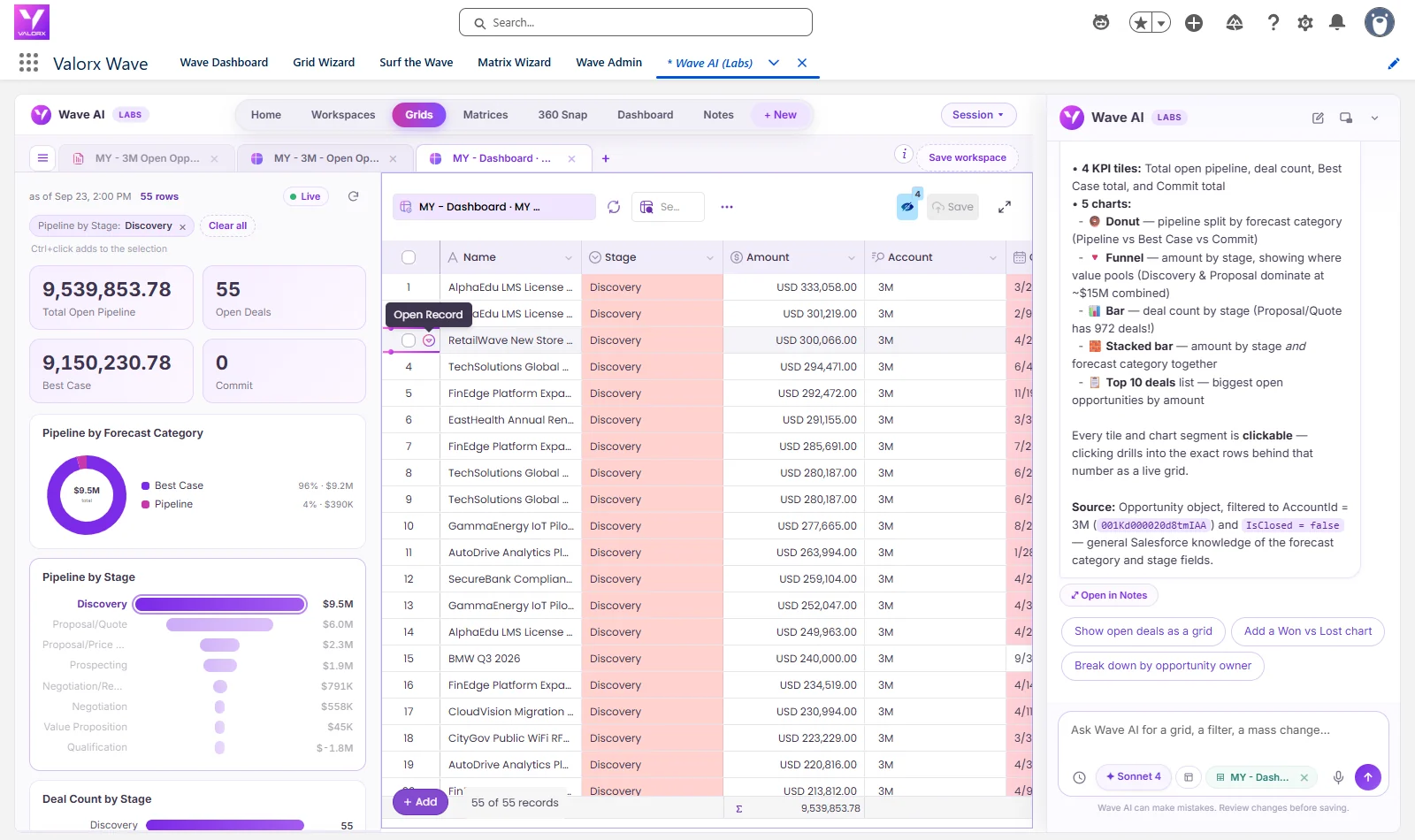
Valorx gives teams a better middle ground. With Valorx Fusion, teams can keep working in Excel or Google Sheets while syncing forecast data with Salesforce. With Valorx Wave, teams can manage forecast records in a spreadsheet-style grid directly inside Salesforce.
That means users can review, update, validate, and manage forecast data without exports, reuploads, version chaos, or disconnected files.
Frequently asked questions
Is spreadsheet-based forecasting bad?
No. Spreadsheets are useful for analysis, modeling, and scenario planning. The problem begins when spreadsheets become the primary system of record for forecasting at scale.
What are the biggest risks of forecasting in excel?
The biggest risks are version control issues, manual consolidation, formula errors, stale data, lack of audit history, and poor forecast accuracy tracking.
Why do manufacturers still use excel for forecasting?
Manufacturers use Excel because it is familiar, flexible, and easy to customize. However, disconnected Excel workflows create problems when many teams, distributors, products, and systems are involved.
How can manufacturers reduce spreadsheet forecasting errors?
They can reduce errors by centralizing forecast data, tracking changes, connecting forecasts to Salesforce or ERP systems, and using spreadsheet-style interfaces that preserve governance.
What is the best alternative to spreadsheet-based forecasting?
The alternative is not always replacing spreadsheets completely. Many teams move to connected forecasting workflows where Excel-like interfaces remain, but the data stays governed, synced, and auditable.
Why is Excel forecasting risky for manufacturers?
Broken formulas and overwritten logic go undetected, versions multiply across teams, and the forecast is disconnected from live CRM/ERP data — so decisions run on last week's numbers.
Should manufacturers stop using Excel?
No — Excel's modeling flexibility is irreplaceable. The fix is connecting it: spreadsheets bound to live Salesforce data keep the interface and lose the staleness.
What's the biggest hidden cost?
Planner time: consolidation and reconciliation routinely consume days per cycle that connected forecasting reduces to hours.
.svg)




Choose the workflow you need:
Try Wave in browser Extension

Try Wave in Salesforce

Try Fusion In Excel

Enhancing Salesforce for industry leaders