Distributor forecasting through a Salesforce Partner Portal

Quick answer: A Salesforce partner portal (Experience Cloud) lets distributors submit forecasts and POS data directly into Manufacturing Cloud instead of emailing spreadsheets — roughly 72% of manufacturers still collect distributor data manually. A working portal needs simple submission UX, validation on entry, and visible value for the distributor. Setup pattern and pitfalls below.
It's the 3rd of the month, and a demand planner at a mid-size electronics manufacturer is staring at a half-empty forecast spreadsheet. Only 60% of their distributor partners have submitted POS data. The demand review is in two days. The VP of Supply Chain is asking for a number. The planner does what they always do: pulls last month's figures forward, adjusts by gut feel, and hopes.
This is the norm, not the exception. Roughly 72% of manufacturers rely on third-party distributors to move product to market, yet the forecast data flowing back from those distributors is fragmented, late, and biased. Research from E2open's benchmarking studies shows that at the weekly-item-location level where supply chain decisions actually get made, forecast accuracy drops to around 52%. And the bullwhip effect — where a small demand signal distortion at the distributor amplifies into a 5–10x swing by the time it reaches the manufacturer's production plan — turns bad data into expensive inventory mistakes.
The distribution channel is where most manufacturing revenue is made and where most forecasting data falls apart.
For manufacturers who sell through distributors — which is the majority in industrial, semiconductor, electronics, and chemicals sectors — the distributor's view of demand is more accurate than anything the manufacturer can observe directly. The distributor is closest to the end customer. They see point-of-sale data in real time. They know which customers are building inventory, which are drawing it down, and which are evaluating competitors.
Getting that intelligence into Salesforce Manufacturing Cloud in a structured, timely way is one of the highest-value integration problems in the entire platform. It is also one of the most technically and organizationally challenging.
This article covers the architecture, the practical challenges, and the design decisions that determine whether distributor forecasting works in Manufacturing Cloud — and how Salesforce Experience Cloud enables the distributor portal that makes it possible.
The intro explains distributors, POS data, Experience Cloud, Manufacturing Cloud, and demand planning. A flow visual right after the intro will reduce confusion before the technical sections begin. The article currently transitions from the problem setup into “The distributor data Problem” without a visual bridge.
The distributor data problem
Before getting into architecture, it helps to understand why channel forecasting through distributors is hard.
Why distributor forecasts are hard to trust
The issue is rarely one bad spreadsheet. It is the combination of different formats, delayed updates, and forecast assumptions that are hard to verify.
Different formats
Each distributor may send demand updates in a different spreadsheet, template, or naming structure.
Late submissions
Forecasts arrive after planning cycles have already started, slowing demand review and S&OP decisions.
Optimistic numbers
Distributor inputs may reflect expected sell-through, not confirmed demand, creating gaps between plan and reality.
Data format fragmentation
Manufacturers typically work with dozens or hundreds of distributors. Each distributor has their own systems, their own data formats, and their own data quality standards. One distributor submits weekly POS reports in a specific Excel template. Another provides EDI 852 files. A third sends a CSV by email on the 5th of each month. A fourth has no automated reporting at all — their rep calls the manufacturer's inside sales team.
Normalizing this into a consistent Manufacturing Cloud data structure requires either getting distributors to change their behavior (hard), building integrations for each format (expensive), or providing a distributor portal that standardizes the submission experience (the Salesforce approach).
Data latency
Distributor data arrives late. A manufacturer who needs distributor POS data by the 3rd of each month to feed the demand review process will receive roughly 60% of it by the 3rd, another 25% by the 7th, and the remaining 15% at some unpredictable point thereafter — or not at all.
The demand planning team must decide: wait for complete data and delay the demand review, or proceed with incomplete data and acknowledge the gap. Neither is ideal. The system needs to support both paths — showing clearly which distributors have submitted and which have not, and allowing the demand review to proceed with flagged incomplete accounts.
Data accuracy
Distributor-submitted forecasts are frequently optimistic. Distributors have incentives to submit high forecast numbers: it can help secure allocation during supply-constrained periods, signal strength to a manufacturer's management team, and maintain favorable commercial terms. Treating distributor forecast submissions as unbiased signals of true demand leads to consistent over-forecasting.
The sales team's Week 2 overlay — adjusting distributor numbers based on on-the-ground intelligence — is partially a correction for this systematic bias.
The Salesforce Experience Cloud architecture for distributor portals
Salesforce's answer to the distributor data collection problem is Salesforce Experience Cloud: a portal platform that allows external users (distributors) to interact with Salesforce data through a branded, controlled interface. In the context of channel forecasting, this becomes the Salesforce partner portal through which distributors submit demand data directly into Manufacturing Cloud.
The conceptual architecture is sound. Distributors log into the portal, see their accounts and forecast records, enter or update their data, and submit. The data lands directly in Manufacturing Cloud objects — no email, no file upload, no manual entry by the manufacturer's team.
The reality is more complex.
Site type and licensing for your Salesforce partner community
Salesforce Experience Cloud offers several site types with different licensing models. For distributor forecasting portals, the most common choices are:
The licensing choice matters: Partner Community Salesforce licenses allow sharing of standard Salesforce objects with external users more easily and support more complex sharing models. Customer Community Plus requires more deliberate configuration of sharing rules to expose Manufacturing Cloud records to external users.
For most distributor forecasting implementations, the Salesforce Partner Community license is the recommended starting point. The sharing model flexibility it provides avoids a significant amount of custom development that would otherwise be needed to expose Account Forecast Periods and Sales Agreements to external users.
Object exposure and sharing model
Distributors interacting with the Salesforce partner portal should see their own data and nothing else. The sharing model must be configured correctly before any portal goes live.
Objects typically exposed to distributor portal users:
- Their Account record — limited fields, no internal pricing or margin fields visible
- Their Sales Agreement — planned volumes/revenue, schedule view
- Their Account Forecast Periods — the records they are submitting data into
- A custom POS Submission object (if POS data is captured separately from forecast data)
Field-level security is critical. Remove visibility to any internal fields — ERP Contract ID, internal pricing, other account data, rep adjustment notes. Portal users should see only what is directly relevant to their submission.
Distributor portal page architecture
The typical distributor portal built on Salesforce Experience Cloud for forecast submission has three to four page types:
The four pages every distributor forecasting portal needs
A useful portal is not just a login page. It needs clear places for submission, visibility, status, and communication.
Home dashboard
Shows submission status, due dates, open actions, and forecast coverage.
Forecast submission
Lets distributors enter or update product and period-level forecast data.
Partner portal
Built on Experience Cloud with controlled access to Manufacturing Cloud data.
POS data view
Gives distributors visibility into submitted sell-through or actuals where needed.
Communication
Captures notes, reminders, clarifications, and submission follow-ups.
The UX problem: Data volume vs. Interface design
This is the issue that most Salesforce partner portal implementations underestimate, and it is the most common reason distributor adoption is lower than expected.
A distributor managing 15 product families across 12 monthly periods is entering 180 data points per submission cycle. In the standard Salesforce interface — individual record forms with one record per page — that is 180 page loads, 180 clicks into edit mode, 180 saves. For a distributor's inside sales coordinator who handles this as one of a dozen monthly admin tasks, that experience is a strong signal to go back to emailing a spreadsheet.
180 saves vs. one submit
The gap between standard Experience Cloud forms and what distributors actually need is the #1 reason portal adoption stalls.
The gap between what the distributor portal needs to deliver (a fast, grid-based data entry experience) and what standard Salesforce Experience Cloud pages provide (a form-based record editing experience) is one of the most well-documented friction points in Manufacturing Cloud distributor portal implementations.
There are several architectural responses to this problem:
- Custom Lightning components: A grid component built in LWC (Lightning Web Components) that shows multiple Account Forecast Period records in a tabular layout with inline editing. Provides a much faster entry experience but requires development effort and ongoing maintenance.
- Third-party grid tools: Several tools in the Salesforce ecosystem provide spreadsheet-style grid interfaces over standard Salesforce objects, including Account Forecast Periods. These can be embedded in Experience Cloud pages within the partner community and dramatically reduce the entry time. Evaluating these should be part of any distributor portal design.
- File upload with validation: Accept CSV or Excel file submissions from distributors, validate the data format and account matching, and load into Manufacturing Cloud via automation. Allows distributors to work in their familiar format while getting structured data into Salesforce. Requires a custom upload component and validation logic.
Portal UX design for distributors should be tested with actual distributors before launch. What seems fast in a demo environment with two accounts and six periods becomes painful at real scale. Run a pilot with one or two distributors and measure actual completion time before rolling out broadly.
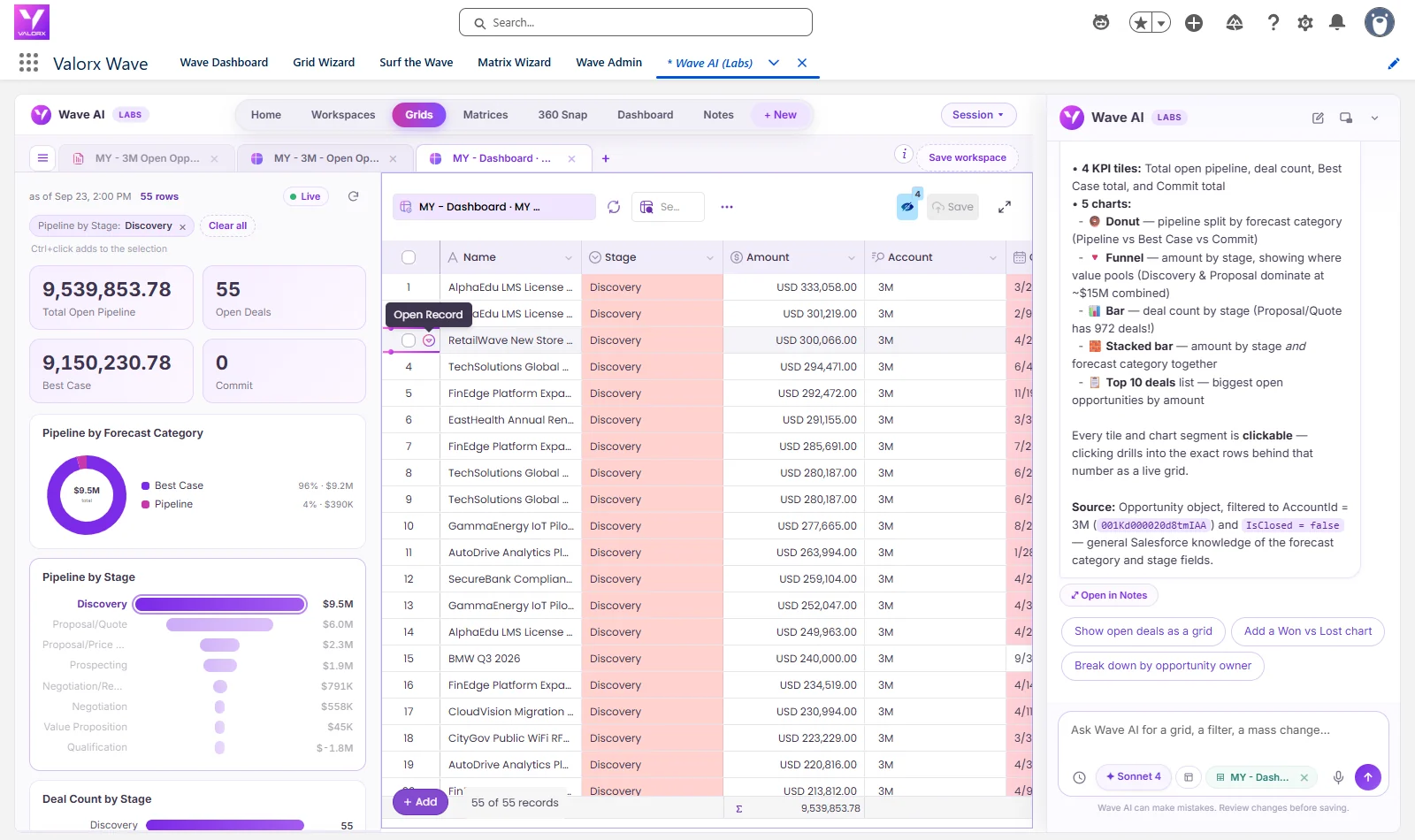
Need a faster way to manage high-volume Salesforce forecast updates?
Valorx Wave gives teams a spreadsheet-style grid experience inside Salesforce, so users can review and update many forecast records without moving through one record at a time.
Distributor submission tracking for channel forecasting
The demand planning team needs to know, at any point in the data collection window, which distributors have submitted and which have not. Without this visibility, the channel forecasting process either waits indefinitely or proceeds without knowing the coverage gap.
Build a submission tracking mechanism:
- A custom Submission Status field on the Account or Account Forecast record, updated by Flow when a distributor completes their entry through the Salesforce partner portal
- A demand planner dashboard showing the coverage percentage — "137 of 180 distributors have submitted for this period"
- An automated email reminder to distributors who have not submitted within N days of the collection window opening
This infrastructure makes the distributor forecasting process manageable and creates accountability for distributor submissions that a pure email-based process cannot provide.
Practical rollout approach
Distributor portal rollouts that attempt to onboard all distributors to the Salesforce partner community simultaneously almost always fail. The right approach is phased:
Do not launch the portal to every distributor at once
A phased rollout helps teams validate the experience, fix submission gaps, and expand only when the process is stable.
Top distributors
Start with the highest-volume partners where forecast quality has the biggest business impact.
Active mid-tier
Expand to distributors with regular demand activity after submission rules and reminders are working.
Long-tail partners
Bring in lower-volume distributors once the portal is repeatable, governed, and easy to support.
What successful distributor forecasting looks like
A successful distributor forecasting implementation in Manufacturing Cloud, supported by a well-designed Salesforce Experience Cloud partner portal, produces measurable improvements in three areas:
A successful distributor forecasting
A well-designed partner portal transforms data collection from a manual chase into a structured, trackable process.
Channel forecasting through a Salesforce partner portal built on Experience Cloud and Manufacturing Cloud is among the highest-ROI applications in the platform — when it works. The UX challenge and the data format fragmentation are real, and both require explicit design decisions rather than assuming the standard platform capabilities are sufficient. The implementations that succeed are those that design the distributor portal experience with the same rigor they apply to internal user workflows.
Frequently asked questions
What is a Salesforce partner portal, and how is it used in manufacturing?
A Salesforce partner portal is an external-facing site built on Salesforce Experience Cloud that gives distributors, resellers, or channel partners secure access to specific Salesforce data. In manufacturing, it's most commonly used to collect distributor forecasts, POS submissions, and sales agreement data directly into Manufacturing Cloud — replacing the manual cycle of emails, spreadsheets, and phone calls that most manufacturers still rely on.
Which Salesforce Experience Cloud license is best for a distributor portal?
For distributor forecasting use cases, the Salesforce Partner Community license is typically the best fit. It supports complex sharing models and makes it easier to expose Manufacturing Cloud objects like Account Forecast Periods and Sales Agreements to external users. Customer Community Plus is a viable alternative at lower cost, but requires more configuration to achieve the same level of record-level access and editing capability.
Why do distributor forecasts tend to be inaccurate?
Distributor-submitted forecasts skew optimistic for structural reasons. Distributors may inflate numbers to secure product allocation during supply-constrained periods, maintain favorable commercial terms, or signal strength to the manufacturer. This systematic bias means raw distributor forecasts should not be treated as unbiased demand signals — they typically require a sales overlay or adjustment layer before feeding into the demand plan.
What is the biggest challenge with distributor portal adoption?
Data entry UX. A distributor submitting forecasts across 15 product families and 12 monthly periods is entering 180 data points. Standard Salesforce Experience Cloud pages use a one-record-per-page form layout, which means 180 page loads and 180 saves. Without a grid-based or spreadsheet-style interface — whether built as a custom Lightning component, delivered via a third-party tool, or handled through validated file upload — most distributors will abandon the portal and revert to email.
Can Manufacturing Cloud handle channel forecasting from hundreds of distributors?
Yes, but the data collection infrastructure needs to be designed for scale. Manufacturing Cloud's Account Forecast and Sales Agreement objects can handle the data volume. The challenge is getting hundreds of distributors to submit on time and in a consistent format. A Salesforce partner portal with submission tracking, automated reminders, and a phased rollout approach — starting with top-tier distributors — is the proven path to broad adoption.
How do you track which distributors have submitted their forecasts?
Build a submission tracking layer using a custom Submission Status field on the Account or Account Forecast record, updated automatically by Salesforce Flow when a distributor completes their portal entry. Pair this with a demand planner dashboard showing real-time coverage (e.g., "137 of 180 distributors submitted") and automated email reminders to non-submitters. This replaces the guesswork that plagues email-based collection processes.
How long does it take to roll out a Salesforce partner portal for distributor forecasting?
A realistic rollout is phased, not simultaneous. Phase 1 (8–12 weeks) covers portal build, sharing model configuration, and pilot with 10–20 top distributors. Phase 2 (4–8 weeks) expands to mid-tier partners with a documented onboarding process. Phase 3 addresses the long tail, where some distributors may permanently use a simplified file-upload path instead of full portal adoption. Attempting to onboard all distributors at once almost always results in low adoption and wasted effort.
What is a distributor forecast portal?
An Experience Cloud site where channel partners enter or upload their forecasts and sell-through data, which lands directly in your Manufacturing Cloud forecast objects.
Why do distributor portals fail?
Clunky submission UX. If entering a forecast is harder than emailing a spreadsheet, distributors email the spreadsheet — grid-style entry and pre-validated templates fix this.
What data should distributors submit?
Forecast quantities by product and period, plus POS/sell-through and inventory on hand — the three signals that make channel demand visible.
.svg)





Choose the workflow you need:
Try Wave in browser Extension

Try Wave in Salesforce

Try Fusion In Excel

Enhancing Salesforce for industry leaders