Update marketing data inside Salesforce

Update campaign members, clean lead data, and manage lists—without CSV exports. Your data stays in Salesforce.
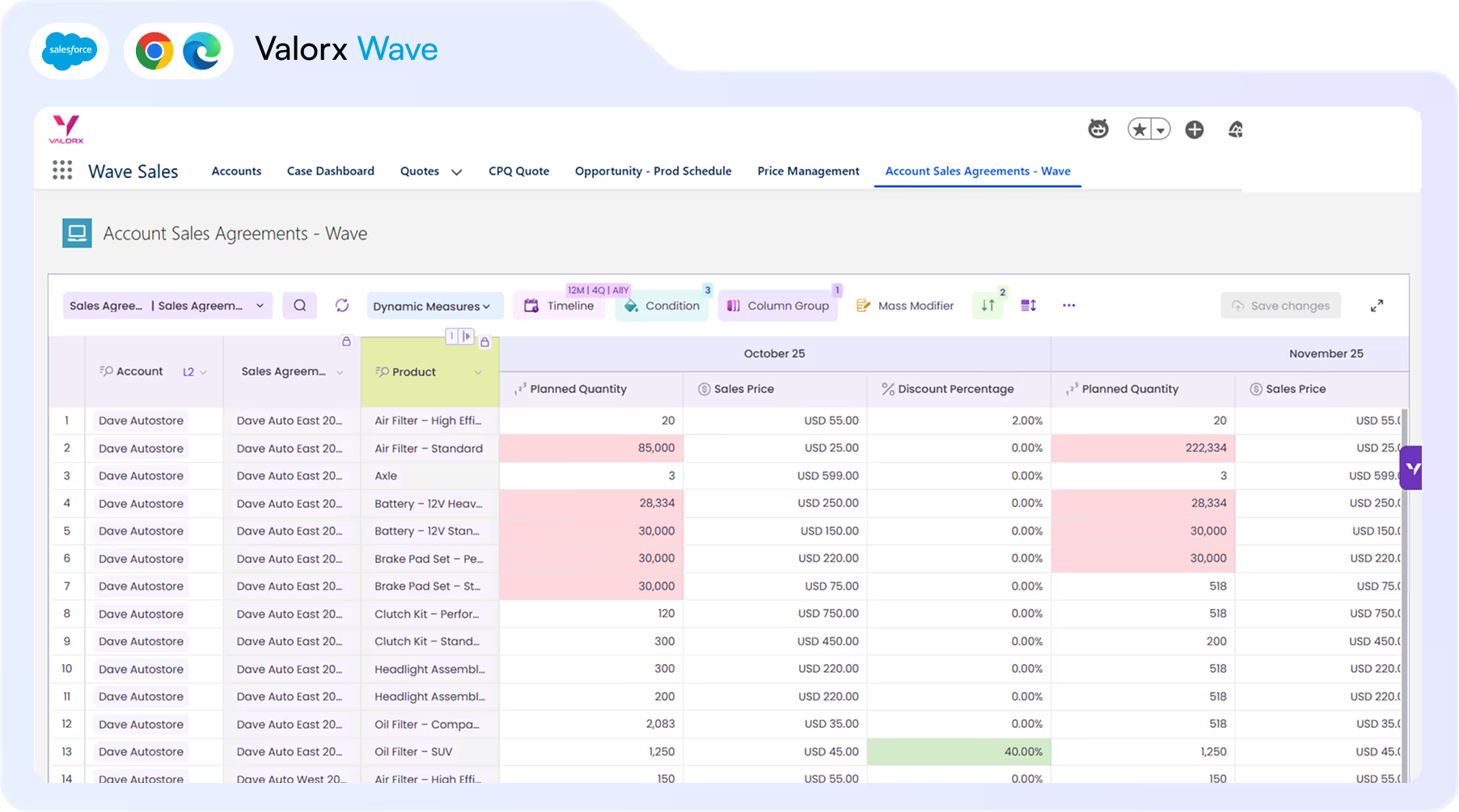
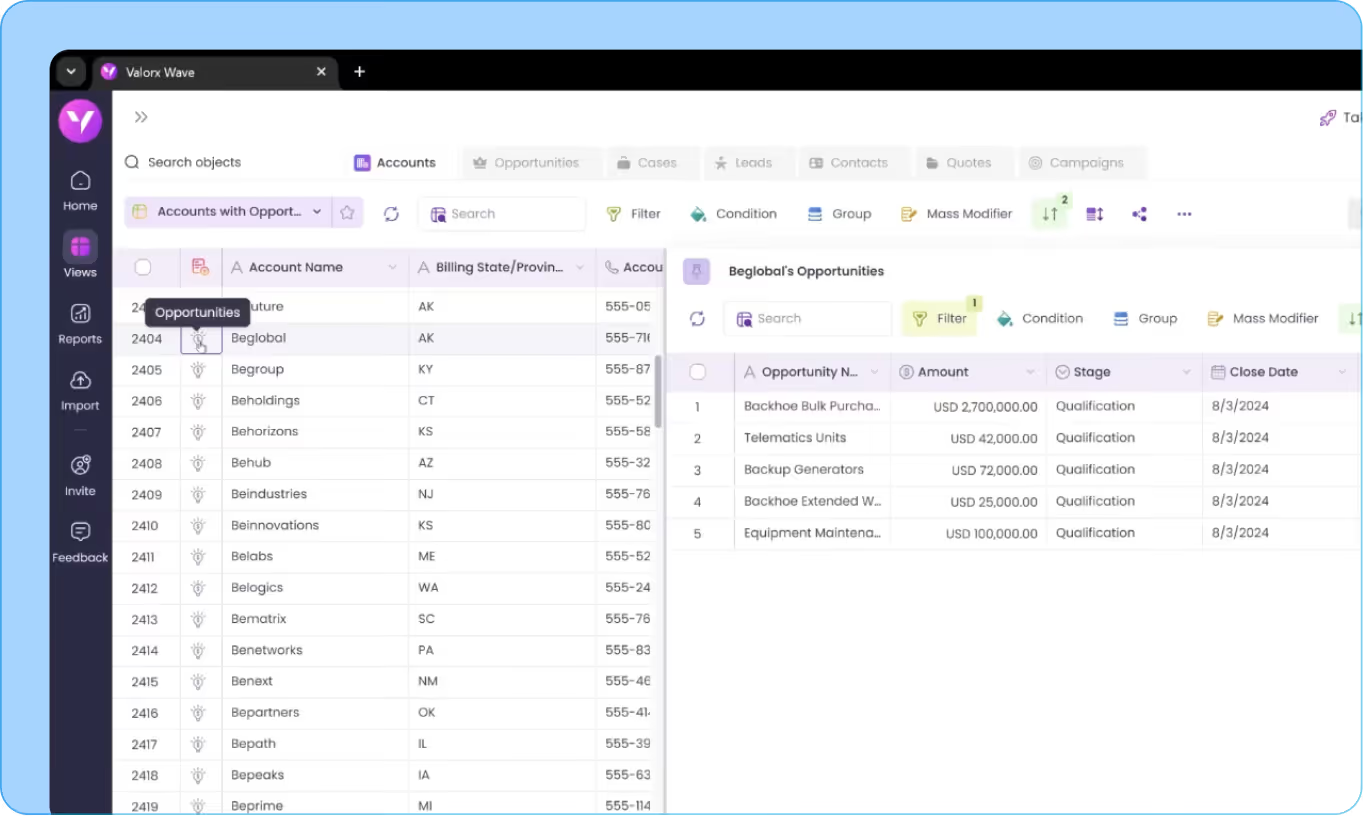
Screenshot of Valorx Wave sales dashboard showing account sales agreements with columns for product, planned quantity, sales price, and discount percentage for October 25 and November 25.
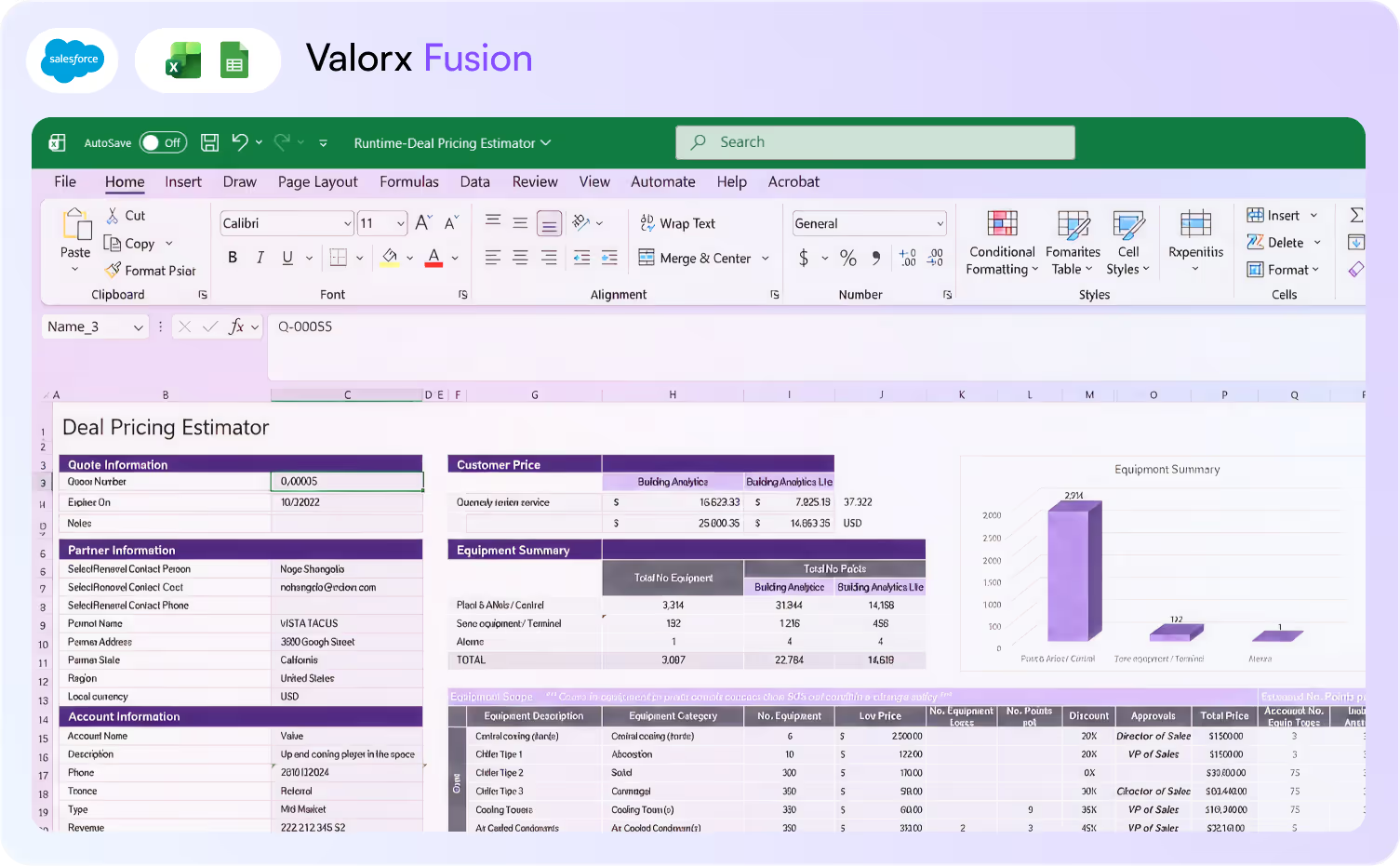
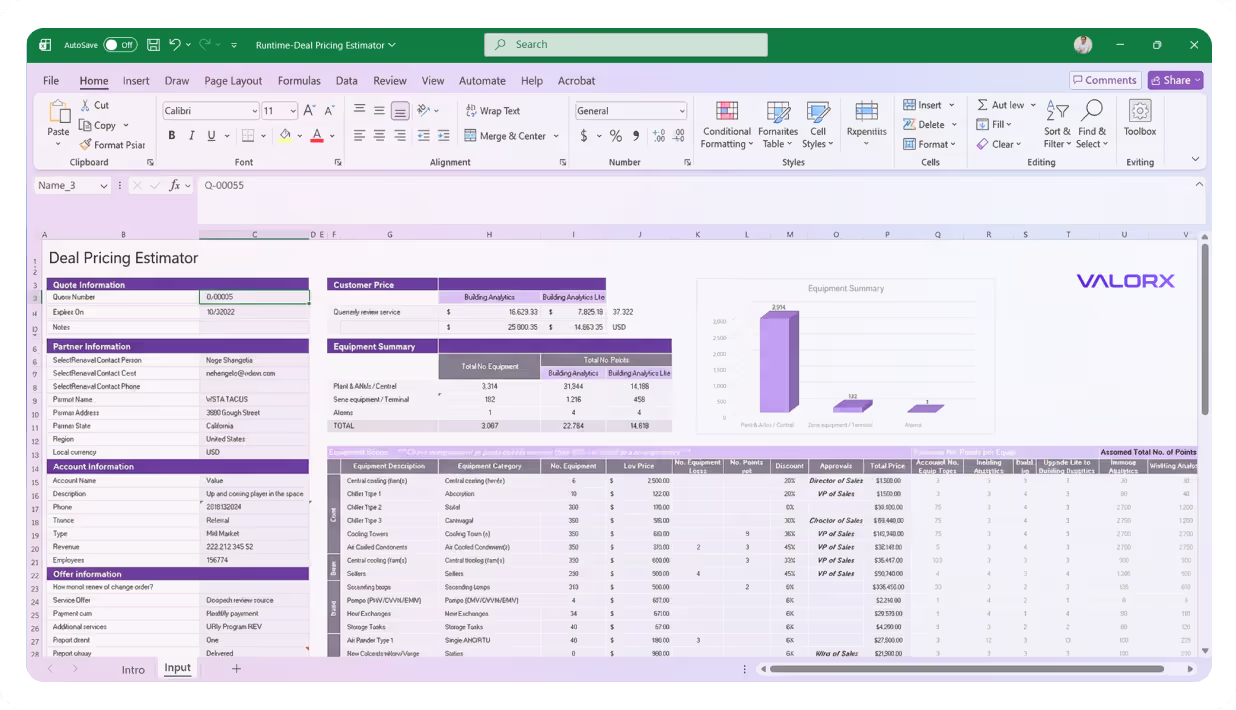
Valorx Fusion interface showing an Excel sheet titled Deal Pricing Estimator with sections for Quote Information, Partner Information, Account Information, Customer Price, and Equipment Summary.
Campaign

Campaign members

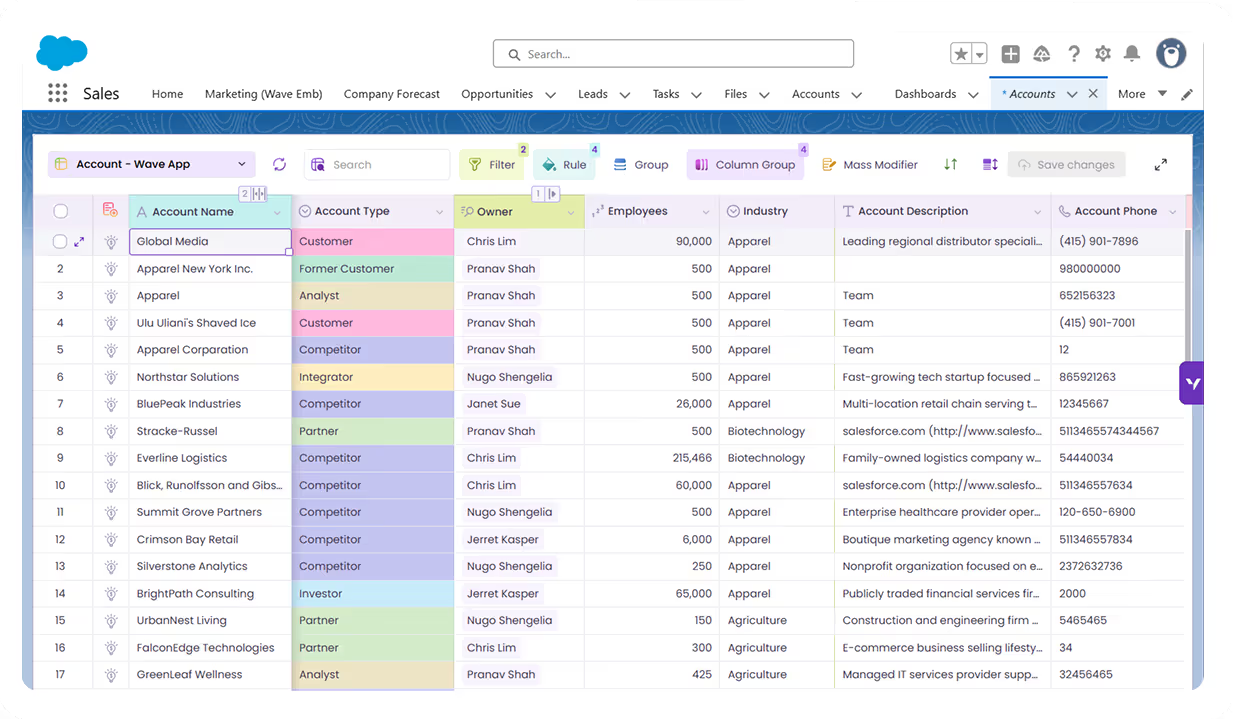
Salesforce limits you to 200 records at a time. Wave doesn't. Filter, select, update—done. Add members from any view, update any field, trigger any Flow.

Bulk status updates

Change 'Sent' to 'Responded', 'Registered' to 'Attended'. Select members, pick new status, save. One action across 500+ members.

Add members from any view

Filter leads or contacts by any criteria. Add to campaign directly from the grid. No export required, no CSV preparation.

Update custom fields

Lead score adjustments, source corrections, UTM updates. Any field, any number of records. Use Mass Modifier to apply calculations across selected rows.

Cross-campaign member management

Filter members across multiple campaigns, select globally, update in bulk. No single-campaign limitation. Roll up campaign-level changes across your event portfolio.
Events

Events & webinars

By the time you end your webinar, instantly update status with simple copy paste. No post-event scramble, no 2-hour manual work.

Update attendee status

Filter campaign members by 'Registered.' Check against attendee list. Update to 'Attended' in one action. Works for 50 or 5,000 attendees.

Track no-shows

Filter for 'Registered' still remaining. Update to 'No Show.' Trigger follow-up Flow automatically. Your re-engagement sequence starts immediately.

Import attendee lists from Excel

Got the attendee CSV from Zoom or GoToWebinar? Paste into Wave grid, match emails, bulk update status. No Data Loader, no reformatting.

Event ROI in Excel

Pull campaign data into Excel with Fusion. Calculate cost-per-MQL, pipeline influenced, and ROI by event type. Leadership dashboards that refresh themselves.
Workflows

Grid workflow triggers

Grid Actions trigger Salesforce Flows directly from selected records. Send emails, update scores, route leads—without leaving the grid.

Trigger email sends

Select leads needing follow-up. Click 'Send Email.' Your Flow runs—templated emails sent. No export, no campaign setup.

Update lead scores

Select webinar attendees. Click 'Boost Score.' Your scoring Flow adds points. Sales sees updated MQLs instantly.

Route hot leads to sales

Select hot leads. Click 'Route to SDR.' Your assignment Flow handles the rest. No manual owner changes, no slipping leads.

Any custom Flow as a Grid Action

Any Salesforce Flow can become a Grid Action button. Map it to the records in your grid. One click, Flow runs, automation kicks off.
Leads

Lead data cleanup

Duplicates? Leads to import? Filter by owner, select all, change owner, save. Done. No Data Loader. No IT tickets. No CSV formatting.

Standardize field values

Find all variations of 'United States' (US, USA, U.S.A.). Select. Update to standard value. Clean data, one action—validation rules still run.

Fix incomplete records

Filter leads missing key fields—company, title, phone. Update in bulk or export for enrichment. Fill gaps without Data Loader gymnastics.

Bulk owner reassignment

Rep leaves, territory shifts, round-robin resets. Filter by owner, select all, change owner. Your assignment rules fire for new ownership.

Enrich from Excel in Fusion

Got a list of enriched records from ZoomInfo or Apollo? Use Fusion to match, validate, and push updates to Salesforce—without Data Loader CSV rituals.
Contacts

ABM & contact roles

Target accounts need clean data. Update hundreds at once. Give the right data to Sales and run targeting campaigns. Refresh anytime.

Update account tiers

Assign target account tiers across your list. Tier 1, Tier 2, Tier 3—bulk update based on your ICP criteria. Keep Sales and SDR teams aligned.

Manage contact roles

Add contacts to opportunities in bulk. Assign roles—Decision Maker, Influencer, Champion. Build your buying committee view at scale.

Sync target lists to Sales

After tier changes, sync updated account lists to Sales teams. Trigger notification Flows from the grid so reps see their new target accounts.

Model ABM program ROI

Use Fusion to track ABM program performance. Pipeline generated, opportunities created, revenue closed by target tier—all with live Salesforce data.
Reports

Reporting & attribution

Campaign reports that refresh instantly. Fix your attribution, use pivot tables, and build reports with your Salesforce data.

Live campaign data in Excel

Build attribution models in Excel with live Salesforce data. One-click refresh. No stale exports. Pivot tables and formulas stay intact.

Executive dashboards

Pull campaign, opportunity, and lead data into Excel. Build the dashboards leadership actually wants—and refresh them in one click before the QBR.

Fix attribution in bulk

When attribution models shift, update primary campaign sources across opportunities in bulk. Keep revenue attribution aligned with reality.

Self-service dashboards for stakeholders

Build once, share the workbook. Finance, sales, and leadership refresh their own data. You control access via Salesforce security.

See how fast Salesforce
can actually feel.

If you can do it in spreadsheet,
you can do it in Valorx.
Book a demo

<00 days

to production

00x

faster forecasts in Salesforce

1000+

leads updated in one operation

Abstract soft pastel-colored gradient background with blurred lavender, blue, and pink hues.

Built for every team that manages Salesforce

Valorx works across various verticals using Salesforce
Abstract hexagonal molecular structure in purple and blue tones representing a chemical or scientific concept.
Blue and purple stylized automotive wheel icon with five spokes.

Marketing Ops Manager

Campaign members, lead cleanup, Flow triggers
Abstract hexagonal molecular structure in purple and blue tones representing a chemical or scientific concept.
Illustration of a purple and blue microchip with circuit lines extending outward.

Demand Gen Manager

Lead scoring, routing, pipeline attribution
Abstract hexagonal molecular structure in purple and blue tones representing a chemical or scientific concept.
Icon with a gear and a wrench crossed, symbolizing machinery or tools.

Campaign Specialist

Bulk member updates, event tracking, no-show flows
Abstract hexagonal molecular structure in purple and blue tones representing a chemical or scientific concept.
Abstract 3D cubes stacked with a gradient of pink and blue hues inside a white circular frame.

ABM Manager

Account tiers, contact roles, target list hygiene

Work in Salesforce like you work in a spreadsheet.
See what Valorx adds to Salesforce

Get more from Salesforce with tools built for the way marketing teams actually work.
Without Valorx
Campaign member updates capped at 200 records
Post-webinar status updates take 2 hours
Flows triggered only on record save
Lead cleanup via CSV + Data Loader
With Valorx
1,000+ members updated in one action
Filter, select, update — done in 5 minutes
Grid Actions trigger any Flow from selected rows
Filter, fix, save directly in Salesforce
Smiling young man with glasses and a beard wearing a black shirt on a light gray circular background with a small purple circle in the top right.
Eric Winston
Service Supervisor
Book a demo
Soft gradient background fading from light gray to pale blue and white.

Why teams choose Valorx

Valorx has made complicated data uploads quick and easy, saving valuable time. The implementation was quick and the support simply top notch!
Dawn Jamieson
Business Operations Manager, Nvidia
Besides the efficiency gains, Valorx has helped us mitigate data leakage and improve accuracy. I highly recommend Valorx to anyone who works with Salesforce data.
Ben Wong
Sales Operations Manager, Adobe
We use Valorx for sales forecasting. Very powerful, highly recommend the product. Excellent customer service and exceptionally fast turnaround time.
Karthik Dosapati
Data Analyst, Western Digital
When it comes to data migration, I see a limitless potential to migrate CPQ master data between orgs to maintain configuration, pricing, and quoting processes without the need for lengthy data loader processing.
Ian Jones
Senior Revenue Cloud Consultant, Globant

Frequently asked questions

Does Valorx work with Manufacturing Cloud?
Yes. Valorx works with all Manufacturing Cloud objects including Sales Agreements, Account Forecasts, and Warranty Claims.
Can I use Valorx with Salesforce CPQ?
Yes. Bulk edit quote line items, update pricing across products, and compare quotes side-by-side.
How does Wave help with forecasting?
Wave lets you edit Account Forecast records in bulk—update planned quantities across accounts, products, and time periods in one grid. Conditional formatting highlights variances between planned and actual.
When should I use Fusion instead of Wave for forecasting?
Use Fusion when you need complex calculations, seasonal adjustments, or what-if scenarios that require Excel's formula capabilities. Fusion syncs live with Salesforce, so your models stay connected to Manufacturing Cloud data.
Does Valorx respect Salesforce security?
Yes. All permissions, sharing rules, and validation rules are enforced. Users only see and edit data they have access to.
How fast can we deploy?
Wave deploys in minutes as a managed package. Fusion requires Excel add-in installation. Most teams are live within 14 days.

Abstract purple outline of four connected circles inside a rounded square frame on a black background.
Abstract geometric logo featuring a circle above layered semicircles within a rounded square border.
Venn diagram with three overlapping purple circles on a black background.
Purple crescent shapes forming a circle on a black square background with rounded corners.
Purple outline icon of a briefcase inside a rounded square border on a black background.
Abstract black and purple geometric design with layered squares and rounded corners.
Green spreadsheet file icon representing an Excel document on a light background.
Abstract black and purple geometric design with layered squares and rounded corners.
Smiling young man with glasses and a beard wearing a black shirt on a light gray circular background with a small purple circle in the top right.
Eric Winston
Service Supervisor
Book a demo
Icon with three nested rectangles inside a rounded square outline, representing a scaling or resizing concept.
Microsoft Excel app icon with an overlapping white X on a green abstract background.
Purple geometric icon with three nested diamond shapes on a black background.
Three purple abstract human figures representing a group or team on a light background.
Icon with three stacked rounded rectangles in purple outline on a black background.
Abstract purple outline of four connected circles inside a rounded square frame on a black background.
Icon showing four interconnected circles forming a square with a horizontal line extending from the right circle.
Google Chrome web browser logo.
Salesforce logo with white text inside a blue cloud shape.
Abstract geometric design with multiple rounded squares outlined in purple on a black background.
Purple circular abstract icon with overlapping partial rings on a black square background with rounded corners.
Three overlapping purple circles forming a triangular Venn diagram on a black background.
Abstract geometric logo featuring a circle above layered semicircles within a rounded square border.